Avamar: How to check if Avamar is configured with root-to-root replication
Summary: Avamar: How to check if Avamar is configured with root-to-root replication
This article applies to
This article does not apply to
This article is not tied to any specific product.
Not all product versions are identified in this article.
Instructions
We can check if an Avamar is configured to use root-to-root replication by investigating the source Avamar in a replication pair.
policy based replication
This is simplest to check for via the Avamar Administrator GUI.
- Log in to the GUI on the Source and open the replication tab. Once there select the groups tab, and you should see all the configured replication groups.
- Select a group, and click the edit button, then select "7. Overview" in the pop-up window.
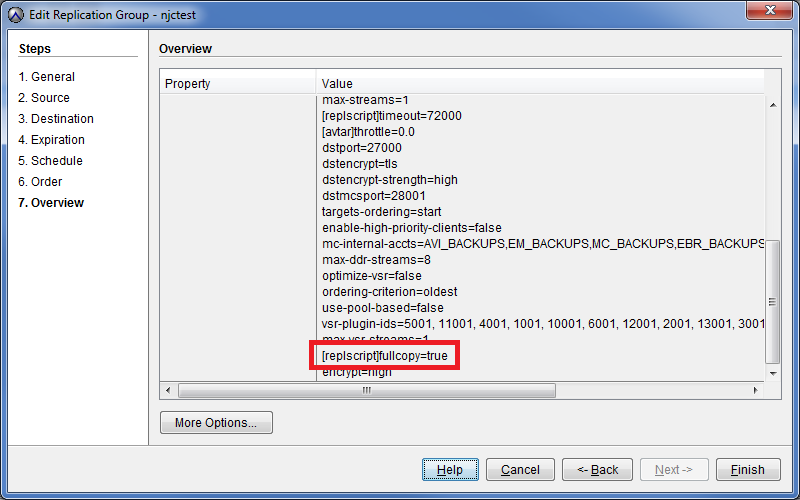
- Scroll down the right hand pane to expose all of the "more options" segment, and look for the text "[replscript]fullcopy=true" (as in the screenshot below).
If this text is present, root-to-root replication is configured for that group, although the group may or may not be enabled.
Affected Products
AvamarProducts
Avamar, Avamar Data Store, Avamar ServerArticle Properties
Article Number: 000020043
Article Type: How To
Last Modified: 25 Jul 2025
Version: 4
Find answers to your questions from other Dell users
Support Services
Check if your device is covered by Support Services.