Data Protection Advisor (DPA): How to create Associated Reports for Alerts
Summary: Creating Alerts associated Reports.
This article applies to
This article does not apply to
This article is not tied to any specific product.
Not all product versions are identified in this article.
Instructions
1.Login to DPA GUI
2.Expand policies-->Analysis Policies-->System Rule Templates
3. Select the Rule Template and click on Save As Custom Rule Template.
A Create Rule Template Dialog box appears.
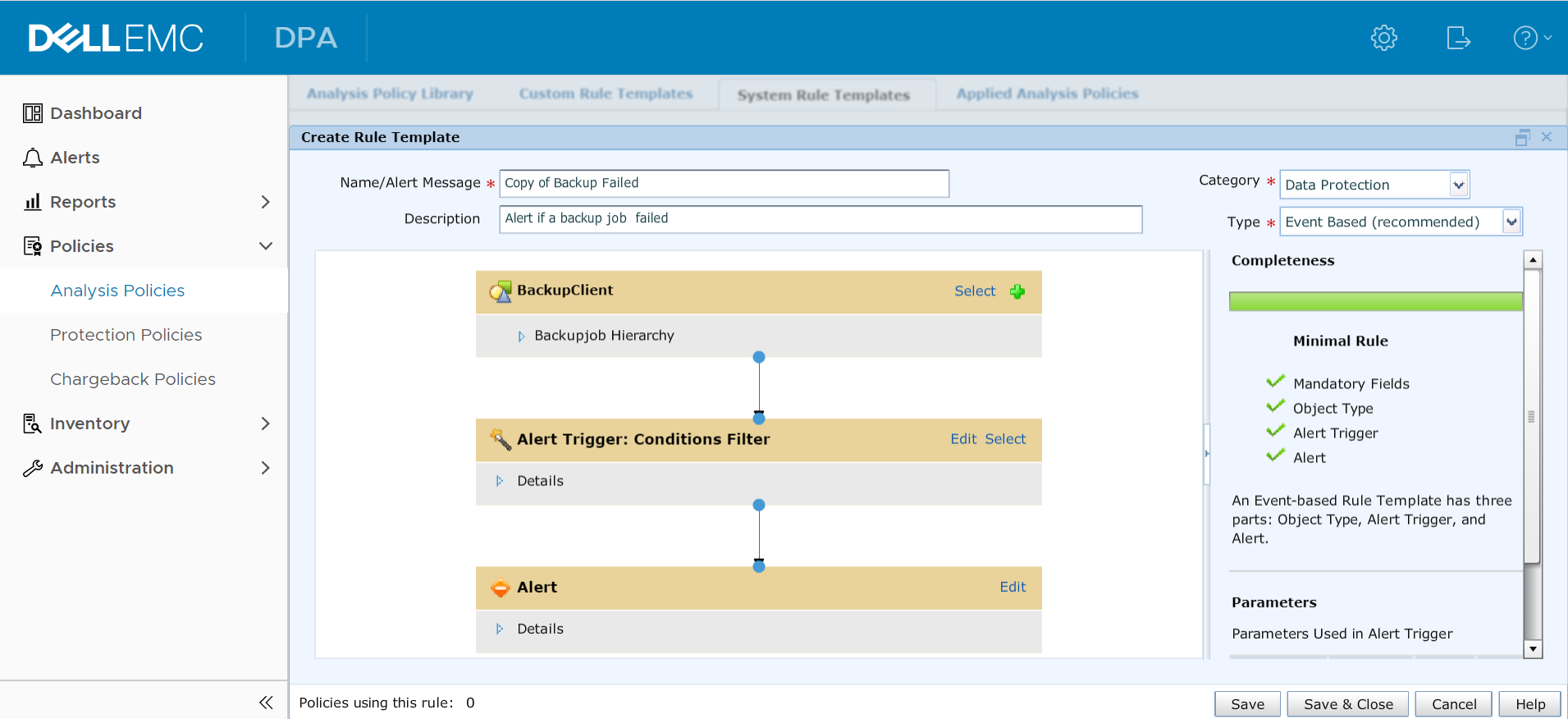
4. In the Create Rule Template Dialog Box, click on the edit button on the Alert Box.
The Edit Alert Dialog Box appears.

5.Go to Associated Reports tab and click on Create Associated Report button. The Create Associated Report dialog box appears as shown below:

6. Select either Report or Dashboard Template.
Note: Select the appropriate report or Dashboard for the alert. For example if the Backup Failed alerts is used then select an Associated Reports such as Backup Failed Jobs, Backup Failed Clients etc.
7.Select the Start and End Time of the alert and click on ok and ok again.
8.Click on Save and close.
The created rule template will be present under Policies-->Analysis policies-->Custom Rule Template section.
2.Expand policies-->Analysis Policies-->System Rule Templates
3. Select the Rule Template and click on Save As Custom Rule Template.
A Create Rule Template Dialog box appears.
4. In the Create Rule Template Dialog Box, click on the edit button on the Alert Box.
The Edit Alert Dialog Box appears.
5.Go to Associated Reports tab and click on Create Associated Report button. The Create Associated Report dialog box appears as shown below:
6. Select either Report or Dashboard Template.
Note: Select the appropriate report or Dashboard for the alert. For example if the Backup Failed alerts is used then select an Associated Reports such as Backup Failed Jobs, Backup Failed Clients etc.
7.Select the Start and End Time of the alert and click on ok and ok again.
8.Click on Save and close.
The created rule template will be present under Policies-->Analysis policies-->Custom Rule Template section.
Additional Information
Please contact Dell EMC Technical Support for further details or information
This content is translated in 15 languages:
This content is translated in 15 languages:
| https://downloads.dell.com/TranslatedPDF/CS_KB540265.pdf |
| https://downloads.dell.com/TranslatedPDF/DA_KB540265.pdf |
| https://downloads.dell.com/TranslatedPDF/DE_KB540265.pdf |
| https://downloads.dell.com/TranslatedPDF/ES-XL_KB540265.pdf |
| https://downloads.dell.com/TranslatedPDF/FI_KB540265.pdf |
| https://downloads.dell.com/TranslatedPDF/FR_KB540265.pdf |
| https://downloads.dell.com/TranslatedPDF/IT_KB540265.pdf |
| https://downloads.dell.com/TranslatedPDF/JA_KB540265.pdf |
| https://downloads.dell.com/TranslatedPDF/KO_KB540265.pdf |
| https://downloads.dell.com/TranslatedPDF/NL_KB540265.pdf |
| https://downloads.dell.com/TranslatedPDF/NO-NO_KB540265.pdf |
| https://downloads.dell.com/TranslatedPDF/PL_KB540265.pdf |
| https://downloads.dell.com/TranslatedPDF/PT-BR_KB540265.pdf |
| https://downloads.dell.com/TranslatedPDF/RU_KB540265.pdf |
| https://downloads.dell.com/TranslatedPDF/SV_KB540265.pdf |
| https://downloads.dell.com/TranslatedPDF/TR_KB540265.pdf |
| https://downloads.dell.com/TranslatedPDF/ZH-CN_KB540265.pdf |
Affected Products
Data Protection AdvisorProducts
Data Protection AdvisorArticle Properties
Article Number: 000020182
Article Type: How To
Last Modified: 08 Oct 2024
Version: 4
Find answers to your questions from other Dell users
Support Services
Check if your device is covered by Support Services.