Isilon: How to find the serial number label on an Isilon A100 accelerator node
Summary: Introduction The serial number label on an Isilon A100 acceleration node is in a different location than the serial number labels on other Isilon nodes. This article describes how to find the serial number label. ...
This article applies to
This article does not apply to
This article is not tied to any specific product.
Not all product versions are identified in this article.
Instructions
Procedure
The serial number is printed on a blue label inside the node chassis, as indicated by the following image: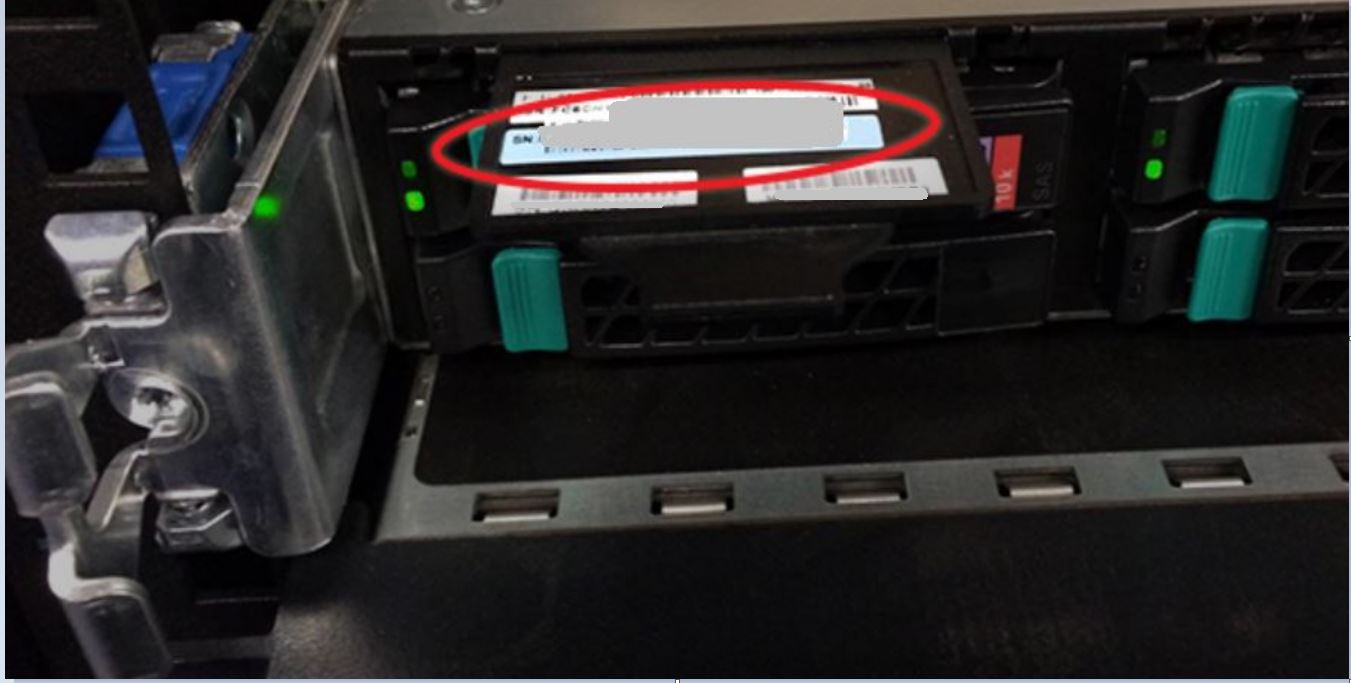
To retrieve the serial number from the chassis:
- Remove the face plate:
- Press both latches inward and to the center simultaneously.
- Pull the face plate off straight toward you while keeping the latches pushed in.
- Locate the black plastic tab sticking out of the chassis at the top-left corner, directly above the leftmost boot drive.
- Pull the tab out to expose the blue serial number label. The serial number starts with "FC6IS" and followed by nine digits.
- When you are done, push the label tab back into the chassis.
- Reinstall the face plate by carefully lining it up with the mount points and then pressing it onto the chassis until it clicks into place.
NOTE
To view the serial number using the OneFS web administration interface or the command-line interface, see PowerScale: Isilon: How to find serial numbers for PowerScale/Isilon nodes. | Dell US
To view a demonstration of this procedure, see the following video.
Affected Products
IsilonProducts
Isilon, Isilon A100Article Properties
Article Number: 000020342
Article Type: How To
Last Modified: 14 Oct 2022
Version: 3
Find answers to your questions from other Dell users
Support Services
Check if your device is covered by Support Services.