VxRail: How to enable Lockdown Mode for VxRail appliance node
Summary: Summary: How to enable ESXi lockdown mode for VxRail appliance node.
This article applies to
This article does not apply to
This article is not tied to any specific product.
Not all product versions are identified in this article.
Instructions
VxRail ESXi lockdown requirements and configuration in VxRail 7.0.320 and later
In VxRail release 7.0.320 and later, ESXi lockdown is supported without requiring to add the root user to the "Exception Users" list.
Note: There are some VxRail workflows which may require lockdown to be temporarily disabled or add the root user to the "Exception Users" list before they can be successfully performed. These are outlined below.
Lockdown mode is supported from the VxRail code level with the following conditions:
- The only supported "Lockdown Mode" is "Normal"
- VxRail upgrades (LCM) are supported to later VxRail releases without having to disable lockdown pre-upgrade.
- The "Exception Users" list must contain the following accounts:
- VxRail ESXi Management account (customer-defined at deployment and pre-populated)
- VxRail Platform Service account (
vxpsvc_ptagent_opand pre-populated)
- There are several VxRail workflows which must be updated to support lockdown without the root user being added to the "Exception Users" list. If you must perform any of these operations, you must either disable lockdown on the hosts or add the root user to the "Exception Users" list. Once the operation has been completed, you can re-enable ESXi lockdown on the hosts again. The impacted VxRail workflows are outlined below.
- VxRail Cluster Shutdown (from right-click Cluster -> VxRail -> Shut Down feature)
- Change or Edit VxRail ESXi hostname (from Cluster -> Configure -> VxRail -> Hosts -> Edit feature)
- Change or Edit VxRail ESXi Host Management IP (from Cluster -> Configure -> VxRail -> Hosts -> Edit feature)
- Migrate VxRail Manager to a new cluster
For more information on enabling or disabling ESXi lockdown, see the VMware KB: Enabling or disabling Lockdown mode on an ESXi host (1008077)

VxRail ESXi lockdown requirements and configuration prior to VxRail 7.0.320
Lockdown mode is supported from the VxRail code level with the following conditions:
- The only supported "Lockdown Mode" is "Normal"
- Lockdown feature must be disabled on ESXi hosts before upgrading to a later VxRail release, and once upgrade has completed lockdown can be enabled again.
Note: You can upgrade from VxRail 7.0.240 to later VxRail releases without having to disable lockdown as the underlying restriction was resolved in that release. - The "Exception Users" list must contain the following accounts:
- ESXi root account (root)
- VxRail ESXi Management account (customer-defined at deployment and pre-populated)
- VxRail Platform Service account (vxpsvc_ptagent_op and pre-populated)
- From VxRail 7.0.130, the ESXi root account must be manually added to the "Exception Users" list.
- All earlier versions of VxRail (including VxRail 4.5.x and 4.7.x trains) require that all three accounts are manually added to the "Exception Users" list.
- For VxRail releases prior to 7.0.130 in 7.0 train, the VxRail ESXi host management account (customer defined) and VxRail Platform Service account (
vxpsvc_ptagent_op) are not automatically added to the Exception User list and must be added manually.
An example of ESXi lockdown enabled in Normal mode with the root user exception added along with the VxRail Platform service user vxpsvc_ptagent_op and VxRail ESXi host management user vxrm are shown below: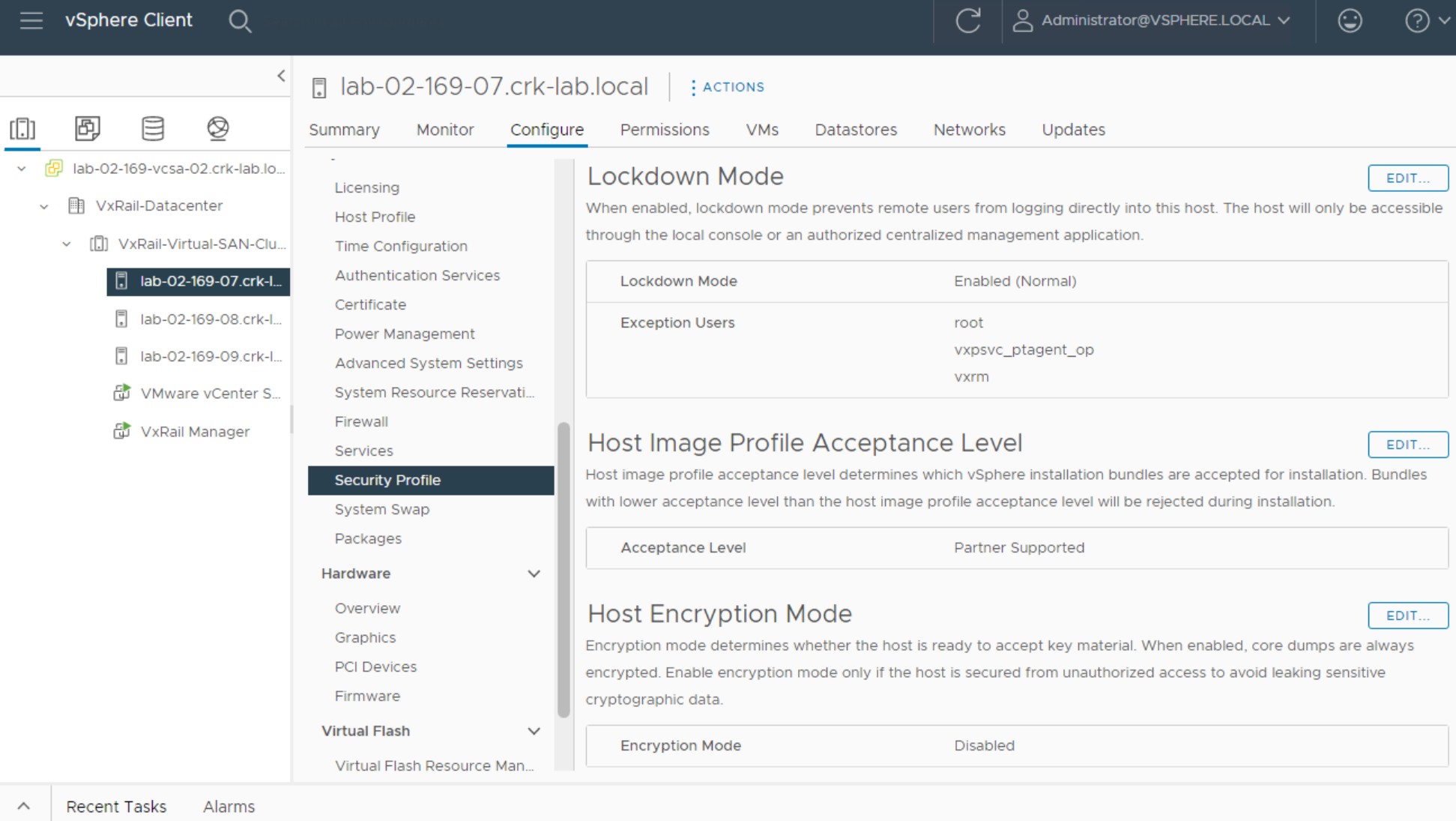
Note:The account
vxpsvc_ptagent_op is created and deleted as needed, so checking the user list on the node may not always display the account.
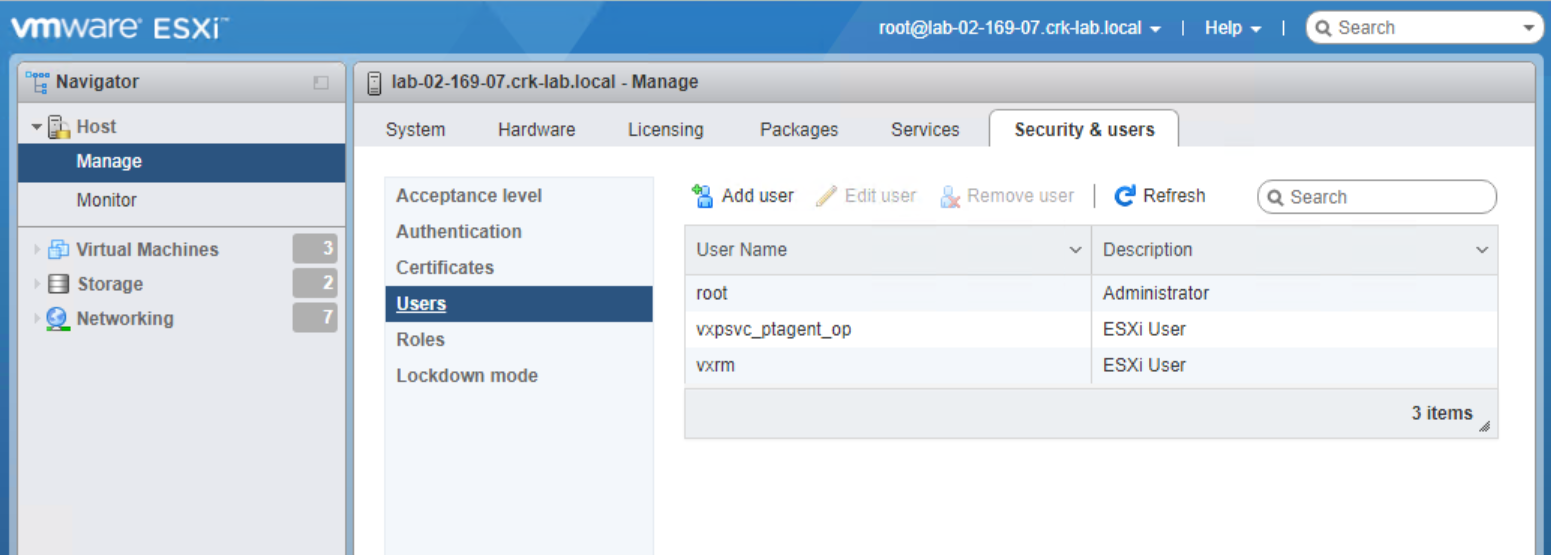
For instance, in the photo above, if the customer is using the account "vxrm" as the VxRail management user on all nodes, the following list of accounts should be added to the exception list: vxpsvc_ptagent_op, root, and vxrm.
If you do not remember what username was defined at deployment for the VxRail ESXi Management account please open a Service Request for assistance.
For more information about enabling or disabling ESXi lockdown see the VMware KB: Enabling or disabling Lockdown mode on an ESXi host (1008077)
Affected Products
VxRail Appliance FamilyProducts
VxRail, VxRail Appliance SeriesArticle Properties
Article Number: 000020919
Article Type: How To
Last Modified: 23 Dec 2025
Version: 8
Find answers to your questions from other Dell users
Support Services
Check if your device is covered by Support Services.