VNX: How to check if a particular CAVA server is doing the virus scanning and communicating with AV engine for viruschecking (User Correctable)
Summary: VNX: How to check if a particular CAVA server is doing the virus scanning and communicating with AV engine for viruschecking (User Correctable)
This article applies to
This article does not apply to
This article is not tied to any specific product.
Not all product versions are identified in this article.
Instructions
When all CAVA servers are reporting online, all will be used in active scanning and audit output will demonstrate total requests being processed historically and in progress.
But if the customer wants to test a particular server to verify if McAfee AV engine is scanning VNX files without removing other servers from the viruschecker configuration, removing other servers will usually impact their virus scan and CIFS performance SLA.
Procedure:
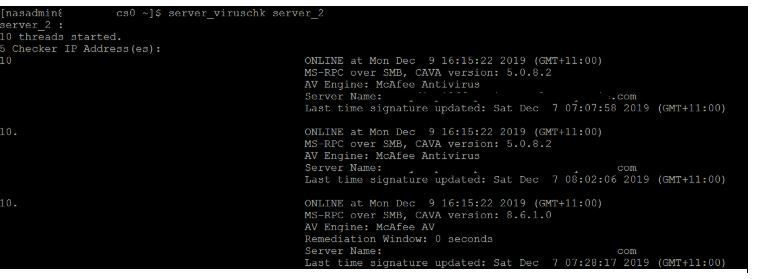
Run the command "server_viruschk server_2" -> To check list of CAVA servers and their status.
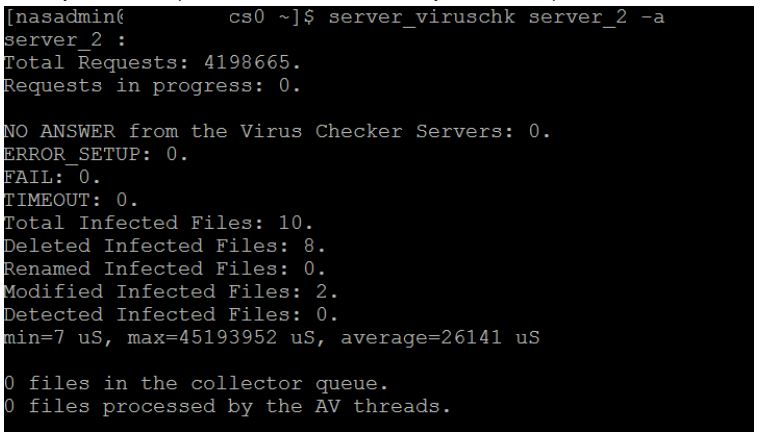
Run the command "server_viruschk server_2 -a -> This is to check Auditing for the scans, see any files in the queue and look for successfully scanned requests.
Testing a particular CAVA server:
Login to that CAVA server to verify if McAfee AV engine is scanning VNX files.
Click on On-Access scan statistics from McAfee system plate or search for On-Access scan statistics and then look for last file scanned VNX shares and the total number of scanned files as shown below:
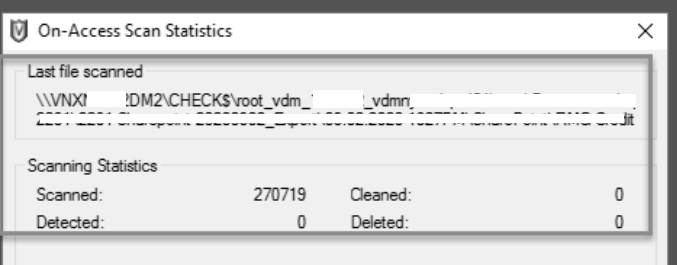
Based on the output, we can confirm that a particular CAVA server is scanning VNX shares and communicating with AV engine successfully.
But if the customer wants to test a particular server to verify if McAfee AV engine is scanning VNX files without removing other servers from the viruschecker configuration, removing other servers will usually impact their virus scan and CIFS performance SLA.
Procedure:
Run the command "server_viruschk server_2" -> To check list of CAVA servers and their status.
Run the command "server_viruschk server_2 -a -> This is to check Auditing for the scans, see any files in the queue and look for successfully scanned requests.
Testing a particular CAVA server:
Login to that CAVA server to verify if McAfee AV engine is scanning VNX files.
Click on On-Access scan statistics from McAfee system plate or search for On-Access scan statistics and then look for last file scanned VNX shares and the total number of scanned files as shown below:
Based on the output, we can confirm that a particular CAVA server is scanning VNX shares and communicating with AV engine successfully.
Products
VNX/VNXeArticle Properties
Article Number: 000021103
Article Type: How To
Last Modified: 07 Nov 2025
Version: 3
Find answers to your questions from other Dell users
Support Services
Check if your device is covered by Support Services.