Dell Unity: Drive Firmware Upgrade Instructions and Information
Summary: This article discusses how to download and upgrade the drive firmware on all Unity arrays except the virtual UnityVSA appliance. UnityVSA is not impacted.
This article applies to
This article does not apply to
This article is not tied to any specific product.
Not all product versions are identified in this article.
Instructions
Unisphere displays the following Alert:
"A drive firmware upgrade (version xxxx) is now available for download."
When logged into a Unity system using Unisphere, the array automatically scans for and notifies the user if a new drive firmware update is available. If a firmware update is available, an alert message is displayed in the list of Alerts for each drive firmware requiring updates (message seen above).
How to obtain new drive firmware for a Unity Array:
- Log in to the Unity array using Unisphere.
- Select the "Update System Settings" icon on the upper right corner of the UI.
- Select "Software and Licenses" then "Drive Firmware."
- Select "Obtain Drive Firmware Online." This brings up the download page for your system. Download the latest "Unity_Drive_Firmware_Package" version.
- Existing Dell customers can also download the drive firmware package.
How to update the drive firmware for a Unity array:
- Log in to the Unity array using Unisphere.
- Select the "Update System Settings" icon on the upper right corner of the UI.
- Select "Software and Licenses" then "Drive Firmware."
- Select "Install Drive Firmware."
- Select "Perform health Checks." * see Note below.
- Select "Choose File" and select the drive firmware package previously downloaded.
- Select "Next" to upload the drive firmware package to the storage system.
- Select "Finish" to install the drive firmware.
- View the results and close.
Unisphere may also display the following Alert when it has auto downloaded a drive firmware package:
14:190002: A new drive firmware file(version xxxx) is now available on the storage system and ready for upgrade
Each time a drive firmware package is automatically downloaded, the Unity system triggers alert 14:190002. The auto-download functionality is supported on Unity systems running OE version 4.3 or later.
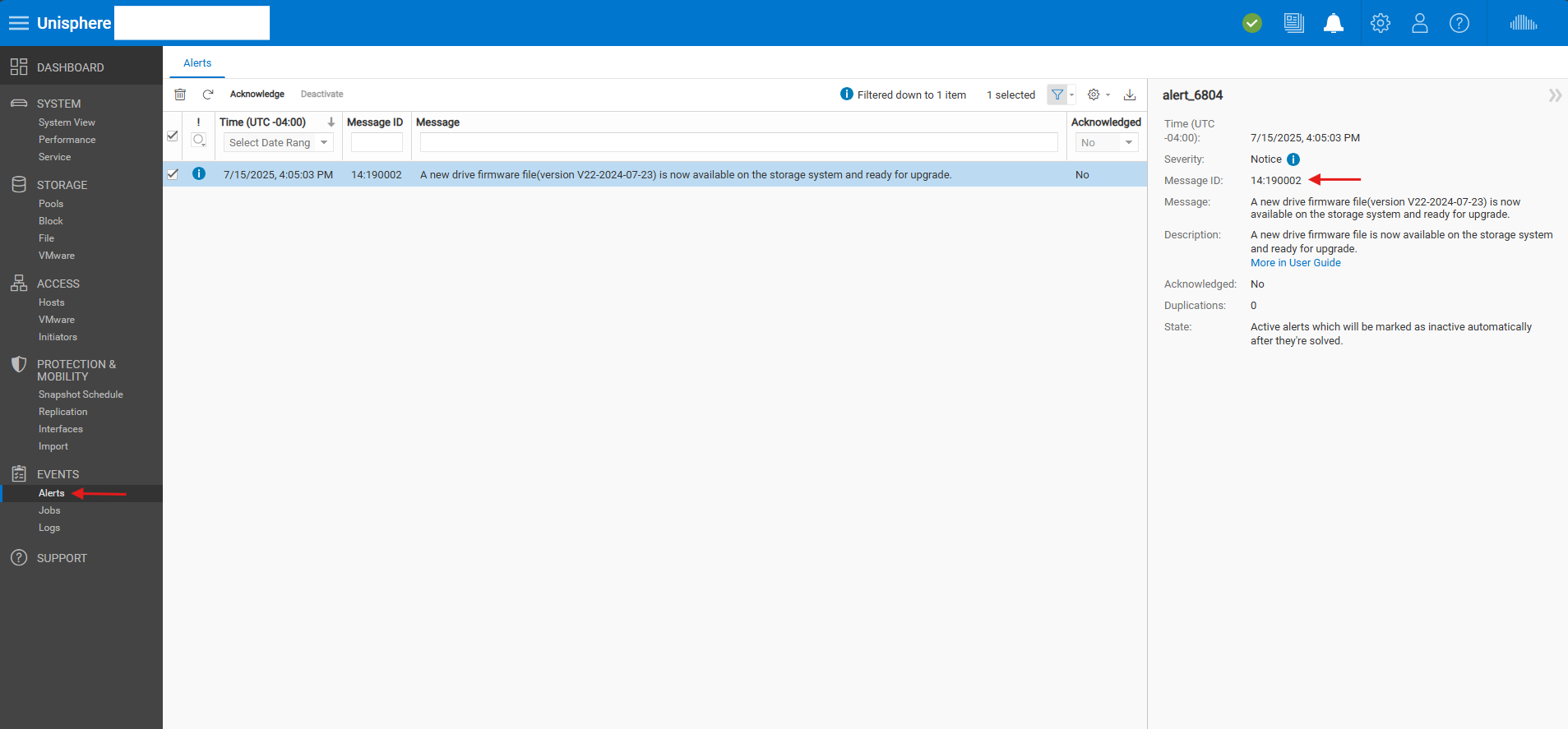
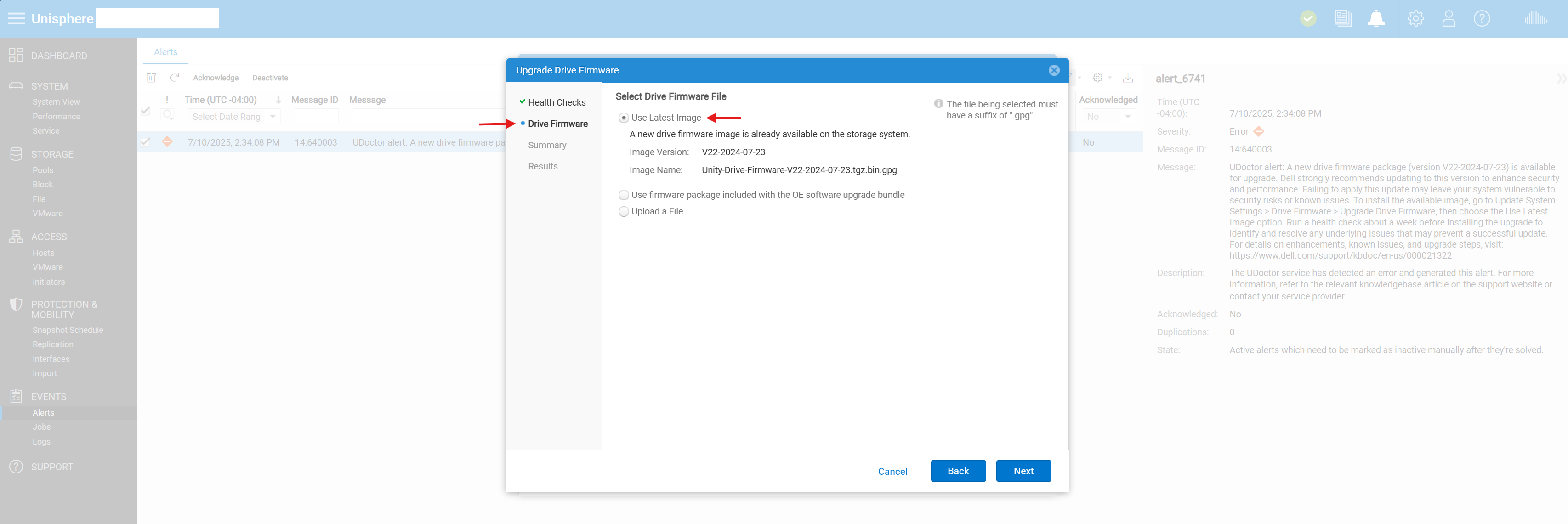
How to update the drive firmware for a Unity array using the auto downloaded package:
- Log in to the Unity array using Unisphere.
- Select the "Update System Settings" icon on the upper right corner of the UI.
- Select "Software and Licenses" then "Drive Firmware."
- Select "Install Drive Firmware."
- Select "Perform health Checks." (see Note below)
- Select "Use Latest Image" option to use the auto downloaded drive firmware package (see image below)
- Select "Next" to upload the drive firmware package to the storage system.
- Select "Finish" to install the drive firmware.
- View the results and close.
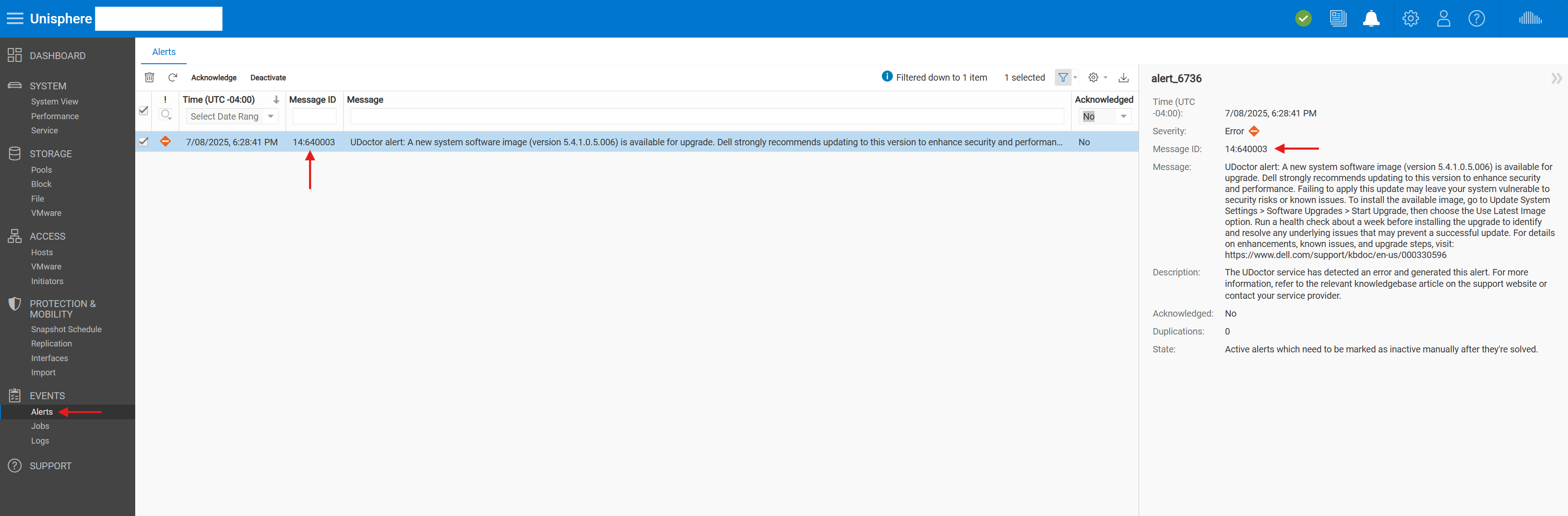
Dell Unity systems may generate a weekly error alert 14:6400003 if an automatically downloaded drive firmware package is available but has not yet been installed.
Note: If the pre-update health check fails, resolve the issue before performing an update. If the health check does not fail, but displays warning messages highlighting potential issues, check and correct these issues either before or after the update.
Online disk firmware upgrades (ODFU) are typically non-disruptive and do not require downtime or SP reboots. The system lets you know if there are any disruptions in the "summary" section of the upgrade wizard when performing the upgrade using the UI. You have the opportunity to cancel the upgrade at this point if you do not want to move forward.
Release Notes
Existing Dell Technologies customers can view the attached release notes below.
Additional Information
Part numbers and firmware that are in Unity_Drive_Firmware_Package-V23 (Unity_Drive_Firmware_Package-V23.tgz.bin.gpg)
Important Note: The parts numbers in the list below do not mean they are qualified for use in a Dell Unity system. It only means that the drive firmware update package updates those drives listed if they are found. If there is a question, see the Dell SPMD parts site to check on compatibility of a part.
| Part Numbers | FW |
| 005052428, 005052430, 005052427, 005052429, 005052434, 005052436, 005052433, 005052435, 005052431, 005052432, 005052437, 005052438 | NAM4 |
| 005052151, 005052152, 005052156, 005052157, 005052158, 005052159 | EQPC |
| 005052521, 005052522, 005052393, 005052394, 005052395, 005052396, 005052397, 005052398 | EQL8 |
| 005052112, 005052113, 005052128, 005052129 | EQHD |
| 005051739, 005051740, 005052154, 005052155 | PC17 |
| 005052379, 005052380, 005052377, 005052378 | QC4F |
| 005052669, 005052670, 005052576, 005052577, 005052578, 005052579, 005052580, 005052581, 005053166, 005053167, 005053168, 005053169, 005053170, 005053171 | EWFA |
| 005052582, 005052583, 005052584, 005052585, 005053156, 005053157, 005053158, 005053159 | ESFA |
| 005052556, 005052557, 005052558, 005052559, 005053160, 005053161, 005053162, 005053163 | ESV8 |
| 005053481, 005053482, 005053477, 005053478, 005053479, 005053480 | KC02 |
| 005051543, 005051544, 005051545, 005051546, 005051547, 005051548, 005051549, 005051550, 005051577, 005051578, 005051579, 005051580, 005051581, 005051582, 005051583, 005051584, 005051585, 005051586, 005051587, 005051588, 005051589, 005051590, 005051591, 005051592 | C360 |
| 005052867, 005052866, 005052869, 005052868, 005052871, 005052870, 005053573, 005053572, 005053577, 005053576, 005053579, 005053578, 005052859, 005052858, 005052861, 005052860, 005052863, 005052862, 005053583, 005053582, 005053596, 005053595, 005053598, 005053597, 005053575, 005053574 | PA5R |
| 005053794, 005053793, 005053802, 005053801, 005053810, 005053809, 005053796, 005053795, 005053804, 005053803, 005053792, 005053812, 005053791, 005053811, 005053798, 005053797, 005053806, 005053805, 005053814, 005053813, 005053800, 005053799, 005053808, 005053807, 005053816, 005053815, 005053729, 005053728, 005053721, 005053720, 005053731, 005053730, 005053723, 005053722, 005053733, 005053732, 005053725, 005053724, 005053735, 005053734, 005053727, 005053726, 005053749, 005053748, 005053751, 005053750, 005053737, 005053736, 005053753, 005053752, 005053739, 005053738, 005053755, 005053754, 005053741, 005053740 | S10C |
| 005053656, 005053657, 005053658, 005053659, 005053676, 005053677, 005053678, 005053679, 005053680, 005053681, 005053688, 005053689, 005053690, 005053691, 005053692, 005053693, 005054064, 005054065 | ESA7 |
| 005053682, 005053683, 005053684, 005053685, 005053686, 005053687, 005053694, 005053695, 005053696, 005053697, 005053698, 005053699, 005053700, 005053701, 005054066 | EWA7 |
| 005054007, 005054008, 005054009, 005054010, 005054011, 005054012, 005054013, 005054014, 005054015, 005054016, 005054017, 005054018, 005054019, 005054020, 005054021, 005054022, 005054023, 005054024, 005054025, 005054026, 005054027, 005054028, 005054029, 005054030, 005054031, 005054032, 005054033, 005054034, 005054070, 005054071, 005054072 | UD6B |
| 005053873, 005053874, 005053875, 005053876, 005053877, 005053878, 005053879, 005053880, 005053881, 005053882, 005053883, 005053884, 005053885, 005053886, 005053887, 005053888 | CC09 |
| 005050451, 005053995 | VC0A |
| 005053244, 005053245, 005053246, 005053247, 005053248, 005053249, 005053250, 005053251, 005053252, 005053253, 005053254, 005053255, 005053256, 005053257, 005053258, 005053259, 005053260, 005053261, 005053262, 005053263, 005053264, 005053266, 005053267, 005053268, 005053269, 005053270 | S960 |
|
005053132, 005053133, 005053134, 005053135, 005053136, 005053137, 005053138, 005053139, 005053140, 005053141, 005053142, 005053143, 005053144, 005053145, 005053146, 005053147, 005053148, 005053149, 005053150, 005053151, 005053152, 005053153, 005053154, 005053155, 005053332, 005053333, 005053334, 005053335, 005053336, 005053337, 005054077, 005054078 |
0F0B |
|
005053342, 005053343, 005053344, 005053345, 005053346, 005053347, 005053348, 005053349, 005053350, 005053351, 005053352, 005053353, 005053354, 005053355, 005053356, 005053357, 005053358, 005053359, 005053360, 005053361, 005053362, 005053363, 005053364, 005053365, 005053373, 005053374, 005053375, 005053376, 005053377, 005053378, 005054062, 005054063 |
SC0E |
|
005648497, 005648498, 005648499, 005648500, 005648485, 005648486, 005648487, 005648488, 005648540, 005648541 |
EXG6 |
|
005648501, 005648502, 005648503, 005054149, 005054150, 005054151, 005054152, 005648542 |
EZG6 |
|
005054157, 005648493, 005648494, 005648495, 005648496, 005648504, 005648505, 005648506, 005648637, 005648656, 005648537, 005648538, 005648539, 005648657, 005054153, 005054154, 005054155, 005054156, 005054158, 005054159, 005054160, 005054161, 005054162, 005054163, 005054164, 005054165, 005054166, 005054167, 005054168, 005054169, 005648489, 005648490, 005648491, 005648492 |
UD78 |
Note:
- If the drive part number is not contained in this list that means the drive has no new firmware available and is up to date.
- The word "Disk" may be used instead of "Drive" in Unisphere depending on the version of the Unity OE.
The complete drive matrix can be found in the below links.
Reference to OE versions
Unity operating environment versions that are listed below contain an optional drive firmware update after the operating environment update has been completed. We recommended downloading the latest version as indicated in this article.
| Unity OE version | Included drive firmware bundle |
|---|---|
| 5.0.0.0.5.116, 5.0.1.0.5.011, 5.0.2.0.5.009 | Unity-Drive-Firmware-V10-2019-05-05 |
| 5.0.3.0.5.014 | Unity-Drive-Firmware-V14-2020-01-23 |
| 5.0.4.0.5.012, 5.0.5.0.5.002, 5.0.6.0.5.008 | Unity-Drive-Firmware-V15-2020-06-01 |
| 5.0.7.0.5.008, 5.0.8.0.5.007 | Unity-Drive-Firmware-V16-2020-10-01 |
| 5.1.0.0.5.394 | Unity-Drive-Firmware-V17-2021-01-28 |
| 5.1.1.0.5.005, 5.1.2.x.x.xxx | Unity-Drive-Firmware-V18-2021-08-16 |
| 5.2.0.0.x.xxx | Unity-Drive-Firmware-V19-2021-11-30 |
| 5.2.1.0.x.xxx, 5.2.2.0.x.xxx, 5.3.0.0.x.xxx | Unity-Drive-Firmware-V20-2022-06-13 |
| 5.4.0.0.x.xxx | Unity-Drive-Firmware-V21-2024-01-09 |
| 5.5.0.0.x.xxx | Unity-Drive-Firmware-V22-2024-07-23 |
| 5.5.1.0.x.xxx | Unity-Drive-Firmware-Package-V22-for-Unity-OE-5.5.1-and-later |
Affected Products
Dell EMC Unity, Dell Unity 300, Dell EMC Unity 300F, Dell EMC Unity 350F, Dell EMC Unity XT 380, Dell EMC Unity XT 380F, Dell EMC Unity 400, Dell EMC Unity 400F, Dell EMC Unity 450F, Dell EMC Unity XT 480, Dell EMC Unity XT 480F, Dell EMC Unity 500
, Dell EMC Unity 500F, Dell EMC Unity 550F, Dell EMC Unity 600, Dell EMC Unity 600F, Dell EMC Unity 650F, Dell EMC Unity XT 680, Dell EMC Unity XT 680F, Dell EMC Unity XT 880, Dell EMC Unity XT 880F, Unity All Flash, Dell EMC Unity Family |Dell EMC Unity All Flash, Dell EMC Unity Family, Dell EMC Unity Hybrid, Unity Hybrid flash
...
Attachments
UNITY-Drive-Firmware-V23-ReleaseNotes_pkb_en_US_1.pdf Unity XT Drive Support Matrix_pkb_en_US_1.pdf Unity-Drive-Firmware-V22-2024-07-23_pkb_en_US_1.zip Unity Drive Support Matrix_pkb_en_US_1.pdf UNITYDriveFW_V20-GPG-2022-06-13 RN_pkb_en_US_1_en_US_1.pdf
Article Properties
Article Number: 000021322
Article Type: How To
Last Modified: 18 Mar 2026
Version: 49
Find answers to your questions from other Dell users
Support Services
Check if your device is covered by Support Services.