VxRail: G560 Requires Different iDRAC Network Configuration
Summary: VxRail G560 requires a different iDRAC network configuration (LOM1) rather than default DEDICATED as others.
This article applies to
This article does not apply to
This article is not tied to any specific product.
Not all product versions are identified in this article.
Instructions
Verify the configuration before running cluster initialization or node expansion. VxRail G560 appliance has four nodes.
After ESXi boots up, log in to each node as root, and run the command esxcfg-nics -l on the node to verify that the embedded network interface card (NIC) appears as vmnic0.
Note: See that
vmnic0 should be 1 Gb, it should not be 10 Gb.
A good example:
#esxcfg-nics -l

Name PCI Device Driver Admin Status Link Status Speed Duplex MAC Address MTU Description
vmnic0 0000:04:00.0 igbn Up Up 1000 Full 50:xx:xx:xx:xx:xx 1500 Intel Corporation I350 Gigabit Network Connection
vmnic1 0000:18:00.0 i40en Up Up 10000 Full 3c:fd:xx:xx:xx:xx 1500 Intel(R) Ethernet Controller X710 for 10GbE SFP+
vmnic2 0000:18:00.1 i40en Up Up 10000 Full 3c:fd:xx:xx:xx:xx 1500 Intel(R) Ethernet Controller X710 for 10GbE SFP+
vmnic3 0000:5e:00.0 i40en Up Down 0 Half 3c:fd:xx:xx:xx:xx 1500 Intel(R) Ethernet Controller X710 for 10GbE SFP+
vmnic4 0000:5e:00.1 i40en Up Down 0 Half 3c:fd:xx:xx:xx:xx 1500 Intel(R) Ethernet Controller X710 for 10GbE SFP+
vusb0 Pseudo cdc_ether Up Up 10 Half 50:xx:xx:xx:xx:xx 1500 Unknown Unknown
If vmnic0 is not displayed correctly, see the additional information section.
Additional Information
Expected settings: (also refer to article VxRail: iDRAC Settings That Cannot be Changed)
iDRAC Settings > Connectivity > Network > Network Settings > NIC Selection = LOM1
iDRAC UI Configuration > BIOS settings > Integrated Devices > Embedded NIC1 = enabled
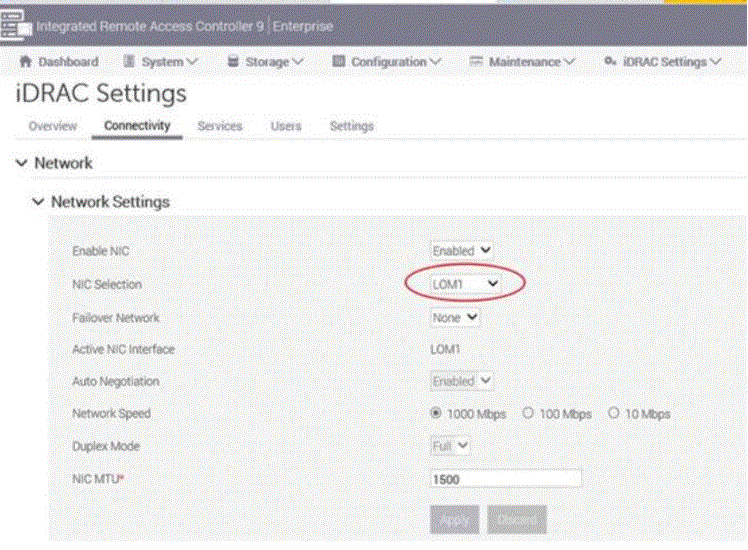
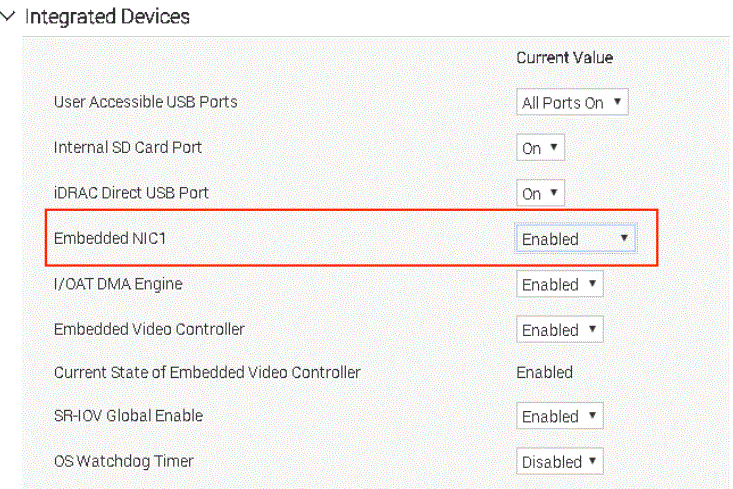
If the settings are not showing as expected, follow the below steps to restore the default settings.
- Rest iDRAC to default by using the reset option-3 in iDRAC UI (Discard all settings and rest the username to root and password to default), wait for the iDRAC reboot to compete.
- Reboot the system, and in the BIOS click the Default button to apply the defaults needed for the VxRail system.
If vmnic0 is still not displayed correctly, the node must be reimaged with RASR or NIM.
Affected Products
VxRail G Series Nodes, VxRail G560, VxRail G560 VCF, VxRail G560F, VxRail G560F VCFArticle Properties
Article Number: 000021541
Article Type: How To
Last Modified: 12 Nov 2025
Version: 7
Find answers to your questions from other Dell users
Support Services
Check if your device is covered by Support Services.