NetWorker:如何使用 NetWorker 備份前後命令來執行備份前後的動作
Summary: 如何通過在用戶端備份前後運行預處理和後處理命令來自定義備份行為,
This article applies to
This article does not apply to
This article is not tied to any specific product.
Not all product versions are identified in this article.
Instructions
NetWorker 前後命令
Additional Information
NetWorker 前後命令使用方式:
1.定義要在 NetWorker Management Console 中,作為用戶端內容一部分執行的 pre 和 post 命令。 它位於「應用和模組」選項卡中。
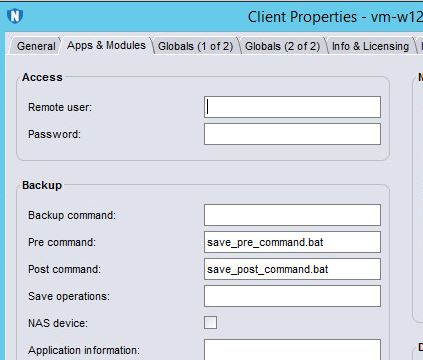
2.在「Pre command」中指定的命令在備份此客戶機的存儲集之前運行(它只運行一次 - 在備份第一個存儲集之前)。 此處引用的指令檔必須與 NetWorker 用戶端二進位檔案位於相同的目錄中。 指令檔名稱必須以「save」或「nsr」開頭。
3. “Post 命令”中指定的命令運行一次;在備份最後一個存儲集後。 此處引用的指令檔必須與 NetWorker 用戶端二進位檔案位於相同的目錄中。指令檔名稱必須以「save」或「nsr」開頭。

4.按一下確定。 下次運行此用戶端的備份時,pre 和 post 命令將在備份操作之前和之後運行。
5.在 NetWorker 伺服器上執行備份操作後,您可以檢閱如下
記錄:C:\Program Files\EMC NetWorker\nsr\logs\policy\pre-test\pre-test>nsr_render_log backup192004.raw > 004log & 記事本 004log
並留意以下訊息
:savegrp NSR notice precmd started
savegrp NSR notice save_pre_command.bat
savegrp NSR notice: precmd succeeded
savegrp NSR notivce postcmd started(已啟動)
savegrp NSR notice nsrpost -s [server name] -c save_post_command.bat -j 192004
savegrp NSR notice postcmd 成功
如果這無法如您預期的方式運作,正是此記錄檔會告訴您程序中的哪一點發生問題。 如果您的其中一個前後指令檔產生錯誤,您可能需要更詳細地檢查指令檔,並在 NetWorker 外執行,以測試其運作。
若要進一步自訂備份程序,可以使用自訂的備份命令。 這包括將標準 NetWorker 備份程序替換為自訂指令檔。 《Dell EMC NetWorker 管理指南》提供操作方式的詳細指示和範例;查找「備份命令自定義」字樣。
1.定義要在 NetWorker Management Console 中,作為用戶端內容一部分執行的 pre 和 post 命令。 它位於「應用和模組」選項卡中。
2.在「Pre command」中指定的命令在備份此客戶機的存儲集之前運行(它只運行一次 - 在備份第一個存儲集之前)。 此處引用的指令檔必須與 NetWorker 用戶端二進位檔案位於相同的目錄中。 指令檔名稱必須以「save」或「nsr」開頭。
3. “Post 命令”中指定的命令運行一次;在備份最後一個存儲集後。 此處引用的指令檔必須與 NetWorker 用戶端二進位檔案位於相同的目錄中。指令檔名稱必須以「save」或「nsr」開頭。
4.按一下確定。 下次運行此用戶端的備份時,pre 和 post 命令將在備份操作之前和之後運行。
5.在 NetWorker 伺服器上執行備份操作後,您可以檢閱如下
記錄:C:\Program Files\EMC NetWorker\nsr\logs\policy\pre-test\pre-test>nsr_render_log backup192004.raw > 004log & 記事本 004log
並留意以下訊息
:savegrp NSR notice precmd started
savegrp NSR notice save_pre_command.bat
savegrp NSR notice: precmd succeeded
savegrp NSR notivce postcmd started(已啟動)
savegrp NSR notice nsrpost -s [server name] -c save_post_command.bat -j 192004
savegrp NSR notice postcmd 成功
如果這無法如您預期的方式運作,正是此記錄檔會告訴您程序中的哪一點發生問題。 如果您的其中一個前後指令檔產生錯誤,您可能需要更詳細地檢查指令檔,並在 NetWorker 外執行,以測試其運作。
若要進一步自訂備份程序,可以使用自訂的備份命令。 這包括將標準 NetWorker 備份程序替換為自訂指令檔。 《Dell EMC NetWorker 管理指南》提供操作方式的詳細指示和範例;查找「備份命令自定義」字樣。
Affected Products
NetWorkerProducts
NetWorker, NetWorker Management ConsoleArticle Properties
Article Number: 000022377
Article Type: How To
Last Modified: 23 Sep 2024
Version: 5
Find answers to your questions from other Dell users
Support Services
Check if your device is covered by Support Services.