NetWorker: How to use NetWorker pre and post commands to perform actions before and after backups
Summary: How to customize backup behavior by running preprocessing and postprocessing commands before and after the client backup,
This article applies to
This article does not apply to
This article is not tied to any specific product.
Not all product versions are identified in this article.
Instructions
NetWorker Pre and Post Command
Additional Information
NetWorker Pre and Post Command Usage:
1. Define the pre and post commands to be run as part of the client properties in the NetWorker Management Console. This is in the 'Apps & Modules' tab.
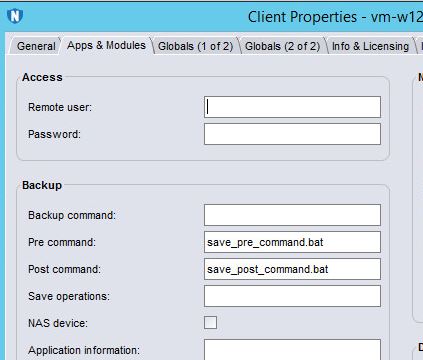
2. The command specified in 'Pre command' runs before the backup of the save sets for this client (it runs only once - before the backup of the first save set). The script referenced here must be located in the same directory as the NetWorker client binaries. The script name must start either with the prefix 'save' or 'nsr'.
3. The command specified in 'Post command' runs once; after the backup of the last of the the save sets. The script referenced here must be located in the same directory as the NetWorker client binaries. The script name must start either with the prefix 'save' or 'nsr'.

4. Click OK. The next time the backup of this client runs, the pre and post commands will run before and after the backup operations.
5. After the backup operation on the NetWorker server, you can review the log like below:
C:\Program Files\EMC NetWorker\nsr\logs\policy\pre-test\pre-test>nsr_render_log backup192004.raw > 004log & notepad 004log
And look out for messages such as:
savegrp NSR notice precmd started
savegrp NSR notice save_pre_command.bat
savegrp NSR notice: precmd succeeded
savegrp NSR notivce postcmd started
savegrp NSR notice nsrpost -s [server name] -c save_post_command.bat -j 192004
savegrp NSR notice postcmd succeeded
If this is not working as you expect, it is this log file which will tell you at which point in the process there was an issue. If one of your pre or post scripts is generating an error, you may need to inspect the script in more detail and run it outside of NetWorker to test its operation.
For further customization of the backup process, a customized backup command can be used. This involves the replacement of the standard NetWorker backup process with a customized script. The Dell EMC NetWorker Administration Guide provides detailed instructions and examples on how to do this; look for the words 'Backup command customization'.
1. Define the pre and post commands to be run as part of the client properties in the NetWorker Management Console. This is in the 'Apps & Modules' tab.
2. The command specified in 'Pre command' runs before the backup of the save sets for this client (it runs only once - before the backup of the first save set). The script referenced here must be located in the same directory as the NetWorker client binaries. The script name must start either with the prefix 'save' or 'nsr'.
3. The command specified in 'Post command' runs once; after the backup of the last of the the save sets. The script referenced here must be located in the same directory as the NetWorker client binaries. The script name must start either with the prefix 'save' or 'nsr'.
4. Click OK. The next time the backup of this client runs, the pre and post commands will run before and after the backup operations.
5. After the backup operation on the NetWorker server, you can review the log like below:
C:\Program Files\EMC NetWorker\nsr\logs\policy\pre-test\pre-test>nsr_render_log backup192004.raw > 004log & notepad 004log
And look out for messages such as:
savegrp NSR notice precmd started
savegrp NSR notice save_pre_command.bat
savegrp NSR notice: precmd succeeded
savegrp NSR notivce postcmd started
savegrp NSR notice nsrpost -s [server name] -c save_post_command.bat -j 192004
savegrp NSR notice postcmd succeeded
If this is not working as you expect, it is this log file which will tell you at which point in the process there was an issue. If one of your pre or post scripts is generating an error, you may need to inspect the script in more detail and run it outside of NetWorker to test its operation.
For further customization of the backup process, a customized backup command can be used. This involves the replacement of the standard NetWorker backup process with a customized script. The Dell EMC NetWorker Administration Guide provides detailed instructions and examples on how to do this; look for the words 'Backup command customization'.
Affected Products
NetWorkerProducts
NetWorker, NetWorker Management ConsoleArticle Properties
Article Number: 000022377
Article Type: How To
Last Modified: 23 Sep 2024
Version: 5
Find answers to your questions from other Dell users
Support Services
Check if your device is covered by Support Services.