VNX: Sådan slettes Clone Private LUN'er
Summary: VNX: Sådan slettes Clone Private LUN'er.
This article applies to
This article does not apply to
This article is not tied to any specific product.
Not all product versions are identified in this article.
Instructions
-
Log på Unisphere. Vælg det berørte system ved hjælp af rullemenulinjen til venstre for "Dashboard" eller ved at vælge den i feltet "Systemer efter alvorsgrad" øverst til venstre på skærmen.
-
Gå til fanen mærket Databeskyttelse.
-
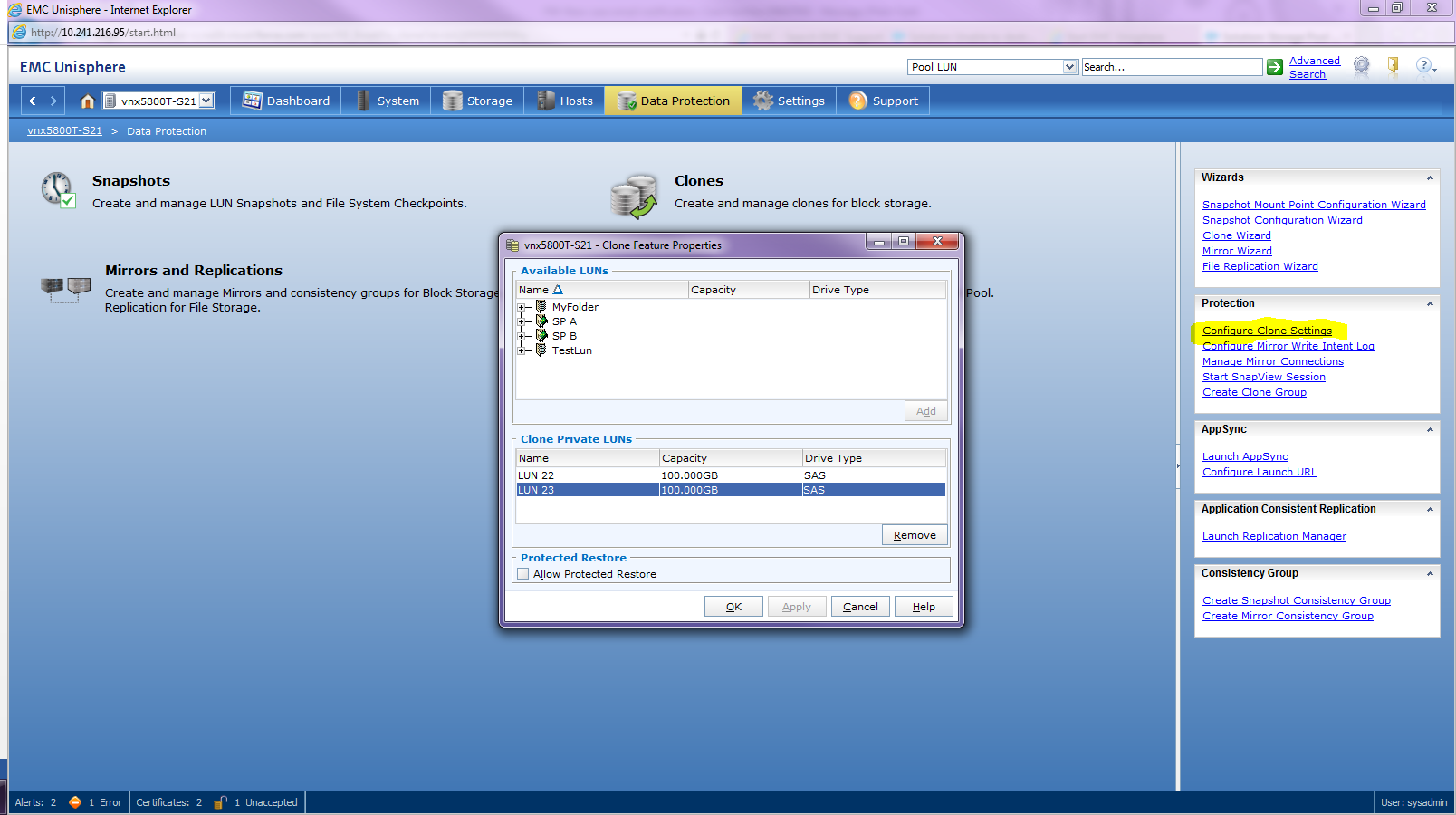
Klik langs højre side på Konfigurer klonindstillinger
-
Klik på den ønskede Clone Private LUN fra listen over Clone Private LUN'er
-
Klik på Fjern
Bemærk: Alle tilknyttede kloner og klongrupper skal opdeles og fjernes, før klonen privat LUN slettes.
Affected Products
VNX1 SeriesProducts
VNX1 Series, VNX2 Series, VNX/VNXeArticle Properties
Article Number: 000022409
Article Type: How To
Last Modified: 22 Oct 2025
Version: 5
Find answers to your questions from other Dell users
Support Services
Check if your device is covered by Support Services.