VNX: Unisphere Manager GUI를 통해 CLI(Command Line Interface)에 들어가는 방법 (사용자 수정 가능)
Summary: Unisphere를 통해 CLI에 액세스하는 방법에 대한 단계입니다.
This article applies to
This article does not apply to
This article is not tied to any specific product.
Not all product versions are identified in this article.
Instructions
Unisphere
에서 CLI에 액세스하는 방법1. Unisphere에 로그인합니다.
2. 시스템 탭을 선택합니다.
3. 오른쪽 하단 창에서 Control Station CLI 로 이동합니다.
4. 바로 아래에 있는 명령 실행 을 선택합니다.
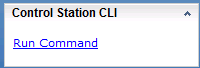
5. 명령을 입력할 수 있는 명령 페이지가 열립니다.

에서 CLI에 액세스하는 방법1. Unisphere에 로그인합니다.
2. 시스템 탭을 선택합니다.
3. 오른쪽 하단 창에서 Control Station CLI 로 이동합니다.
4. 바로 아래에 있는 명령 실행 을 선택합니다.
5. 명령을 입력할 수 있는 명령 페이지가 열립니다.
Affected Products
VNX/VNXeProducts
VNX/VNXeArticle Properties
Article Number: 000022420
Article Type: How To
Last Modified: 24 Sep 2024
Version: 3
Find answers to your questions from other Dell users
Support Services
Check if your device is covered by Support Services.