VNX:如何透過 Unisphere Manager GUI 進入命令行介面 (CLI)。(使用者可修正)
Summary: 如何透過 Unisphere 存取 CLI 的步驟。
This article applies to
This article does not apply to
This article is not tied to any specific product.
Not all product versions are identified in this article.
Instructions
如何在 Unisphere
中存取 CLI1. 登入 Unisphere。
2.選取 系統 標籤。
3.前往右下方窗格的 控制站 CLI 。
4.選取其正下方 的執行命令 。
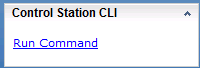
5.命令頁面隨即開啟,可供您輸入命令。

中存取 CLI1. 登入 Unisphere。
2.選取 系統 標籤。
3.前往右下方窗格的 控制站 CLI 。
4.選取其正下方 的執行命令 。
5.命令頁面隨即開啟,可供您輸入命令。
Affected Products
VNX/VNXeProducts
VNX/VNXeArticle Properties
Article Number: 000022420
Article Type: How To
Last Modified: 24 Sep 2024
Version: 3
Find answers to your questions from other Dell users
Support Services
Check if your device is covered by Support Services.