Dell Unity: How to manage FTP settings on a NAS server
Summary: This KB focuses on how to manage the ftp access for clients on NAS server on Unity arrays.
This article applies to
This article does not apply to
This article is not tied to any specific product.
Not all product versions are identified in this article.
Instructions
To show the current status of a NAS Servers use the below: uemcli -d IPofDestination -u localUser -p UserPasswd /net/nas/ftp show
To modify a certain NAS server ftp setting (Add a new user with a certain Home Directory): uemcli -d IPofDestination -u localUser -p UserPasswd /net/nas/ftp -server ServerName set -ftpEnabled yes -defaultHomedir /home/public
Other ftp settings:/net/nas/ftp -server <value> set [-ftpEnabled <value>] [-sftpEnabled <value>] [-cifsUserEnabled <value>] [-unixUserEnabled <value>] [-anonymousUserEnabled <value>] [-homedirLimitEnabled <value>] [-defaultHomedir <value>] [-welcome <value>] [-motd <value>] [-auditEnabled {yes|no}] [-auditDir <value>] [-auditMaxSize <value>] {[-allowHost <value>]| [-appendAllowHost <value>] | [-removeAllowHost <value>] | [-denyHost <value>] | [-appendDenyHost <value>] | [-removeDenyHost <value>]} {[-allowUser <value>] | [-appendAllowUser <value>] | [-removeAllowUser <value>] | [-denyUser <value>] | [-appendDenyUser <value>] | [-removeDenyUser <value>]} {[-allowGroup <value>]| [-appendAllowGroup <value>] | [-removeAllowGroup <value>] |[-denyGroup <value>] | [-appendDenyGroup <value>] | [-removeDenyGroup <value>]}
Refer to the Unity Tech guide for a clear description of the above attributes:
Dell Unity Family Unisphere Command Line Interface User Guide
FTP can be managed also from Unisphere as per below:
-From Storage Panel on the left side of the user interface view >>File >> NAS Server >> Choose the required NAS server on which ftp shall be configured.
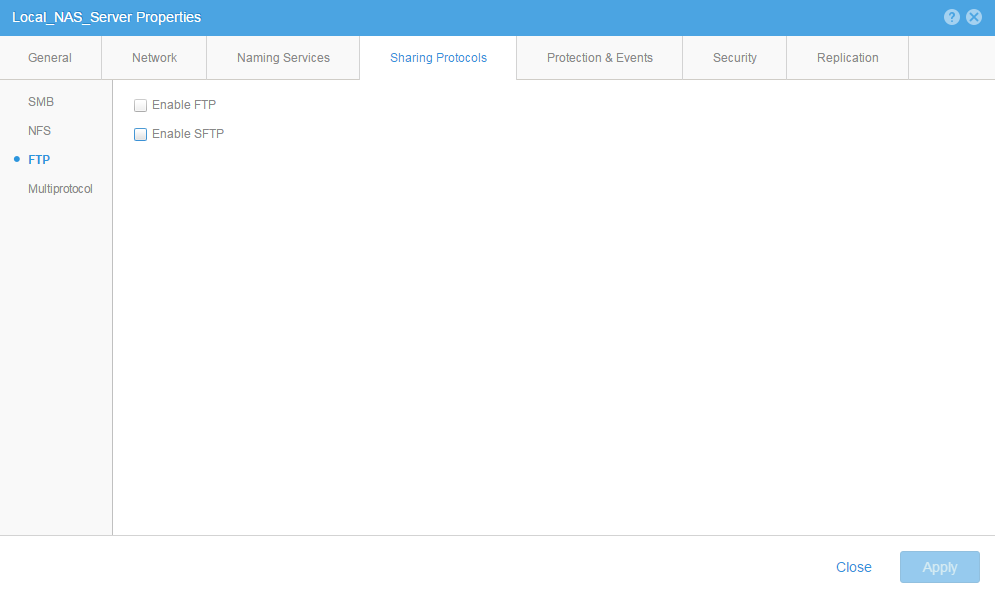
-From the Sharing protocol click the FTP then mark the FTP checkbox.
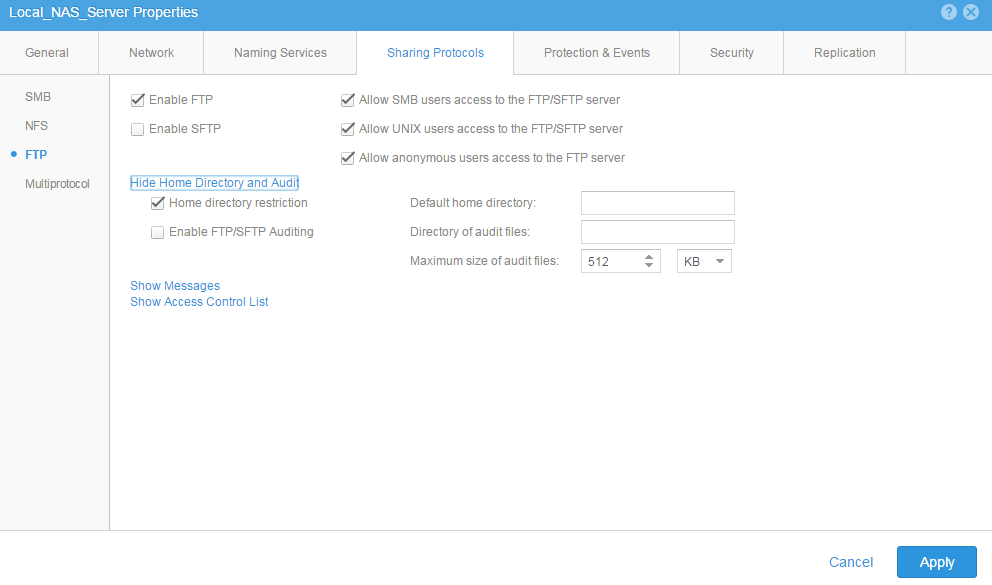
- At this stage, there are two options, either enabling Home directory restriction (each user has a preconfigured home directory) or configuring a Default home directory for all ftp users.
Affected Products
Dell EMC Unity FamilyProducts
Dell EMC Unity FamilyArticle Properties
Article Number: 000022512
Article Type: How To
Last Modified: 22 Oct 2025
Version: 6
Find answers to your questions from other Dell users
Support Services
Check if your device is covered by Support Services.