VxRail: vCenter용 SSH를 활성화하는 방법
Summary: "내부 오류가 발생했습니다 - 오류 #1009" 오류가 발생할 때 SSH를 수동으로 활성화하는 방법
This article applies to
This article does not apply to
This article is not tied to any specific product.
Not all product versions are identified in this article.
Instructions
vCenter에서 SSH를 활성화하려고 시도하는 동안 administrator@vsphere.local 또는 루트 계정을 사용하는 경우에도 아래 오류가 나타날 수 있습니다.
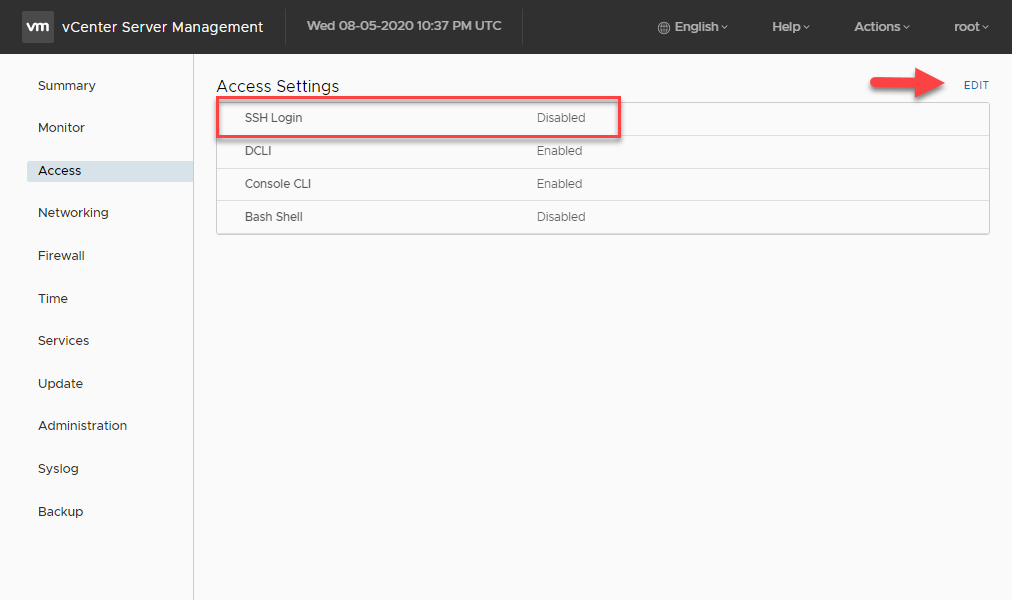
이 메시지가 나타나면 아래 단계에 따라 SSH를 활성화합니다.
- 브라우저를 열고 VAMI로 이동합니다.
https://<vcenter-ip>:5480 - 루트 자격 증명으로 로그인합니다.
- 왼쪽 메뉴에서 Access를 클릭합니다.
- 편집 버튼을 클릭합니다.
- SSH 로그인 옵션을 활성화하고 확인을 클릭하여 변경 사항을 저장합니다
Article Properties
Article Number: 000022532
Article Type: How To
Last Modified: 29 Jul 2025
Version: 6
Find answers to your questions from other Dell users
Support Services
Check if your device is covered by Support Services.