「VxRail:vCenterのSSHを有効にする方法
Summary: 「An internal error has occurred - Error #1009」というエラーが表示されたときにSSHを手動で有効にする方法
This article applies to
This article does not apply to
This article is not tied to any specific product.
Not all product versions are identified in this article.
Instructions
vCenterでSSHを有効にしようとすると、administrator@vsphere.localまたはrootアカウントを使用している場合でも、以下のエラーが表示されることがあります。
このメッセージが表示された場合は、次の手順に従ってSSHを有効にします。
- ブラウザーを開き、[VAMI:
https://<vcenter-ip>:5480 - root認証情報を使用してログインします。
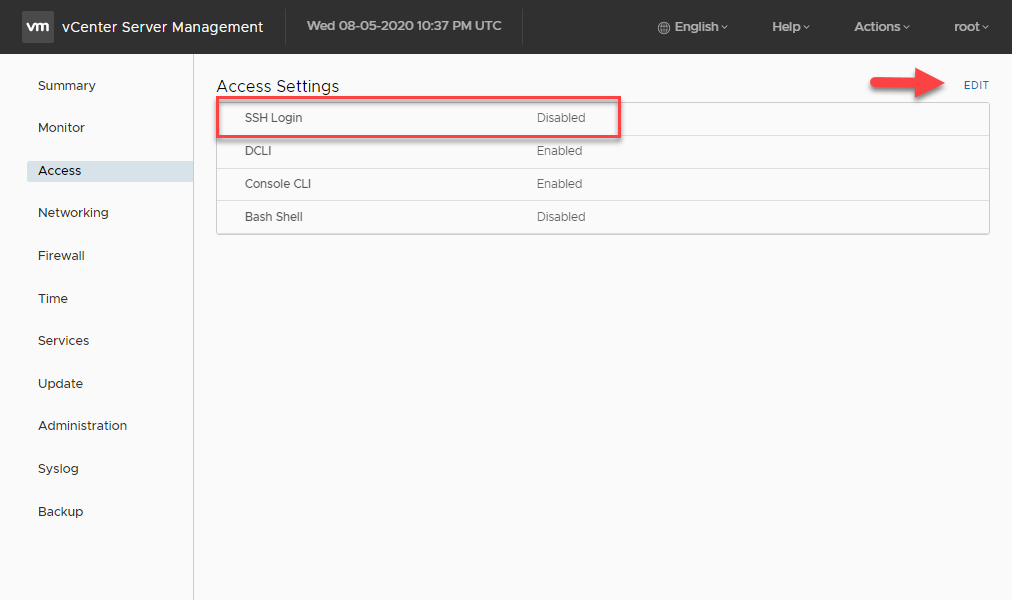
- 左側のメニューで、[アクセス]をクリックします。
- [編集] ボタンをクリックします。
- SSHログインオプションを有効にし、OKをクリックして変更を保存します
Article Properties
Article Number: 000022532
Article Type: How To
Last Modified: 29 Jul 2025
Version: 6
Find answers to your questions from other Dell users
Support Services
Check if your device is covered by Support Services.