VxRail: SSH inschakelen voor vCenter
Summary: SSH handmatig inschakelen bij foutmelding "Er is een interne fout opgetreden - Fout #1009"
This article applies to
This article does not apply to
This article is not tied to any specific product.
Not all product versions are identified in this article.
Instructions
Wanneer u SSH probeert in te schakelen in vCenter, kan de onderstaande fout verschijnen, zelfs bij gebruik van administrator@vsphere.local of rootaccount.
Als dit bericht wordt weergegeven, schakelt u SSH in door de onderstaande stappen te volgen:
- Open een browser en ga naar VAMI:
https://<vcenter-ip>:5480 - Meld u aan met de root-referenties.
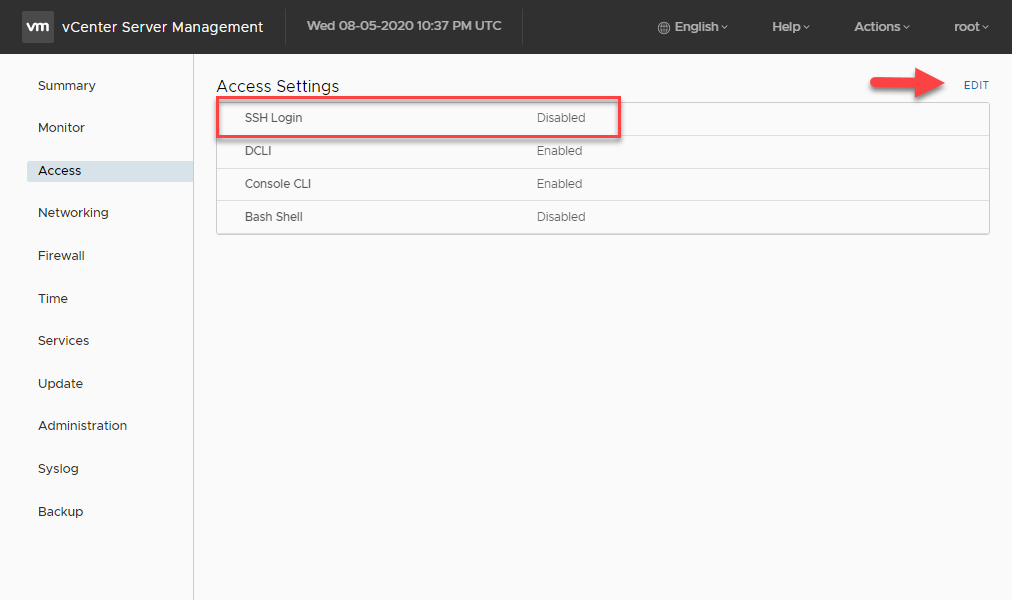
- Klik in het menu aan de linkerkant op Toegang.
- Klik op de knop Bewerken.
- Schakel de SSH Login-optie in en klik op OK om de wijziging op te slaan
Article Properties
Article Number: 000022532
Article Type: How To
Last Modified: 29 Jul 2025
Version: 6
Find answers to your questions from other Dell users
Support Services
Check if your device is covered by Support Services.