VNX-tuoteperhe: Lisää LUN tallennusryhmään
Summary: VNX-tuoteperhe: Lisää LUN tallennusryhmään
This article applies to
This article does not apply to
This article is not tied to any specific product.
Not all product versions are identified in this article.
Instructions
Unispheren
isäntien>tallennusryhmän alla-Korosta tallennusryhmän nimi, johon haluat lisätä LUN-paikan.
-Napsauta yhdistä LUN: t:

-Etsi tallennusryhmän ominaisuudet -valintaikkunasta yläpaneelista LUN, jonka olet lisäämässä tallennusryhmään.
-Klikkaa Lisää:

-Kun olet lisännyt LUN: n, se ilmestyy sitten alapaneeliin.
-Napsauta kyseisen LUN-tunnuksen isäntä-LUN-tunnusta ja näkyviin tulee avattava valikko, jotta voit muuttaa sen HLU: ksi:
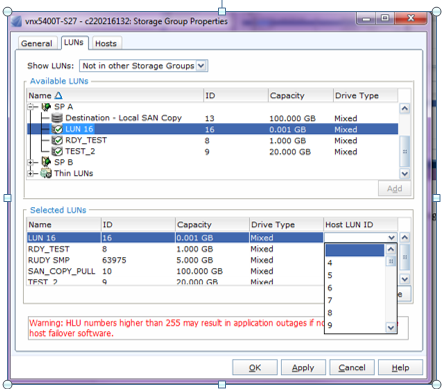
-Napsauta Käytä.
Affected Products
VNX/VNXeProducts
VNX/VNXeArticle Properties
Article Number: 000022619
Article Type: How To
Last Modified: 22 Oct 2025
Version: 6
Find answers to your questions from other Dell users
Support Services
Check if your device is covered by Support Services.