VNX Ailesi: Depolama grubuna LUN eklenmesi
Summary: VNX Ailesi: Depolama grubuna LUN eklenmesi
This article applies to
This article does not apply to
This article is not tied to any specific product.
Not all product versions are identified in this article.
Instructions
Unisphere'de
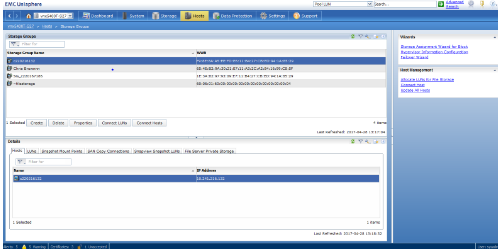
hosts>depolama grubu altında-LUN'u eklemek istediğiniz depolama grubunun adını vurgulayın.
-LUN'ları bağla'ya tıklayın:
- Depolama grubu özellikleri iletişim kutusunda, üst paneldeki depolama grubuna eklediğiniz LUN'u bulun.
-Ekle'ye tıklayın:
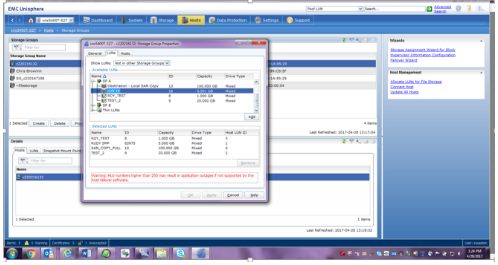
-LUN'u ekledikten sonra alt panelde görünecektir.
-Bu LUN'un Ana Bilgisayar LUN Kimliğine tıklayın ve bunu HLU olarak değiştirebilmeniz için bir açılır menü görünecektir:
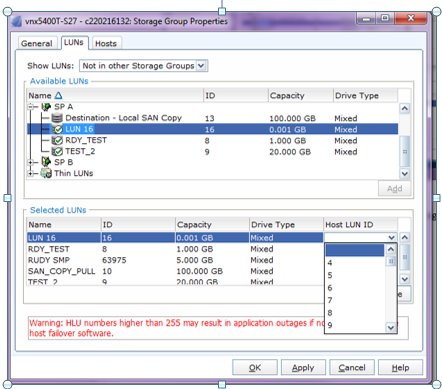
-Uygula'yı tıklayın.
Affected Products
VNX/VNXeProducts
VNX/VNXeArticle Properties
Article Number: 000022619
Article Type: How To
Last Modified: 22 Oct 2025
Version: 6
Find answers to your questions from other Dell users
Support Services
Check if your device is covered by Support Services.