VNX 家族:將 LUN 新增到儲存群組
Summary: VNX 家族:將 LUN 新增到儲存群組
This article applies to
This article does not apply to
This article is not tied to any specific product.
Not all product versions are identified in this article.
Instructions
在 Unisphere 的主機>儲存群組下
- 突出顯示要將 LUN 添加到的儲存組名稱。
-按一下連接 LUN:

-在存儲組屬性對話框中,在頂部面板中找到要添加到存儲組的 LUN。
-點擊添加:

- 添加 LUN 後,它將出現在底部面板上。
按一下該 LUN 的主機 LUN ID,隨即會顯示下拉式清單,以便您能將其變更為 HLU:
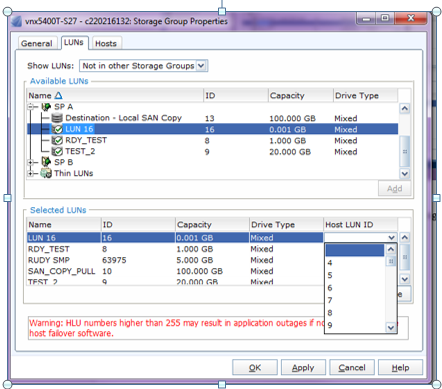
-按兩下應用。
Affected Products
VNX/VNXeProducts
VNX/VNXeArticle Properties
Article Number: 000022619
Article Type: How To
Last Modified: 22 Oct 2025
Version: 6
Find answers to your questions from other Dell users
Support Services
Check if your device is covered by Support Services.