VxRail:如何禁止群集监视以防止在维护期间生成 Dial Home 服务请求
Summary: 如何禁止群集监视以防止在维护、测试或节点更换期间生成 Dial Home 服务请求。
This article applies to
This article does not apply to
This article is not tied to any specific product.
Not all product versions are identified in this article.
Instructions
如果您在 VxRail 一体机上有计划内停机或测试,并且想要防止为这些事件生成呼叫总部事件和服务请求,则可以执行以下作以在这些事件发生之前禁止群集监视。
VxRail 4.5.x 及更低版本的说明:Web UI
-
登录到 VxRail Manager 的 Web UI:

-
单击 UI 左侧的“Config”:
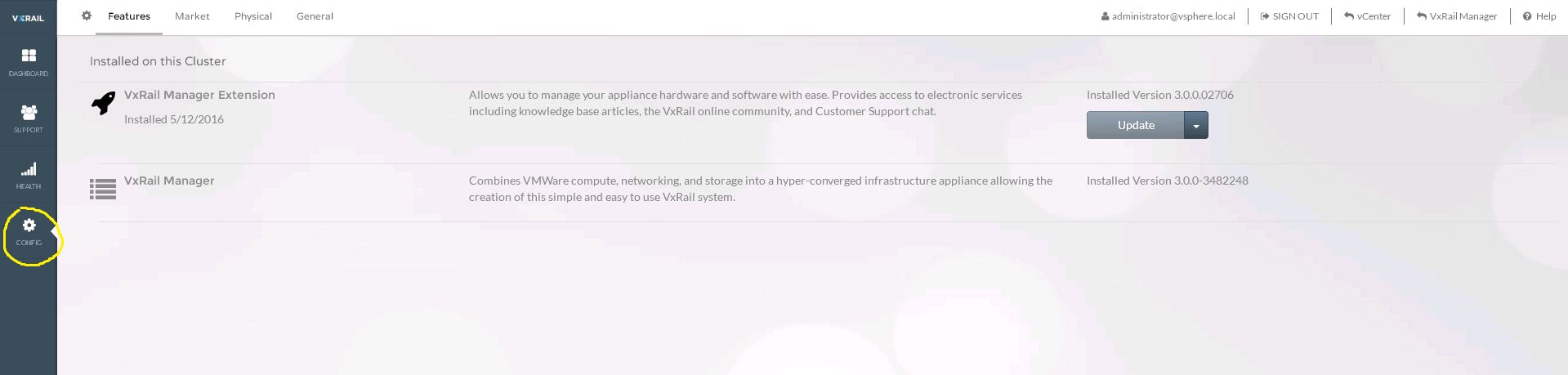
-
单击 UI 顶部的“General”:

-
在“Suppress Cluster Monitor”下,选择“on”,然后单击“Apply”按钮:

-
完成维护或测试后,返回到 Suppress Cluster Monitor,选择“off”,然后单击“apply”。
VxRail 4.7.x 及更高版本的说明:vCenter 插件
-
在 vCenter 中,移至并突出显示要禁止的 VxRail 群集。

-
从右侧的选项卡中,选择“Configure”选项卡。(请参见下面的屏幕截图)
-
从中心窗口窗格视图中,向下滚动以找到并展开“VxRail”部分。
-
在中心窗口窗格视图中进一步向下滚动,突出显示“Health Monitoring”选项。
-
在右侧主窗口视图中,单击“Health Monitoring Status”选项,将“Enable”更改为“Disable”,并禁止群集监视。

Additional Information
通过执行此作,可以帮助防止开始为计划内中断和测试生成呼叫总部事件和服务请求。
Affected Products
VxRail SoftwareProducts
VxRail SoftwareArticle Properties
Article Number: 000022653
Article Type: How To
Last Modified: 28 Mar 2025
Version: 7
Find answers to your questions from other Dell users
Support Services
Check if your device is covered by Support Services.