Dell EMC Unity:如何启用 sftp(用户可纠正)
This article applies to
This article does not apply to
This article is not tied to any specific product.
Not all product versions are identified in this article.
Instructions
确认 sftp 已启用。(通过转到 Storage >文件 > Nas 服务器>共享协议>确认已选中“启用 SFTP”
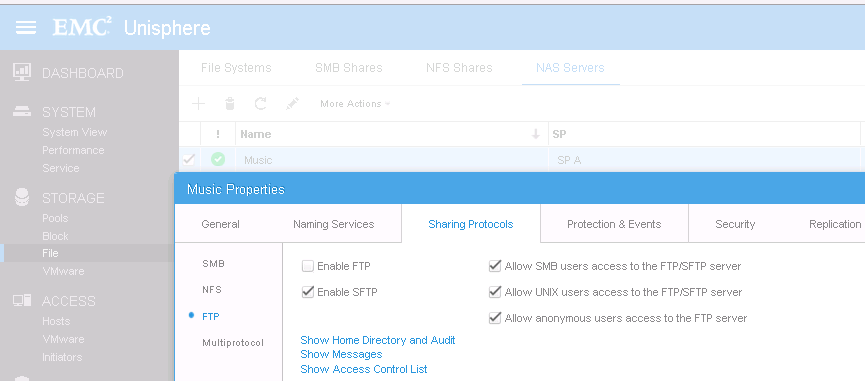
框)— 确保您的用户是 UNIX 或 SMB。如果是匿名用户,则不允许访问 SFTP 服务器。
- 从 CLI 确认您的 NAS 服务器上已启用 sftp 并且您的用户已启用(例如,如果用户是 SMB 用户,则确认 CIFS 用户已启用)。
-uemcli /net/nas/ftp show
Storage system address:127.0.0.1
Storage system port: 443
HTTPS connection
1: NAS server = nas_3
FTP enabled = no
SFTP enabled = yes
CIFS users enabled = yes
Unix users enabled = yes
Anonymous user enabled = yes
Homedir limitation enabled = no
Default home directory = /FTP/
Allowed hosts =
Allowed users =
Allowed groups =
Denied hosts =
拒绝的用户 =
拒绝的组 =
框)— 确保您的用户是 UNIX 或 SMB。如果是匿名用户,则不允许访问 SFTP 服务器。
- 从 CLI 确认您的 NAS 服务器上已启用 sftp 并且您的用户已启用(例如,如果用户是 SMB 用户,则确认 CIFS 用户已启用)。
-uemcli /net/nas/ftp show
Storage system address:127.0.0.1
Storage system port: 443
HTTPS connection
1: NAS server = nas_3
FTP enabled = no
SFTP enabled = yes
CIFS users enabled = yes
Unix users enabled = yes
Anonymous user enabled = yes
Homedir limitation enabled = no
Default home directory = /FTP/
Allowed hosts =
Allowed users =
Allowed groups =
Denied hosts =
拒绝的用户 =
拒绝的组 =
Affected Products
Dell EMC Unity FamilyProducts
Dell EMC Unity FamilyArticle Properties
Article Number: 000022747
Article Type: How To
Last Modified: 22 Oct 2025
Version: 4
Find answers to your questions from other Dell users
Support Services
Check if your device is covered by Support Services.