Dell EMC Unity: How to view the system configuration Telemetry files (User Correctable)
Summary: KB showing how to view the Dell EMC Unity configuration using telemetry files.
This article applies to
This article does not apply to
This article is not tied to any specific product.
Not all product versions are identified in this article.
Instructions
What are Telemetry Files?
Similar to "ArrayConfig" for VNX1/VNX2, these files contain the system configuration information and provide a visual representation of the configuration on the array (File systems, LUNs, NAS Servers, Hosts, Replication Sessions, Snapshots, etc..)
How to find the Telemetry Files?
Method A: From Data Collects / Service Data (KB 483583):
Method B: Directly from the SP through SSH connection:
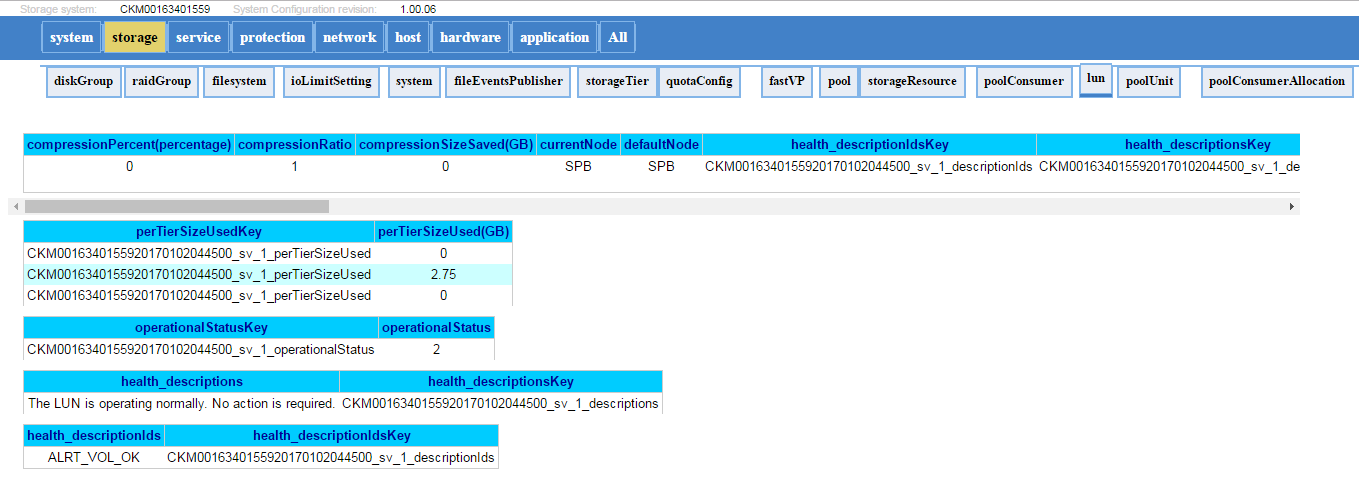
Below is an example of how the Telemetry file will look:
Similar to "ArrayConfig" for VNX1/VNX2, these files contain the system configuration information and provide a visual representation of the configuration on the array (File systems, LUNs, NAS Servers, Hosts, Replication Sessions, Snapshots, etc..)
How to find the Telemetry Files?
Method A: From Data Collects / Service Data (KB 483583):
- Unzip the data collect files.(spa.service_dc.tgz and spb.service_dc.tgz)
- The telemetry file will be under: spx\EMC\backend\service\configuration_history\
- Check the path for both SPs to get the latest Telemetry file (usually present on the Primary SP while gathering the Logs)
- Extract the files and open the .html file (Example: 20170105_095114_CKM0016350xxxx_EMC-UEM-Telemetry.html)
Method B: Directly from the SP through SSH connection:
- Run svc_arrayconfig -H
- A new telemetry file (.html) will be created directly on the SP where the above command was run. It will be under: /EMC/backend/service/configuration_history.
- Use WinSCP (or any file transfer method) to retrieve the html file from the SP.
Below is an example of how the Telemetry file will look:
Additional Information
Affected Products
Dell EMC Unity FamilyProducts
Dell Unity 300, Dell EMC Unity 300F, Dell EMC Unity 400, Dell EMC Unity 400F, Dell EMC Unity 500, Dell EMC Unity 500F, Dell EMC Unity 600, Dell EMC Unity 600F, Dell EMC Unity Family |Dell EMC Unity All Flash, Dell EMC Unity HybridArticle Properties
Article Number: 000022764
Article Type: How To
Last Modified: 16 Oct 2025
Version: 3
Find answers to your questions from other Dell users
Support Services
Check if your device is covered by Support Services.