Dell EMC Unity:如何审核 SMB 文件对象访问(文件删除)(用户可纠正)
Summary: 如何在删除文件和文件夹时审核文件对象访问
This article applies to
This article does not apply to
This article is not tied to any specific product.
Not all product versions are identified in this article.
Instructions
使用 Unity/VNX/VNXe 管理工具,请参阅下面的链接以下载该工具:
安装并启动该工具(仅限 Windows 客户端),右键单击并连接到 CIFS(SMB) Unity NAS-SERVER 接口(或 DNS 名称)以直接进行管理。
注 - 请勿尝试将此工具连接到 SP 管理端口。
这些在 NAS 服务器审核策略中,您应为失败策略和成功策略启用(审核对象访问),一旦(审核对象访问)成功,就会启用操作,这将在删除文件或目录时也会生成事件。
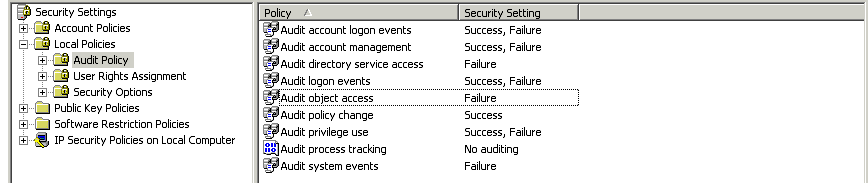
为了能够看到成功的文件或目录删除事件,NAS 服务器审核策略必须包括“成功”类型的事件。
安装并启动该工具(仅限 Windows 客户端),右键单击并连接到 CIFS(SMB) Unity NAS-SERVER 接口(或 DNS 名称)以直接进行管理。
注 - 请勿尝试将此工具连接到 SP 管理端口。
这些在 NAS 服务器审核策略中,您应为失败策略和成功策略启用(审核对象访问),一旦(审核对象访问)成功,就会启用操作,这将在删除文件或目录时也会生成事件。
为了能够看到成功的文件或目录删除事件,NAS 服务器审核策略必须包括“成功”类型的事件。
Affected Products
Dell EMC Unity FamilyProducts
Dell EMC Unity FamilyArticle Properties
Article Number: 000022767
Article Type: How To
Last Modified: 16 Oct 2025
Version: 4
Find answers to your questions from other Dell users
Support Services
Check if your device is covered by Support Services.