Dell HYPERMAX OS and PowerMaxOS Online Device Expansion (ODE) for TDEV Options
Summary: Dell HYPERMAX OS and PowerMaxOS Online Device Expansion (ODE) for TDEV options and supported functionality.
This article applies to
This article does not apply to
This article is not tied to any specific product.
Not all product versions are identified in this article.
Instructions
What are the Dell HYPERMAX OS and PowerMaxOS Online Device Expansion (ODE) for TDEV options and supported functionality?
Both HYPERMAX OS and PowerMaxOS allow the online expansion of TDEV volumes, with some restrictions at specific levels of the Array operating system.
Dell Solutions provides the expansion capability with the symdev modify -tdev command.
Dell Unisphere for VMAX and Unisphere for PowerMax provide the expansion capability with the ArraySid -> Volumes -> Expand Volume dialog box.
Other callers to Array Management using the SYMAPI, SMI-S, REST API layers can also affect a TDEV expand operation.
The following outlines the ODE functionality available and the Solutions Enabler and Array operating system requirements:
-
Up to and including HYPERMAX OS (5977) Arrays, TDEVS cannot be expanded while in a local (for example TimeFinder Clone, SnapVX) or remote (SRDF) replication session.
Solutions Enabler 8.1 and above provides ODE capability for nonreplicated TDEVs. Example syntax:
symdev -sid <sid> -devs <dev> modify -tdev -cap <NewCapacity> -captype <cyl|mb|gb|tb>See Dell KB article 13158: Dell EMC Solutions Enabler : How to expand a TDEV device that is replicated in an SRDF/A (Asynchronous mode) session on VMAX3 array with Enginuity 5977? for details on a procedure to remove an SRDF/A TDEV device on 5977 Array pair from its SRDF/A session, expand the TDEV on both arrays and add the expanded devices back into the SRDF/A session as an SRDF/A pair.
For TDEVs in SRDF/Metro session in 5977 Array pair to be expanded, the TDEVs must be removed from the SRDF/Metro session (using a
symrdf deletepair) before both sides could be expanded, and then add the expanded devices added back into the SRDF/Metro session as an SRDF/Metro pair.As the design of SRDF/Metro makes both array sides available for host I/O access, special considerations must be considered when performing a TDEV expansion procedure.
It is recommended to contact Dell Support before attempting to expand SRDF/Metro TDEVs on 5977 array pair.
-
For PowerMaxOS (5978 on both Arrays, earlier than revision .444), TDEVS can be expanded while in a local (SnapVX) or remote (SRDF) replication session, except SRDF pairs in a SRDF/Metro session.
Note: Online Device Expansion is not supported for Legacy TimeFinder Mode (for examplesymclone).Solutions Enabler 9.0 and later provides ODE capability for local and remote replicated TDEVs on 5978 arrays (earlier than revision .444), except SRDF pairs in a SRDF/Metro session. Example syntax (for remote replicated pair):
symdev -sid <sid> -devs <dev> modify -tdev -cap <NewCapacity> -captype <cyl|mb|gb|tb> -rdfg <rdfg>Where
-rdfgLists devices that belong to the specified SRDF group. When used with modify it specifies the SRDF group that is associated with the SRDF devices and indicates that both sides of the SRDF pair, which are associated with the SRDF group, should be expanded.For TDEVs in SRDF/Metro session in 5978 (earlier than revision .444) array pair to be expanded, the TDEVs must be removed from the SRDF/Metro session (using a
symrdf deletepairor asymrdf movepair) before both sides could be expanded, and then add the expanded devices added back into the SRDF/Metro session as an SRDF/Metro pair.As the design of SRDF/Metro makes both array sides available for host I/O access, special considerations must be considered when performing a TDEV expansion procedure.
It is recommended to contact Dell Support before attempting to expand SRDF/Metro TDEVs on 5978 (earlier than revision .444) array pair.
-
For PowerMaxOS (5978.444 and above on both Arrays), TDEVS can be expanded while in a local (for example SnapVX) or remote (SRDF) replication session, including SRDF pairs in a SRDF/Metro session.
Note: Online Device Expansion is not supported for Legacy TimeFinder Mode (for examplesymclone).Solutions Enabler 9.1 (and later) provides ODE capability for local and remote replicated TDEVs on 5978 arrays (5978.444 and later on both Arrays), including SRDF pairs in a SRDF/Metro session. Example syntax (for remote replicated pair):
symdev -sid <sid> -devs <dev> modify -tdev -cap <NewCapacity> -captype <cyl|mb|gb|tb> -rdfg <rdfg>Where
-rdfgLists devices that belong to the specified SRDF group. When used with modify it specifies the SRDF group that is associated with the SRDF devices and indicates that both sides of the SRDF pair, which are associated with the SRDF group, should be expanded. -
For PowerMaxOS (5978.669 and later on both Arrays), TDEVS in a MetroDR environment cannot be expanded.
Use SYMCLI (9.2 and later) command:
symdev -sid <sid> list -metrodrto list all array devices in Metro DR environments.To expand a TDEV in a MetroDR environment, the existing Smart DR environment must be removed (with
symmdr -sid <sid> -name <EnvName> -dr_rdfg <gg> environment -remove), then expand the TDEV (see step 3 above and see Note 1 below), then the MetroDR environment can be created again (withsymmdr -sid <sid> -name <EnvName> -metro_rdfg <gg> -dr_rdfg <gg> environment -setup).Solutions Enabler 10.3 allows you to modify the SRDF/Metro Smart DR environment, by adding or removing devices after the environment was created. Therefore, with this version, Smart DR removal is not required. The following command can be used:
symmdr -sid <ArrayID> -name <EnvironmentName> modify -add <-dev | file > modify -remove < -devs | -file > -metro_rdfg -dr_rdfg -
Unisphere for PowerMax 9.x (and above) also provides ODE capability for local and remote replicated TDEVs on 5978 (dependent on the Array code), where specifying an RDF group indicates that both sides of the RDF pair is to be expanded. For example:
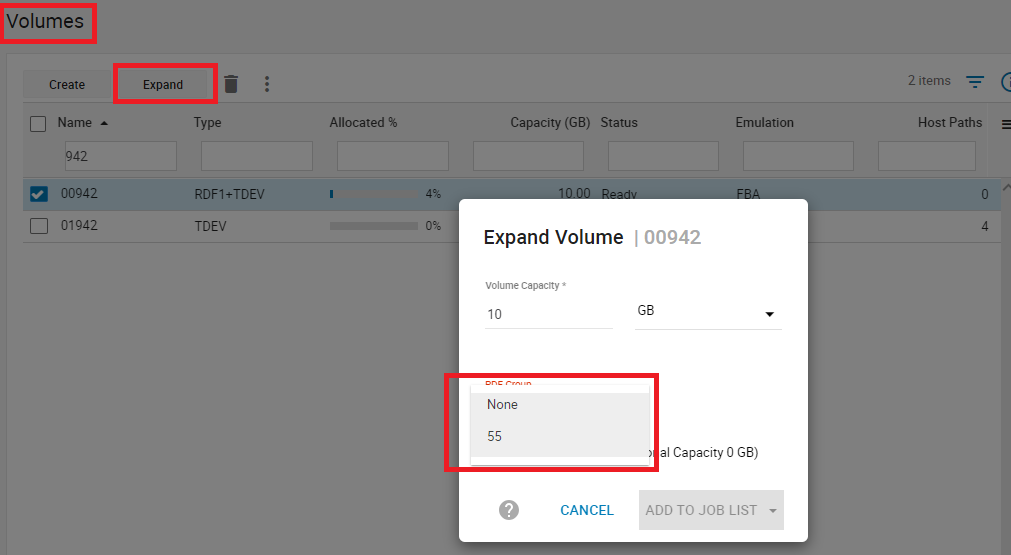
Unisphere for PowerMax Expand Volume dialog.
Selecting RDF group None means that the device is only expanded on the current Array side of the RDF pair.
General Notes:
Note 1: For Array operating system versions that supports
symdev modify -tdev -rdfg, if the TDEV is in a concurrent SRDF configuration (R11 device to 2 R2 devices managed by two SRDF sessions), only one rdfg session can be specified by the -rdfg parameter.
- If neither SRDF sessions are SRDF/Metro, then expand one of the R2 devices first (without the
-rdfgparameter). This leaves one of the session pairs with R2 larger than R1. That is ok as write I/Os only occur on the R1 side. Then the other session pair can be expanded (with the-rdfgparameter), so that then all three devices have the same size.
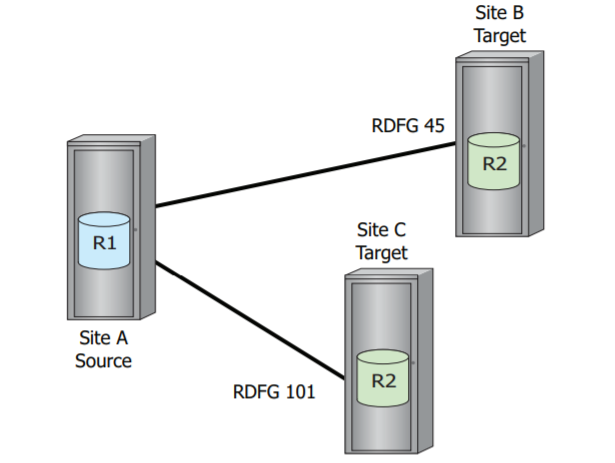
Concurrent SRDF configuration
- If one of the SRDF sessions is SRDF/Metro, then expand the R2 device of the Disaster Recovery session (SRDF/A or SRDF Adaptive Copy Disk) first (without the
-rdfgparameter). This leaves the DR session pair with R2 larger than R1. That is ok as write I/Os only occur on the SRDF/Metro session R1 or R2 sides. Then the SRDF/Metro session pair can be expanded (with the-rdfgparameter), so that then all three devices have the same size.
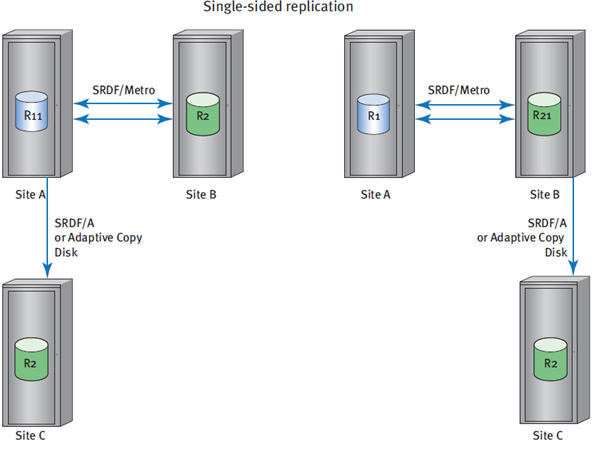
SRDF/Metro session with single-sided Disaster Recovery
- If one of the SRDF sessions is SRDF/Metro, and both sides of the SRDF/Metro sessions have Disaster Recovery sessions (so have SRDF/Metro R11 to R21 session, R11 to R2 session and R21 to R2 session) then expand each of the non-Metro R2 device of the Disaster Recovery sessions (SRDF/A or SRDF Adaptive Copy Disk) first (without the
-rdfgparameter). This leaves both DR session pairs with R2 larger than R1. That is ok as write I/Os only occur on the SRDF/Metro session R1 or R2 sides. Then the SRDF/Metro session pair can be expanded (with the-rdfgparameter), so that then all four devices have the same size.
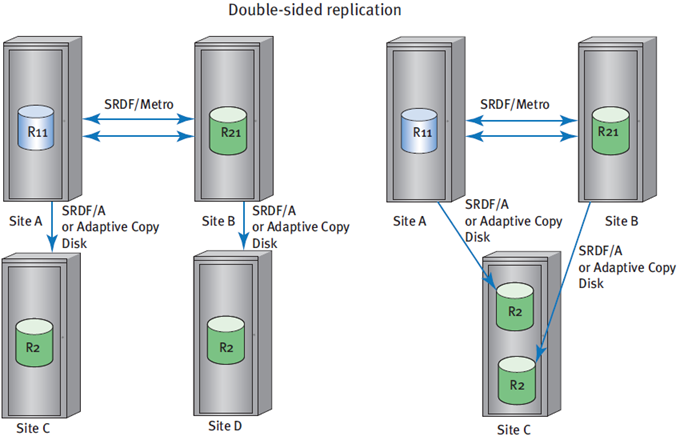
SRDF/Metro session with double-sided Disaster Recovery replication
Note 2: For Array operating system versions that supports
symdev modify -tdev -rdfg, if the TDEV is in a cascaded SRDF configuration (R1 device to R21 device to R2 device managed by two SRDF sessions), only one rdfg session can be specified by the -rdfg parameter.
- If neither SRDF sessions are SRDF/Metro, then expand the R2 device first (without the
-rdfgparameter). This leaves the R21 to R2 session pair with R2 larger than R1. That is ok as write I/Os only occur on the R1 side. Then the other session pair (R1 to R21) can be expanded (with the-rdfgparameter), so that then all three devices have the same size.
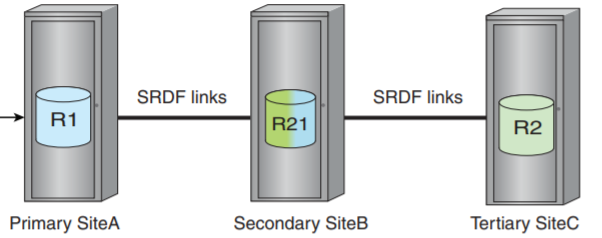
Cascaded SRDF configuration.
Affected Products
Solutions EnablerProducts
PowerMaxOS 5978, SMI-S Provider, Solutions Enabler, Unisphere for VMAX, Unisphere for PowerMax, VMAXArticle Properties
Article Number: 000023189
Article Type: How To
Last Modified: 17 Apr 2026
Version: 11
Find answers to your questions from other Dell users
Support Services
Check if your device is covered by Support Services.