VxRail: ESXi Certificate is Expired, Cannot Validate Install
Summary: VxRail validation fails because an ESXi host’s SSL certificate is expired. Resolve by regenerating the host certificate.
This article applies to
This article does not apply to
This article is not tied to any specific product.
Not all product versions are identified in this article.
Symptoms
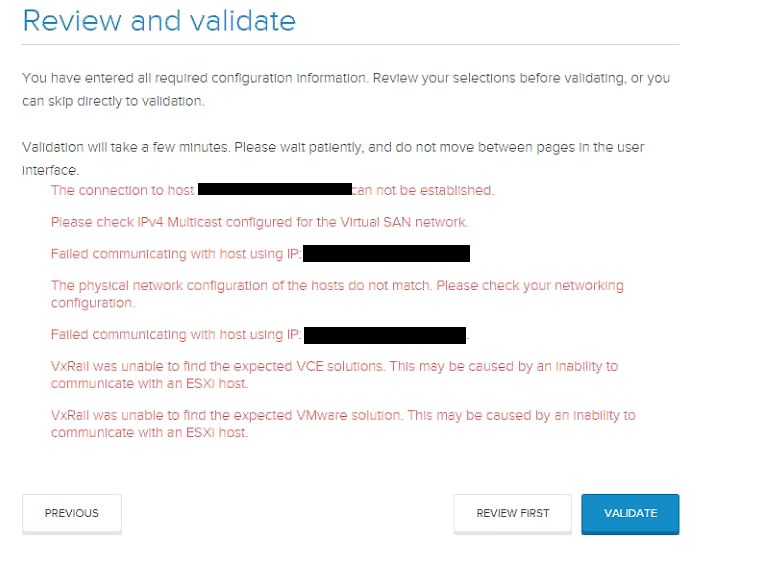
Validation failures due to an expired ESXi certificate
During VxRail validation, the following symptoms may be observed:
- Errors indicating that the system cannot connect to or communicate with a host.
- A particular host reports that its ESXi certificate has expired.
- The
marvin.logfile contains certificate‑related exceptions.
Typical log entries include:
java.security.cert.CertificateException: Certificate with thumbprint : 13:04:29:4B:23:94:3D:08:3F:57:7C:xx:xx:xx:xx:xx:xx:xx:xx:xx is expired
javax.net.ssl.SSLHandshakeException: java.security.cert.CertificateException: Certificate with thumbprint : 13:04:29:4B:23:94:3D:08:3F:57:7C:xx:xx:xx:xx:xx:xx:xx:xx:xx is expired
Visual reference:
Cause
When a host's initial date or time is incorrect and is then fixed, this error can occur as the certificate is tied to the date and time stamp.
Resolution
Regenerate Expired ESXi Host Certificates.
-
Log in to the ESXi Shell and obtain root privileges.
# su -
Password:
-
Navigate to the SSL directory where the host certificates are stored.
# cd /etc/vmware/ssl
-
Back up the existing certificates by renaming them.
# mv rui.cert orig.rui.crt
# mv rui.key  orig.rui.key
-
Generate new self‑signed certificates.
# /sbin/generate-certificates
You may see the following warnings; they can be ignored:
WARNING: can't open config file: /usr/ssl/openssl.cnf
WARNING: can't open config file: /etc/pki/tls/openssl.cnf
-
Confirm that new certificates were created and that their timestamps are newer than the
.origfiles.# ls -la -rw-r--r-- 1 root root 1.2K 2024-11-01 12:34 rui.cert -rw-r--r-- 1 root root 1.2K 2024-11-01 12:34 rui.key -rw-r--r-- 1 root root 1.2K 2024-10-15 09:20 orig.rui.crt -rw-r--r-- 1 root root 1.2K 2024-10-15 09:20 orig.rui.key
-
Restart the ESXi host to apply the new certificates.
# reboot
-
After the host comes back online, re‑run the VxRail validation to ensure that the issue is resolved.
Note: The certificate generation process ties the certificate validity to the host’s system clock. Ensure the host’s date and time are correct before regenerating the certificates.
Additional Information
*If the host has the VxRail Manager virtual machine (usually host 1) you must restart VxRail Manager before initialization.
Affected Products
VxRail Appliance Family, VxRail Appliance Series, VxRail SoftwareArticle Properties
Article Number: 000024955
Article Type: Solution
Last Modified: 16 Jan 2026
Version: 5
Find answers to your questions from other Dell users
Support Services
Check if your device is covered by Support Services.