NetWorker: How to remove a Data Domain mtree for a decommissioned VBA
Summary: The NetWorker Virtual Backup Appliance (VBA) solution has been decommissioned and the mtree fails to delete from the Data Domain System Manager.
This article applies to
This article does not apply to
This article is not tied to any specific product.
Not all product versions are identified in this article.
Symptoms
How to remove a Data Domain mtree for a decommissioned Virtual Backup Appliance (VBA)?
The NetWorker VBA solution has been decommissioned from the environment following the steps in the knowledge base article:
VBA: How to Delete a VBA Node?.
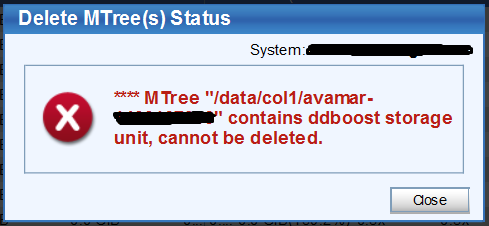
The Data Domain System Manager (DDSM) still shows that the VBA mtree after the decommission steps are completed. Deleting the mtree in the "Data Management > mtree" generates:
Delete MTree(s) Status
MTree "/domain/col/avamar-##########" contains ddboost storage unit, cannot be deleted.
Cause
The NetWorker VBA device creates the Data Domain MTree with a DD Boost device configuration.
Resolution
- Open an SSH session to the Data Domain and log in as sysadmin.
- Return a list of the configured storage units with the following command:
ddboost storage-unit show
- Using the VBA's storage-unit name, delete it with the following command:
ddboost stoage-unit delete VBA_STORAGE_UNIT
NOTE: If the
`ddboost storage-unit show` output shows status D (deleted), the storage-unit and mtree will be deleted after the Data Domain file system clean.
Additional Information
The Data Domain file system clean is an automated task which occurs weekly by default (Tuesday). The file system cleaning task may be started manually outside of the backup window:
filesys clean startAffected Products
NetWorkerProducts
Data Domain, Data Domain Boost, NetWorker, NetWorker SeriesArticle Properties
Article Number: 000028249
Article Type: Solution
Last Modified: 18 Jul 2025
Version: 4
Find answers to your questions from other Dell users
Support Services
Check if your device is covered by Support Services.