Data Domain: Cleaning Not Recovering Disk Space with Avamar
Summary: This article describes how to identify and correct issues that may occur when little or no space has been recovered after performing cleaning in the Data Domain if Avamar is used.
This article applies to
This article does not apply to
This article is not tied to any specific product.
Not all product versions are identified in this article.
Symptoms
- Low disk space
- Data Domain being used with Avamar
- Data Domain cleaning not recovering disk space
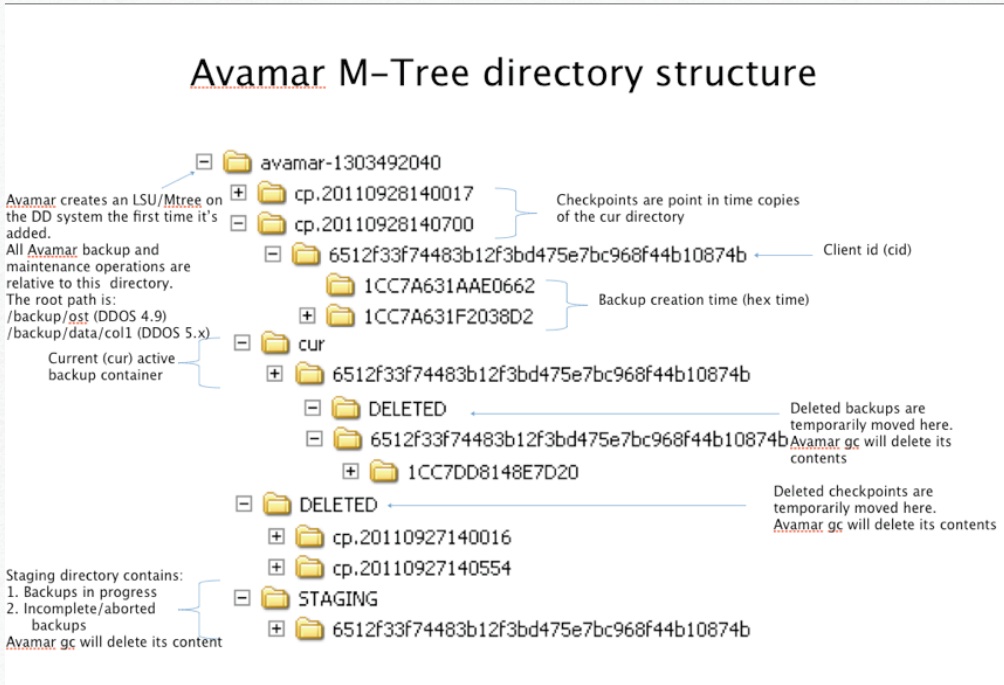
- Many checkpoint directories in the "DELETED" directory on the Data Domain
Cause
APPLIES TO:
- All Data Domain models
- All Data Domain Software Releases
- Avamar
fastcopy, verifies that the data is valid, and not corrupt.
The
fastcopy is then moved to a DELETED directory on the DDR.
Avamar Garbage Collection (GC) then runs daily and removes the checkpoints one by one from the DELETED directory.
If Avamar GC is not run or allowed to finish (possibly because users want to run backups during Avamar GC), the checkpoints accumulate on the DDR. As a result, Data Domain GC cannot reclaim physical space held by those checkpoints.
Diagnostics:
- Check to see if the Data Domain is used with Avamar.
- Determine if the Avamar GC has been disabled or not allowed to finish.
- Count the number of checkpoints and files under Avamar MTree in the Data Domain.
Resolution
- Ensure that Avamar maintenance activities are always enabled
- Maintain a minimum of 15% free space on the DDR to leave room for the cleaning process to work
- Data Domain - Cleaning Not Recovering Disk Space
Affected Products
Data DomainProducts
Data DomainArticle Properties
Article Number: 000028852
Article Type: Solution
Last Modified: 24 Jul 2025
Version: 8
Find answers to your questions from other Dell users
Support Services
Check if your device is covered by Support Services.