NVP vProxy: Unable to assign vProxy for FL Recovery: NSR VMware proxy is not available for datastores (<empty>) using transport mode 'Hotadd' in vCenter
Summary: VM FLR fails with unable to to mount
This article applies to
This article does not apply to
This article is not tied to any specific product.
Not all product versions are identified in this article.
Symptoms
The following error is posted in NMC as well as C:\Program Files\EMC Networker\nsr\logs\adhoc\nrvproxy_flr folder.
155854:nsrvproxy_flr: Starting Saveset Mount...
155858:nsrvproxy_flr: Mounting Saveset Id '9a3e1c2d-00000006-97396bf7-59396bf7-006a5000-92010156' on vCenter 'vcenter.ebr.com' at VM 'vm-rh5(vm-24)' using NetWorker server 'networker.ebr.com' for user 'root'.
162830:nsrvproxy_flr: Mount Job Id '928032'.
153330:nsrvproxy_flr: Unable to assign vProxy for FL Recovery: NSR VMware proxy is not available for datastores (<empty>) using transport mode 'Hotadd' in vCenter 'vcenter.ebr.com'..
164881:nsrvproxy_flr: Operation completed with errors.

Figure 1: NMC recover wizard showing VM FLR mount failure.
Cause
The datastore restriction will essentially mean we can work with only X or Y datastore.
If there are datastore restrictions, no FLR and Instant Recovery will work.
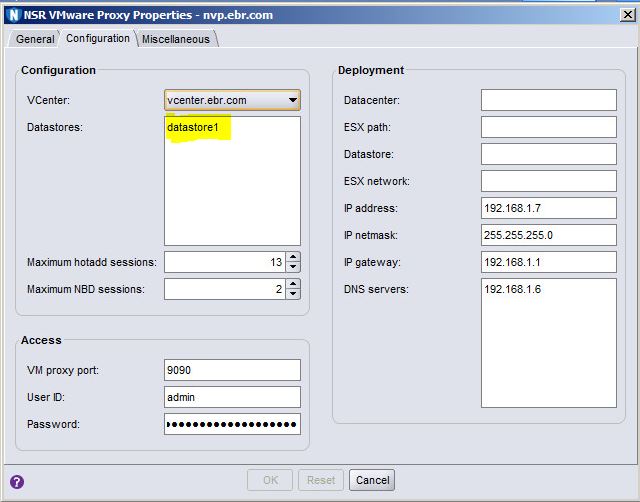
If there are datastore restrictions, no FLR and Instant Recovery will work.
Figure 2: vProxy settings showing Datastore restriction.
Resolution
Ensure that you have at least one proxy that is not restricted to a specific datastore. For the vProxy, select Properties and then select Configuration, and verify that datastores is left blank.

Figure 3: vProxy settings showing no datastore restriction
Figure 3: vProxy settings showing no datastore restriction
Additional Information
Affected Products
NetWorkerProducts
NetWorkerArticle Properties
Article Number: 000029040
Article Type: Solution
Last Modified: 03 Nov 2023
Version: 3
Find answers to your questions from other Dell users
Support Services
Check if your device is covered by Support Services.