IDPA: vCenter Server (vCSA) fails to boot during deployment | DP4400
Summary: The vCenter Server Appliance (vCSA) fails to boot during deployment from the Appliance Configuration Manager (ACM).
This article applies to
This article does not apply to
This article is not tied to any specific product.
Not all product versions are identified in this article.
Symptoms
Affected Products:
- PowerProtect DP4400
Symptoms:
- Affects DP4400 version 2.2 only
- Deployment stops responding or fails shortly after reporting successful deployment of vCSA and DDVE virtual machines
- ACM UI reports:
-
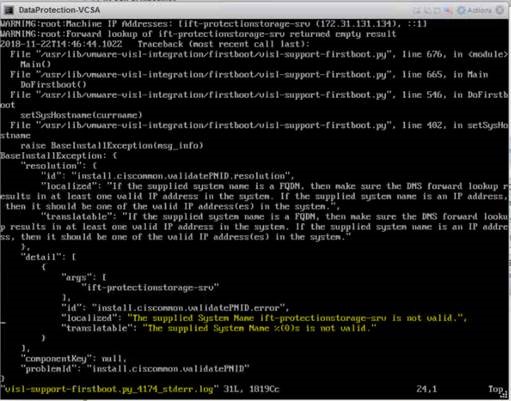
ACMvCenter server deployed successfully. Waiting for services on vCenter server. FAILED.server.logshows:vCenter is not up in 20 MINs. Stopping the configuration. ApplianceException occurred while executing DeployAndConfigVcsaTask.vCSA console displays:
Error: Failed to start services. Firstboot Error.Cause
The ACM was configured using short hostnames instead of Fully Qualified Domain Names (FQDNs).
vCSA fails to start services when the system name is not valid, as seen in:
/var/log/firstboot/visl-support-firstboot.py_<timestamp>_stderr.log
Additional contributing factor:
Duplicate IP addresses on the network can also prevent vCSA from starting.
Resolution
To resolve the issue:
- Use FQDNs for all IDPA system hostnames during ACM configuration
- Ensure that valid DNS entries exist for all hostnames and IP addresses
- Before starting deployment:
- Check for duplicate IPs on the local network
- Validate forward and reverse DNS lookups using
nslookup
If the issue persists, contact Dell EMC Technical Support for further assistance.
Additional Information
Affected Products
Integrated Data Protection Appliance FamilyProducts
PowerProtect DP4400, PowerProtect Data Protection Software, Integrated Data Protection Appliance Family, PowerProtect Data Protection Hardware, Integrated Data Protection Appliance SoftwareArticle Properties
Article Number: 000033313
Article Type: Solution
Last Modified: 03 Oct 2025
Version: 4
Find answers to your questions from other Dell users
Support Services
Check if your device is covered by Support Services.