NVP-vProxy: VMware FLR browsing only displays the most recent file versions
Summary: NetWorker VMware Protection (NVP) Virtual Machine (VM) FLR shows existing files instead of files needed for restore.
This article applies to
This article does not apply to
This article is not tied to any specific product.
Not all product versions are identified in this article.
Symptoms
The NetWorker VMware Protection (NVP) integration is configured with the vProxy Appliance. A file level restore (FLR) is being performed and the save set successfully mounts on the target virtual machine. When browsing under "Select the Files and Folders to Recover," only current files appear, and required older files or folders may be missing. For example, the save set backup date was from a month ago, but it shows files with the current date on the mount point.
Cause
This occurs when a shortcut or shared directory is selected in the recovery tab, redirecting to the VM’s local file system instead. The shortcuts are indicated by
Example: A directory named LOCAL DATA contains restore data, is shared, and has a shortcut on the server pointing to it.
.lnk extension.
Example: A directory named LOCAL DATA contains restore data, is shared, and has a shortcut on the server pointing to it.
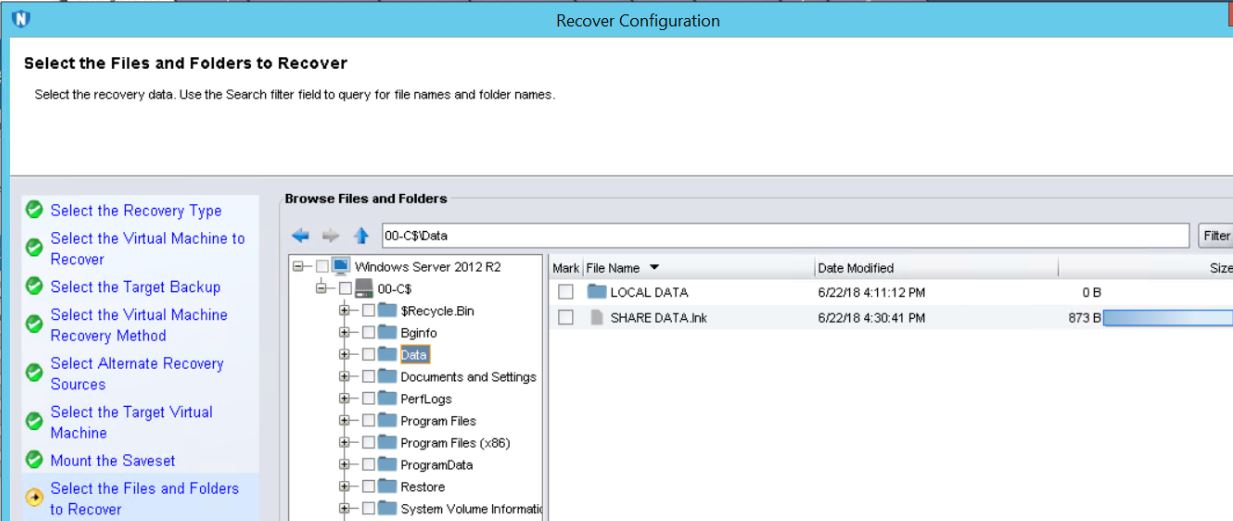
Selecting the share path or shortcut causes the FLR agent to follow the shortcut or shared path. This causes a "mirroring" effect that presents the current existing files to the FLR Agent instead of the files from the backup time.
Resolution
When selecting data for a restore ensure that you are navigating to a mount path, and not from a shortcut or network share.
Affected Products
NetWorkerProducts
NetWorker FamilyArticle Properties
Article Number: 000034802
Article Type: Solution
Last Modified: 22 Jun 2025
Version: 4
Find answers to your questions from other Dell users
Support Services
Check if your device is covered by Support Services.