VxRail: vSAN Health - Failed: vCenter state is authoritative
Summary: This article explains the Cluster Health - vCenter State Is Authoritative check in the vSAN Health Service. It provides details about why it might report an error and how to fix the error. ...
This article applies to
This article does not apply to
This article is not tied to any specific product.
Not all product versions are identified in this article.
Symptoms
vSAN Health is showing an error:
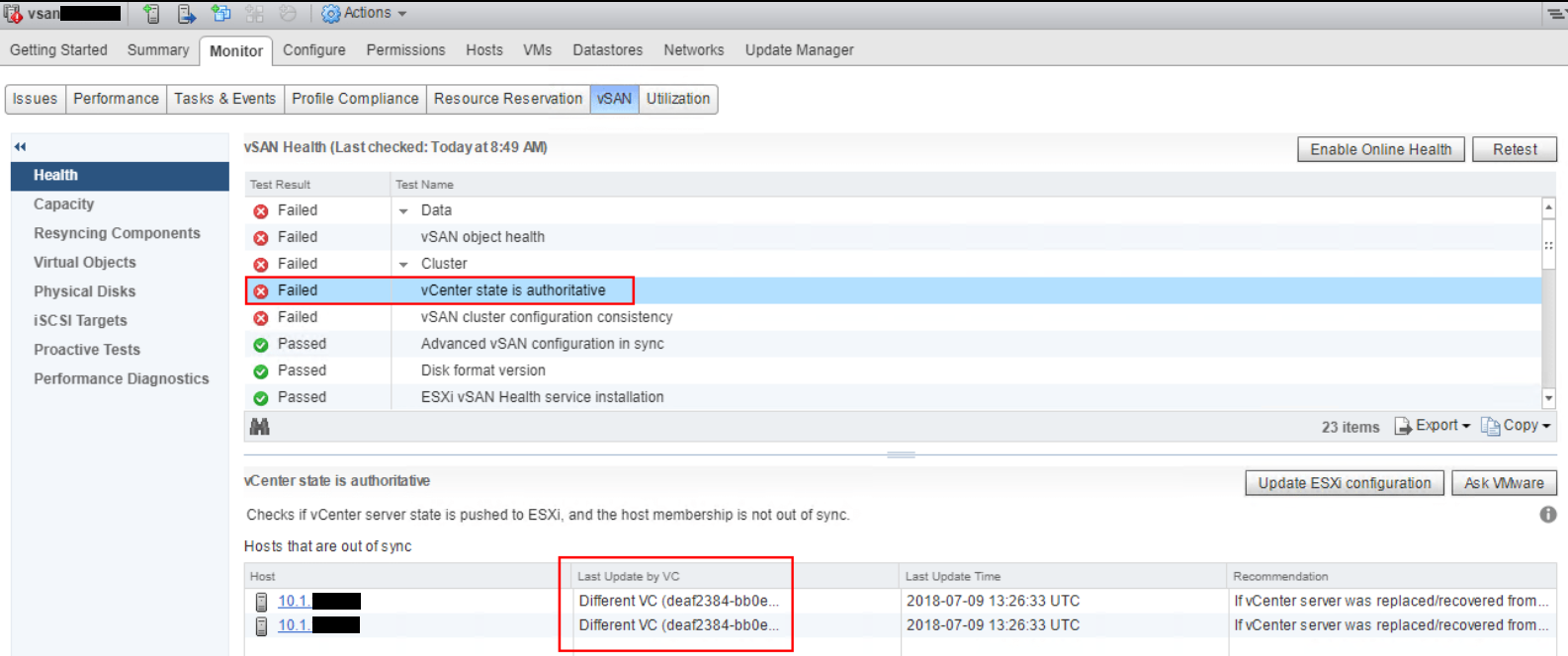
vSAN Health Failed: vCenter state is authoritative
Cause
This problem can occur when replacing or recovering a managed vCenter Server. The hosts with configuration problems are configured to be managed by the previous vCenter Server.
The hosts listed in the out-of-sync table are not using this vCenter Server as the source of truth for vSAN cluster configuration.
The problem hosts are listed with information for the previous managing vCenter Server.
This check verifies that all hosts in the vSAN cluster are using the current managing vCenter Server as the source of truth for the cluster configuration. This includes the vSAN cluster membership list. During normal operation, the vCenter Server can publish the latest host membership list and update the configuration for all hosts in the cluster. This health check reports an error if vCenter Server configuration is not synchronized with a member host, and is no longer accepted as the source of truth.
This issue can lead to auto-update failures for the configuration, including the vSAN cluster membership list.
The hosts listed in the out-of-sync table are not using this vCenter Server as the source of truth for vSAN cluster configuration.
The problem hosts are listed with information for the previous managing vCenter Server.
This check verifies that all hosts in the vSAN cluster are using the current managing vCenter Server as the source of truth for the cluster configuration. This includes the vSAN cluster membership list. During normal operation, the vCenter Server can publish the latest host membership list and update the configuration for all hosts in the cluster. This health check reports an error if vCenter Server configuration is not synchronized with a member host, and is no longer accepted as the source of truth.
This issue can lead to auto-update failures for the configuration, including the vSAN cluster membership list.
Resolution
To fix this issue:
If that does not work, do the following: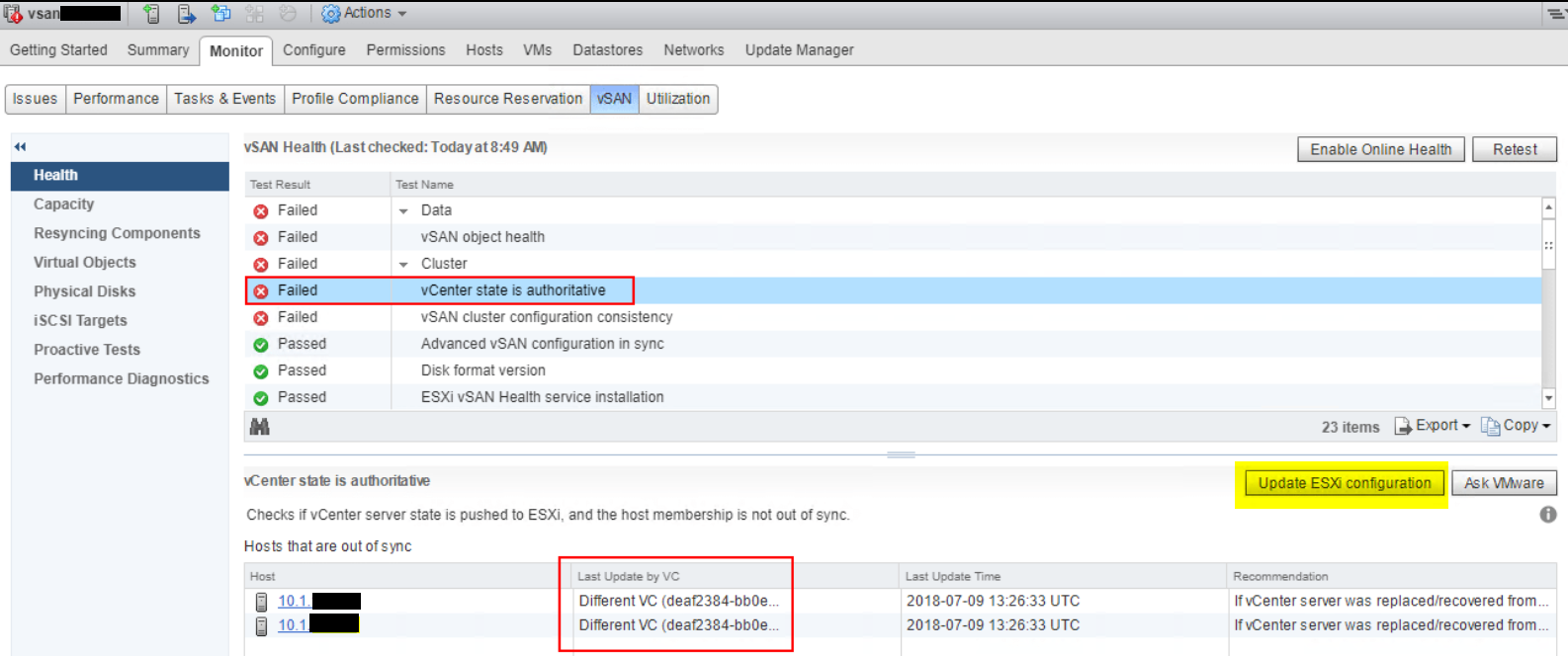
- Go to Cluster > Monitor > vSAN > Health. Select Cluster > vCenter state is authoritative, and click Update ESXi configuration.
- This action synchronizes all hosts in the cluster with the current vCenter Server, and forces the vCenter Server configuration, including the vSAN cluster membership list, to all member hosts. Reference: https://knowledge.broadcom.com/external/article?legacyId=2150916

If that does not work, do the following:
- Check the status of the value of the IgnoreClusterMemberListUpdates on all hosts
esxcfg-advcfg -g /VSAN/IgnoreClusterMemberListUpdates
- Update the value of the IgnoreClusterMemberListUpdates to "0" on all hosts that show a value of "1"
esxcfg-advcfg -s 0 /VSAN/IgnoreClusterMemberListUpdates
- Check the status of the value of the IgnoreClusterMemberListUpdates has been updated to "0"
esxcfg-advcfg -g /VSAN/IgnoreClusterMemberListUpdates
Note: The issue might persist due to the following error:
“PermissionError: [Errno 13] Permission denied: ‘/etc/vmware-vpx/ssl/vcsoluser.key”
- Check the vCenter server by opening an SSH session to it and run the commands below keeping the SSH window open
cd /var/log/vmware/vsan-health/ ‘tail -f vmware-vsan-health-service.log
- Click "Update ESXi Configuration" and monitor through the SSH session above
- Look for the error message above
- To resolve this issue, run the command below on the vCenter:
service-control --stop vmware-vsan-health
cd /usr/lib/vmware-vmon
vmon-cli -U vsan-health -R root
service-control --start vmware-vsan-health
- Under "Recent Tasks", vCenter and the vSAN will start synchronizing with each other
- The alert for 'vCenter state is authoritative' will go away and the vCenter will see that the host systems are synchronized with each other
- Once the value of IgnoreClusterMemberListUpdates is 0, Select Update ESXi configuration in the vSAN health pane of vCenter
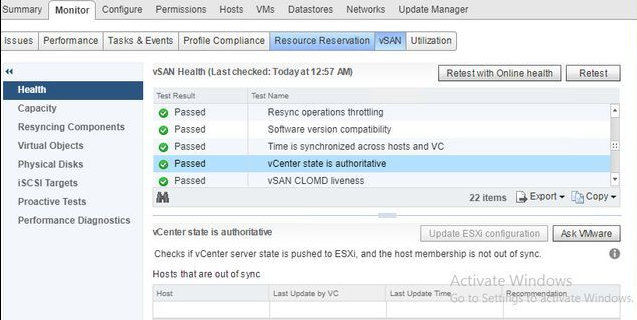
- After the issue has been resolved, the health test will show green:
Affected Products
VxRailProducts
VxRail 460 and 470 Nodes, VxRail Appliance Family, VxRail Appliance Series, VxRail G Series Nodes, VxRail E Series NodesArticle Properties
Article Number: 000037648
Article Type: Solution
Last Modified: 03 Jul 2024
Version: 4
Find answers to your questions from other Dell users
Support Services
Check if your device is covered by Support Services.