Avamar: Slow restore of folders with 1M+ files due to enabled 8.3 filenames
Summary: This article describes where Avamar backup restores are slow when restoring a folder containing >1 million files where 8.3 file names are enabled.
This article applies to
This article does not apply to
This article is not tied to any specific product.
Not all product versions are identified in this article.
Symptoms
Avamar backs up a Windows machine where a folder on an NTFS-formatted drive contains >1 million files.
Restoring the data, the job starts quickly but the performance becomes increasingly slower. The job is still running many days later.
Cause
This is a performance issue related to Windows NTFS volumes where 8.3 filename support is enabled.
Avamar Engineering investigated performance when restoring millions of files to a single directory on Windows NTFS volumes.
This performance was measured using a tool that creates unique files in the same directory until a required number has been created. By logging, every minute, the number of files that are created up to that point, it was determined that base performance, independent of the avtar process.
Performance was found to vary based on the setting of 8.3 names support.
See this article  for information about 8.3 names.
When 8.3 names setting is enabled on a volume, after some files, performance of file creation or restore degrades in logarithmic fashion. The point where this occurs is machine-dependent.
In the graph below the red line has 8.3 names enabled, while the green line has 8.3 names disabled.
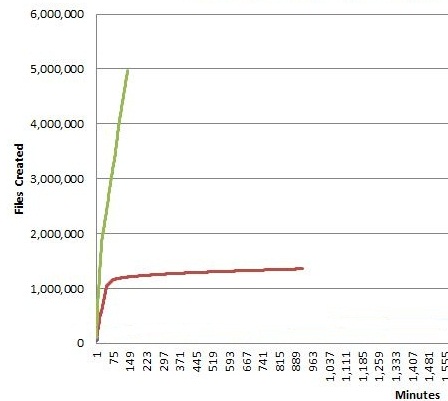
Performance stalls at ~1.3 million files when 8.3 names setting is enabled.
Where 8.3 filenames are disabled, more than 5.0 million files are created in 2-3 hours.
We have seen a practical limit of files in a folder to be around 1.1 million before exponential degradation in file creation performance occurs.
Resolution
Check if the target file system has 8.3 file names enabled.
From a Windows command prompt with elevated privileges, run the following command where C: is the volume name that is the destination for the restored data.
c:\>fsutil.exe 8dot3name query c:

The volume state is: 0 (8dot3 name creation is enabled).
The registry state is: 2 (Per volume setting - the default).
Based on the above two settings, 8dot3 name creation is enabled on c:
If the 8.3 file names are enabled on the volume, disable them.
See http://technet.microsoft.com/en-us/library/cc778996(WS.10).aspx  for more info on fsutil.
Affected Products
AvamarProducts
AvamarArticle Properties
Article Number: 000038464
Article Type: Solution
Last Modified: 26 Mar 2026
Version: 6
Find answers to your questions from other Dell users
Support Services
Check if your device is covered by Support Services.