Avamar: Time discrepancy between activity and session monitors due to no time server setting
Summary: Time discrepancy within Avamar Administrator UI 'activity monitor' and 'session monitor' due to lack of time server setting on Avamar Utility Node
This article applies to
This article does not apply to
This article is not tied to any specific product.
Not all product versions are identified in this article.
Symptoms
Client activities can be monitored 'live' through the Avamar Administrator UI using:
Example:-
In the screenshot below we see a backup which started at 07:46 MEZ (Central European Time).
The upper right-hand corner shows that the current time reported in the Server > Server monitor screen "08:13:09" MEZ.
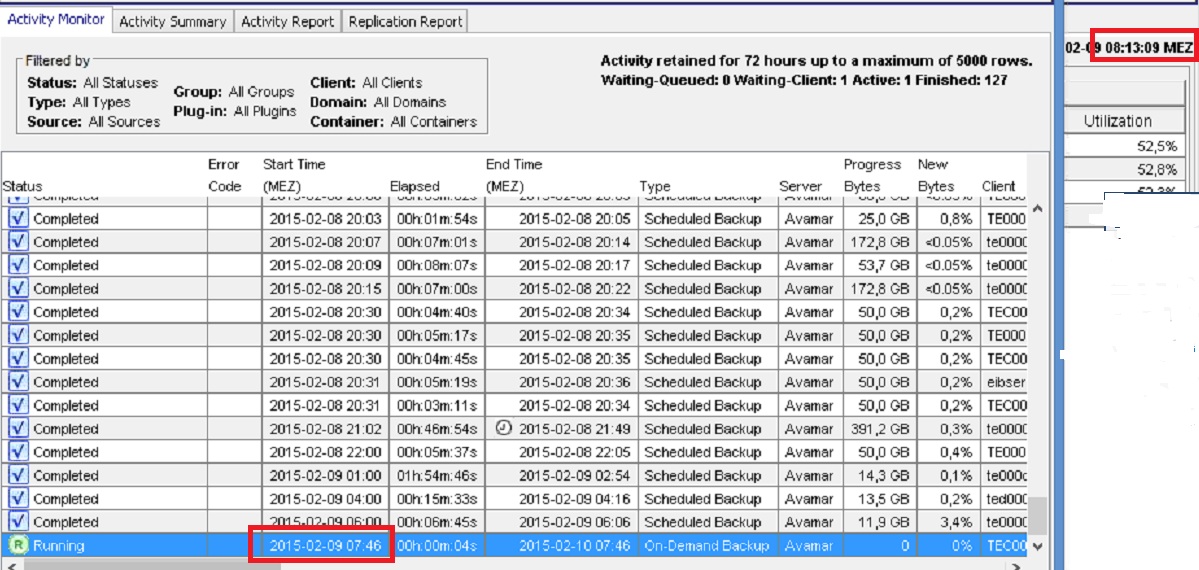
The Server > Session monitor (not shown here) displays the backup starting at 08:13 MEZ. This gives a time discrepancy of almost half an hour.
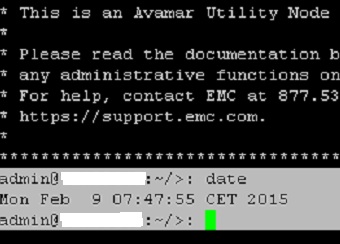
The Avamar server utility node's time is matches with that of the activity in the activity monitor but not the session monitor.
- Activity > Activity monitor (shows backup and restore activities within the last 72 hours by default)
- Server > Session monitor (shows activities occurring at the present moment)
Example:-
In the screenshot below we see a backup which started at 07:46 MEZ (Central European Time).
The upper right-hand corner shows that the current time reported in the Server > Server monitor screen "08:13:09" MEZ.
The Server > Session monitor (not shown here) displays the backup starting at 08:13 MEZ. This gives a time discrepancy of almost half an hour.
The Avamar server utility node's time is matches with that of the activity in the activity monitor but not the session monitor.
Cause
The sources of the times shown in the Avamar Administrator come from different places.
The times for activities shown in the "Activity Monitor" come direct from the Avamar server and use Avamar server time. This is seen by running 'mccli activity show' directly on the utility node.
The source of times seen in the "Server" section of the UI, including "Server Monitor", "Server Management" and "Session Monitor" is the Administrator client machine.
Unless both Avamar Server and the Administrator client are using a reliable and accurate time source, there will be a discrepancy between these times.
The times for activities shown in the "Activity Monitor" come direct from the Avamar server and use Avamar server time. This is seen by running 'mccli activity show' directly on the utility node.
The source of times seen in the "Server" section of the UI, including "Server Monitor", "Server Management" and "Session Monitor" is the Administrator client machine.
Unless both Avamar Server and the Administrator client are using a reliable and accurate time source, there will be a discrepancy between these times.
Resolution
Ensure that both the Avamar Administrator desktop PC and the Avamar server are configured to synchronize with an external time source.
The time source for an Avamar server can be configured as described in the following knowledge article.
The time source for an Avamar server can be configured as described in the following knowledge article.
Affected Products
AvamarProducts
AvamarArticle Properties
Article Number: 000038490
Article Type: Solution
Last Modified: 06 Feb 2025
Version: 6
Find answers to your questions from other Dell users
Support Services
Check if your device is covered by Support Services.