백업 내에서 복원 가능한 디렉토리의 크기가 일치하지 않는 Avamar Administrator 표시
Summary: Avamar Administrator는 백업 내의 복원 가능한 디렉토리에 대해 일관되지 않은 크기를 표시합니다.
This article applies to
This article does not apply to
This article is not tied to any specific product.
Not all product versions are identified in this article.
Symptoms
백업의 복원 가능한 콘텐츠를 탐색하는 동안 Avamar Administrator Backup and Restore 인터페이스에 폴더 내용의 크기가 정확하지 않습니다.
예를 들어 여기에 있는 백업의 논리적 크기는 52.3GB로 표시됩니다.
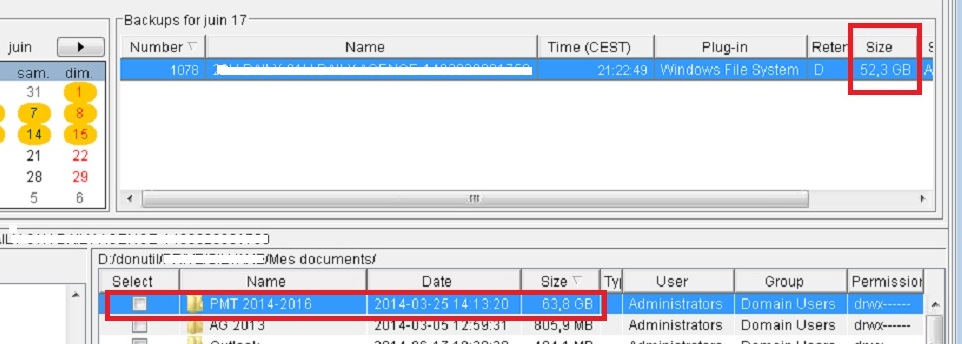
이는 클라이언트 로그 내에서 보고된 백업 크기이기도 합니다.
avtar Info <5156>: 백업 #1078 타임스탬프 2014-06-17 21:22:49, 52,416 파일, 7,220 폴더, 52.31GB(5,262 파일, 1.590GB, 3.04% 신규)
그러나 해당 백업 내 폴더의 크기가 63.8GB로 보고됩니다. 이는 백업 자체보다 큽니까?
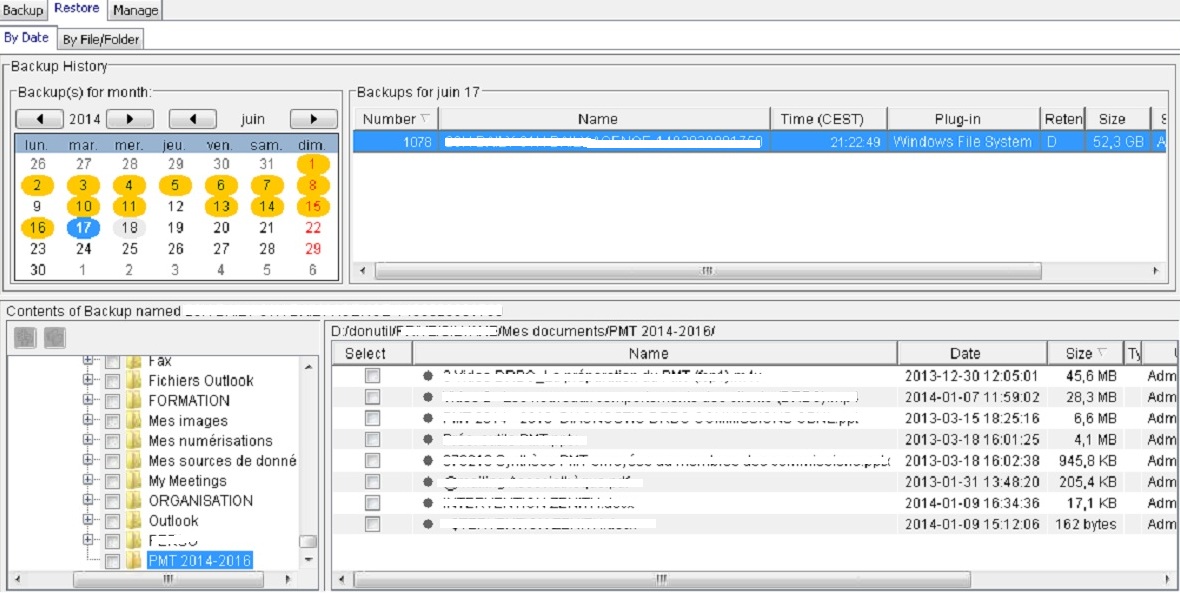
큰 폴더를 검토하면 해당 콘텐츠의 크기가 큰 폴더의 크기까지 추가되지 않는 것을 볼 수 있습니다. 불일치가 있습니다.
예를 들어 여기에 있는 백업의 논리적 크기는 52.3GB로 표시됩니다.
이는 클라이언트 로그 내에서 보고된 백업 크기이기도 합니다.
avtar Info <5156>: 백업 #1078 타임스탬프 2014-06-17 21:22:49, 52,416 파일, 7,220 폴더, 52.31GB(5,262 파일, 1.590GB, 3.04% 신규)
그러나 해당 백업 내 폴더의 크기가 63.8GB로 보고됩니다. 이는 백업 자체보다 큽니까?
큰 폴더를 검토하면 해당 콘텐츠의 크기가 큰 폴더의 크기까지 추가되지 않는 것을 볼 수 있습니다. 불일치가 있습니다.
Cause
백업 로그는 백업이 완료되었지만 일부 파일이 백업되지 않았다는 것을 보고합니다. 대용량 .mpg 하나의 파일이 성공적으로 백업되지 않았습니다.
이러한 오류로 인해 Avamar Administrator가 백업 내의 폴더 크기에 대한 정확한 통계를 생성할 수 없었습니다.
이러한 오류로 인해 Avamar Administrator가 백업 내의 폴더 크기에 대한 정확한 통계를 생성할 수 없었습니다.
avtar Error <5737>: I/O error: Unable to read(3) "D:\donutil\xxxxx\xxxxxxx\Mes documents\PMT 2014-2016\xxxxxxxxxxxxxxxxxxxx.mpg" (code 21: The device is not ready).
avtar Error <5137>: Unable to open "D:\donutil\xxxxx\xxxxxxx\Mes documents\PMT 2014-2016\xxxx.db" for backup (code 3: The system cannot find the path specified).
avtar Error <12516>: Path "D:\donutil\xxxxx\xxxxxxx\Mes documents\PROCEDURES" not found. Verify that path exists on the system
avtar Error <5244>: Unable to open directory "D:\donutil\xxxxx\xxxxxxx\Mes documents\xxxxxxxxxxxxx" (code 3: The system cannot find the path specified).
avtar Info <5314>: Command failed (40 errors, 7 warnings, exit code 10020: completed with errors, client log should be examined)
2014-06-17 21:22:53 avtar Info <5314>: Command failed (40 errors, 7 warnings, exit code 10020: completed with errors, client log should be examined)
Resolution
백업 로그에 있는 오류의 원인을 조사하고 수정합니다.
백업이 성공적으로 완료되면 폴더 크기 통계가 정확해야 합니다.
백업이 성공적으로 완료되면 폴더 크기 통계가 정확해야 합니다.
Additional Information
백업의 논리적 크기는 압축 또는 중복 제거되지 않을 때 사용할 공간입니다. 즉, 백업을 클라이언트에 복원하는 경우 데이터가 클라이언트에서 소비하는 공간의 양입니다.
Affected Products
AvamarProducts
AvamarArticle Properties
Article Number: 000038503
Article Type: Solution
Last Modified: 06 Feb 2025
Version: 5
Find answers to your questions from other Dell users
Support Services
Check if your device is covered by Support Services.