ECS:GeoDrive:Error: 12029 - 無法建立與伺服器的連線
Summary: GeoDrive 錯誤:12029 - 將 ECS 新增至 GeoDrive 用戶端時,「無法建立與伺服器的連線」。
This article applies to
This article does not apply to
This article is not tied to any specific product.
Not all product versions are identified in this article.
Symptoms
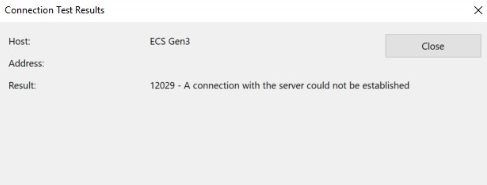
根據使用者指南將 ECS 新增至 GeoDrive Windows 用戶端時,您在新增 IP 後,可能會在連線測試期間看到錯誤訊息:
Error: 12029 - A connection with the server could not be established
Cause
Windows 或 GeoDrive 用戶端無法連線至 ECS。
Resolution
與客戶確認負載平衡器 (LB) 是否正在使用中,或是否已直接連線至 ECS 節點。
使用 telnet 等工具測試從 Windows 用戶端到 ECS 資料 IP 連接埠 9020 (HTTP)/9021 (HTTPS) 的連線。
如果客戶的 Windows 用戶端未啟用 telnet,請要求暫時啟用 (Windows 功能) 或使用相同子網路上的用戶端。
例:
C:\>telnet 10.1.1.1 9021
Connecting To 10.1.1.1...Could not open connection to the host, on port 9021: Connect failed

C:\>
如果無法連線,則應檢查下列步驟:
- 客戶必須確保所需的連接埠並未在客戶環境中的防火牆封鎖。
- 使用了正確的 ECS IP 位址。如果 ECS 端而非管理 IP 啟用了網路分隔,請確認使用資料 IP 位址。
連線至 ECS,確認是否有啟用網路分隔,並檢查資料 IP 位址:
範例:
admin@ecs1:~> getrackinfo -n
Named networks
==============
Node ID      Network           Ip Address     Netmask            Gateway         VLAN               Interface
1            repl              10.1.1.211     255.255.255.0      10.1.1.201      16                 public
1            data              10.1.2.202     255.255.255.0      10.1.2.201      123                public
2            repl              10.1.1.212     255.255.255.0      10.1.1.201      16                 public
2            data              10.1.2.203     255.255.255.0      10.1.2.201      123                public
3            repl              10.1.1.213     255.255.255.0      10.1.1.201      16                 public
3            data              10.1.2.204     255.255.255.0      10.1.2.201      123                public
4            repl              10.1.1.214     255.255.255.0      10.1.1.201      16                 public
4            data              10.1.2.205     255.255.255.0      10.1.2.201      123                public
5            repl              10.1.1.215     255.255.255.0      10.1.1.201      16                 public
5            data              10.1.2.206     255.255.255.0      10.1.2.201      123                public
在上述範例中,IP 10.1.2.202 - 206 是正確的,且必須用於 GeoDrive 用戶端組態。
以下日誌檔最終可以通過搜索此檔中的 Windows 用戶端 IP 位址來幫助進一步進行故障排除。(在上述情況下,由於 datahead 未取得任何連線,因此不會顯示連線嘗試): /opt/emc/caspian/fabric/agent/services/object/main/log/dataheadsvc.log
您也可以使用svc_log在所有節點上搜尋所有 dataheadsvc.logs 以取得 Windows 用戶端 IP 位址:
admin@ecs1:~> svc_log -f '10.x.x.x' -sr dataheadsvc -n all -sn -sf
Additional Information
如果使用者的憑據配置錯誤,則可能會出現相同的錯誤。
1.使用者標識應為對象使用者。
2.秘密訪問金鑰應該是為物件使用者生成的 S3 金鑰。
您可以按照 GeoDrive 的以下步驟編輯使用者 ID 和秘密存取金鑰:
按 “添加 GeoDrive” >> 主機 >> 按要編輯 >> 的主機 編輯
Affected Products
GeoDrive for WindowsProducts
GeoDrive for Windows, ECS Appliance, Elastic Cloud StorageArticle Properties
Article Number: 000045612
Article Type: Solution
Last Modified: 30 May 2025
Version: 5
Find answers to your questions from other Dell users
Support Services
Check if your device is covered by Support Services.