Dell EMC Unity: Unable to Delete a Pool with Capability Profiles (User Correctable)
Summary: Customer was unable to delete a pool. getting an error for capability profile
This article applies to
This article does not apply to
This article is not tied to any specific product.
Not all product versions are identified in this article.
Symptoms
Capability Profile was created for the Pool.
The Customer gets the following error when trying to delete the Pool
Failed: The storage pool has associated Capability Profiles and cannot be deleted. Delete all Capability Profiles, and then try deleting the pool. (Error Code:0x6700174)
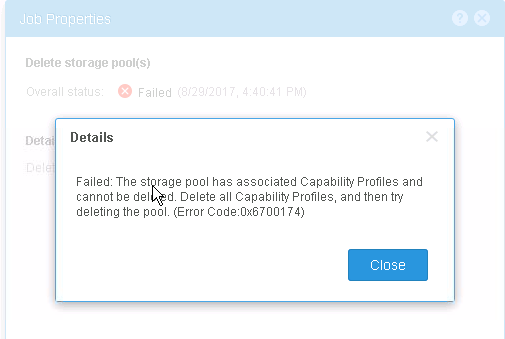
The Customer gets the following error when trying to delete the Pool
Failed: The storage pool has associated Capability Profiles and cannot be deleted. Delete all Capability Profiles, and then try deleting the pool. (Error Code:0x6700174)
Cause
Capability Profile is associated with a Pool
Resolution
You must delete all associated storage resources in order to successfully delete the pool.
Capability Profile is not listed under Storage Resource Properties of the Pool
Delete Capability Profile from
Storage>VMware>Capability Profiles
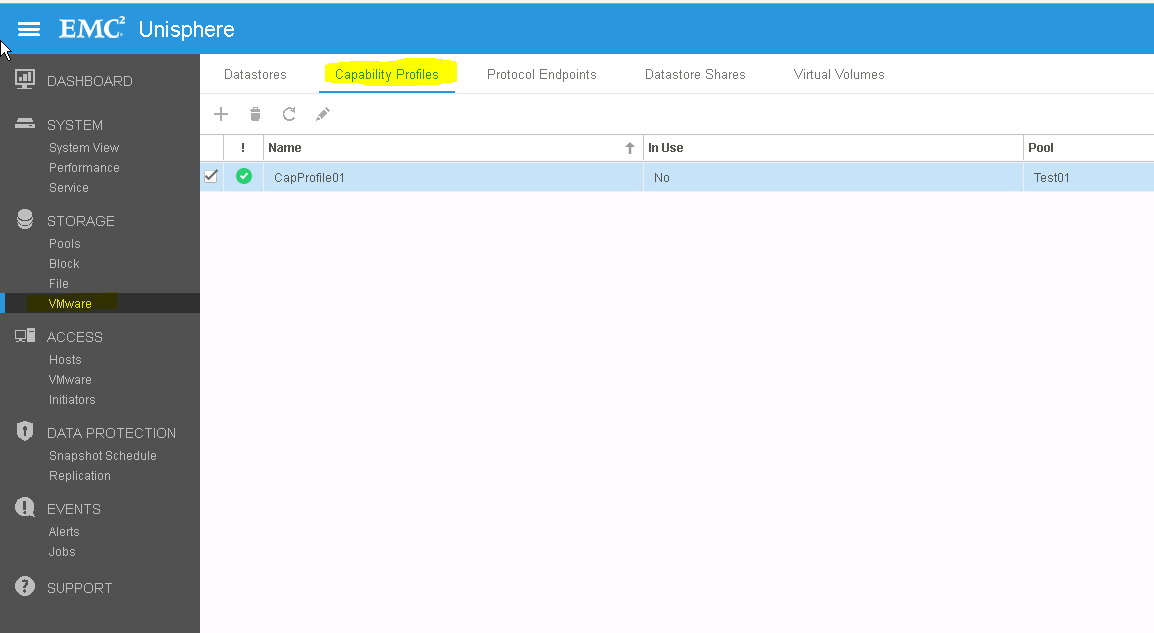
Capability Profile is not listed under Storage Resource Properties of the Pool
Delete Capability Profile from
Storage>VMware>Capability Profiles
Additional Information
Capability profiles
A VVol datastore is associated with one or more capability profiles. A capability profile is a set of storage capabilities for a VVol datastore. These capabilities are derived based on the underlying pools for the VVol datastore. The VVol datastore will show as compatible storage in vCenter or the vSphere Web Client if the associated capability profiles meet VMware storage policy requirements. Capability profiles must be created before you can create a VVol datastore. Capability profiles can be created at the time of pool creation (recommended), or can be added to an existing pool later.
Affected Products
Dell EMC Unity FamilyProducts
Dell EMC Unity FamilyArticle Properties
Article Number: 000050045
Article Type: Solution
Last Modified: 11 Dec 2025
Version: 3
Find answers to your questions from other Dell users
Support Services
Check if your device is covered by Support Services.