Avamar: Een doel-VM-host kan de proxy niet bereiken omdat de Jetty-service niet wordt uitgevoerd
Summary: In dit artikel wordt uitgelegd waarom een Virtual Machine (VM) herstel op bestandsniveau (FLR) mislukt wanneer de doel-VM de proxy niet kan bereiken, en er uiteindelijk een time-out optreedt na langdurige uitvoering. ...
This article applies to
This article does not apply to
This article is not tied to any specific product.
Not all product versions are identified in this article.
Symptoms
Tijdens een FLR voor virtuele machines wordt het volgende vensterbericht weergegeven in de Avamar Administration console:
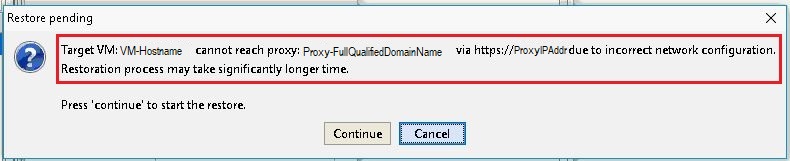
Foutbericht:
Target VM: <VM-hostname> cannot reach proxy: <avamar-proxy-FQDN_or_IP_Address> via https://<proxy-hostname-IP-Address> due to incorrect network configuration.
Restoration may take significantly longer time Press "Continue" to start the restore
Cause
De service die verantwoordelijk is voor het luisteren op poort 443 op de proxy wordt niet uitgevoerd:
root@avamar-proxy:~/>: netstat -plnt |egrep "Proto|443"
Proto Recv-Q Send-Q Local Address Foreign Address State PID/Program name
root@avamar-proxy:~/>: service jetty status
Jetty Info: Jetty Service is not running.
Resolution
Voer de volgende acties uit:
- Start de service voordat u de FLR opnieuw uitvoert:
root@avamar-proxy:~/>: service jetty start
Shutting down vami-lighttpd:done.
Jetty Info: Jetty daemon started.
root@avamar-proxy:~/>: service jetty status
Jetty Info: Jetty Service is running.[13234]
root@avamar-proxy:~/>: netstat -plnt |egrep "Proto|443"
Proto Recv-Q Send-Q Local Address           Foreign Address         State       PID/Program name
tcp        0      0 :::443                  :::*                    LISTEN      13234/java
- Zorg ervoor dat de service is geconfigureerd om automatisch te starten in uitvoeringsniveaus voor meerdere gebruikers:
root@avamar-proxy:~/>: chkconfig --list |grep jetty
jetty 0:off 1:off 2:on 3:on 4:on 5:on 6:off
- Om ervoor te zorgen dat de service automatisch wordt gestart op de opgegeven uitvoeringsniveaus, werkt u de serviceconfiguratie bij met behulp van de onderstaande opdracht:
root@avamar-proxy:~/>: chkconfig --level 2345 jetty on
Als het probleem niet is opgelost met de bovenstaande stappen, voert u deze extra stap uit:
-
Bewerk de
/usr/local/avamarclient/bin/config.xmlbestand op de proxy die wordt gebruikt voor de FLR en wijzig de waarde van de wget-parameter van 0 naar 1:<enablewgetrestore>1</enablewgetrestore>
Affected Products
AvamarArticle Properties
Article Number: 000050308
Article Type: Solution
Last Modified: 17 Apr 2026
Version: 8
Find answers to your questions from other Dell users
Support Services
Check if your device is covered by Support Services.