NVP-vProxy: VM backup or restore operation fails with "Failed to lock Virtual Machine for backup:
Summary: NetWorker VMware Protection (NVP) Virtual Machine (VM) backup or restore operation fails with "Failed to lock Virtual Machine for backup: Another vProxy operation 'File-Level-Recover' is active on VM vm-####." A VM backup or restore operation performed using the NVP vProxy appliance fails with "Failed to lock Virtual Machine" ...
This article applies to
This article does not apply to
This article is not tied to any specific product.
Not all product versions are identified in this article.
Symptoms
The NetWorker VMware Protection integration is configured with the vProxy Appliance. The vProxy backups fail, indicating another vProxy file level restore (FLR) operation is active and it is unable to lock the virtual machine (VM) for backup.
YYYY/MM/DD HH:MM:SS ERROR: [@(#) Build number: 43] Failed to lock Virtual Machine for backup: Another EMC vProxy operation 'File-Level-Recover' is active on VM vm-####
Depending on the operation being performed, for example: backup, FLR, so forth The error may appear slightly different. The consistency is "failed to lock virtual machine" and "another vProxy operation is active on VM."
Cause
The vProxy backup and FLR workflows set VM attributes at the start of the operation to prevent multiple vProxy operations on the same VM. The backup workflow removes the VM attributes at the end of the operation to allow other operations against the VM. A previous vProxy FLR workflow encountered a problem during the execution, and the VM attributes were not removed.
Resolution
The ProxyHC utility can be used to clear any leftover attributes or artifacts which may be left over after a failed or interrupted backup or recovery.
Instructions for downloading and setting up ProxyHC can be found here:
NVP-vProxy: How to use health check tool ProxyHC on vProxy appliance
1. Ensure no backups, or recoveries are running in the vCenter.
2. Setup ProxyHC on the vProxy used for the failed backup/recover
3. Run the following command:
ProxyHC disk tasks cleanup
If this operation cannot be used due to other jobs running or if it does not work. The following procedure can be completed to manually clear annotations on a VM.
The "Dell EMC vProxy FLR Session" attribute must be reset (cleared) manually using the vSphere client. Here is a general overview of the procedure:
- Open the vSphere web Client.
- Locate the affected VM in VMware inventory.
- Perform one of the following options to access the annotations:
a. Right click the VM, select Tags & Custom Attributes then select Edit Custom Attributes:

Figure 1: VM "Edit Custom Attributes" option in vSphere.
b. In the VM Summary tab, select "Edit" the Annotations section.
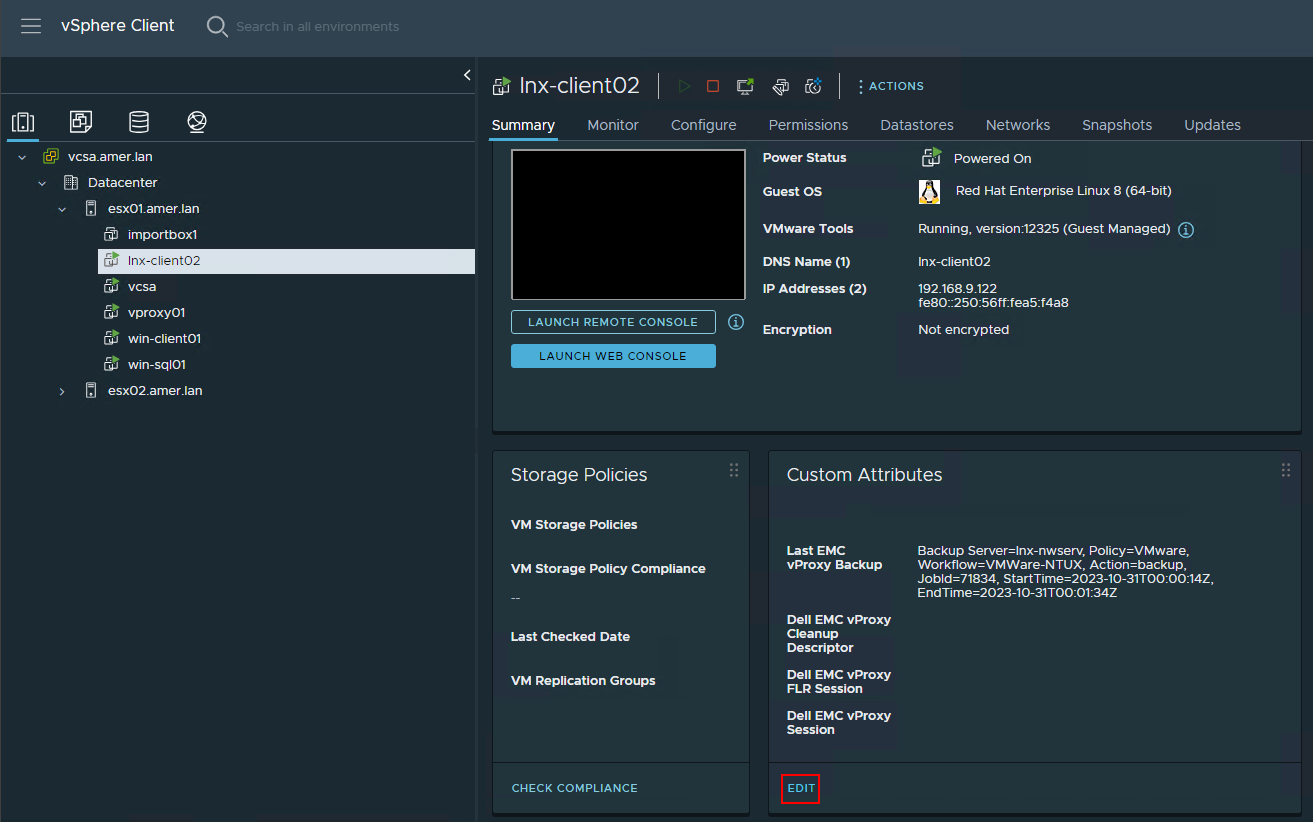
Figure 2: vSphere web client VM custom attributes.
- Select the
Dell EMC vProxy FLR Sessionattribute and then click the X to delete it.
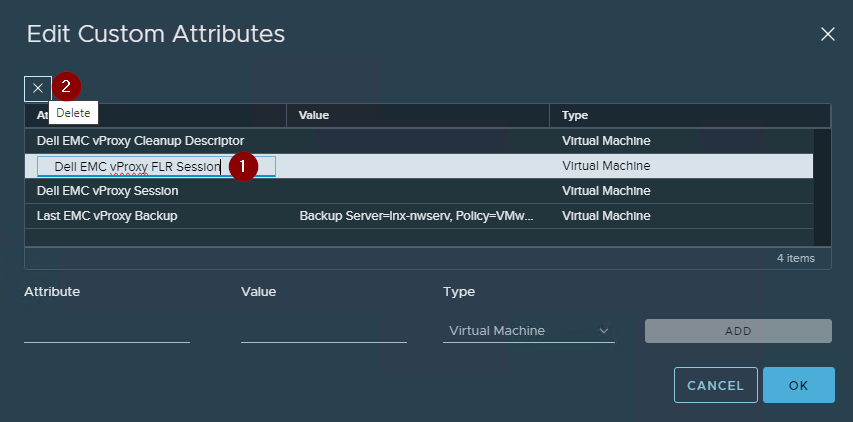
Figure 3: Steps required to delete a VM attribute.
NOTE: Optionally, delete all the "
Dell EMC" attributes. They will be re-created when the next vProxy backup, restore, or cleanup operation is performed.
- Select "OK" in the Edit Annotations window.
Additional Information
Affected Products
NetWorkerProducts
NetWorkerArticle Properties
Article Number: 000050701
Article Type: Solution
Last Modified: 02 Feb 2026
Version: 7
Find answers to your questions from other Dell users
Support Services
Check if your device is covered by Support Services.