Dell EMC Unity:LDAP 组用户登录失败并显示“Logged in user is not authorized to access Unisphere”(已登录的用户无权访问 Unisphere)消息(用户可更正)
Summary: 本文档提供了有关在使用与 LDAP 组关联的用户尝试进行验证时收到的错误的根本原因和解决方案的更多详细信息。
This article applies to
This article does not apply to
This article is not tied to any specific product.
Not all product versions are identified in this article.
Symptoms
配置目录服务设置和用户管理设置后,与 LDAP 组关联的用户将收到一个错误,并显示消息“The Logged in user is not authorized to access Unisphere”(已登录的用户无权访问 Unisphere)。
在验证目录服务设置期间,Dell EMC Unity 系统与 LDAP 服务器之间的连接有效且可正常运行。
如果用户已直接添加到用户管理配置中,则用户将能够成功登录到 Unisphere。
Cause
此问题的根本原因与 Unity 系统和 LDAP 服务器之间的验证过程相关。在验证过程中,LDAP 组名称区分大小写。
#示例:
1.当前在 Active Directory 中设置组“测试组”: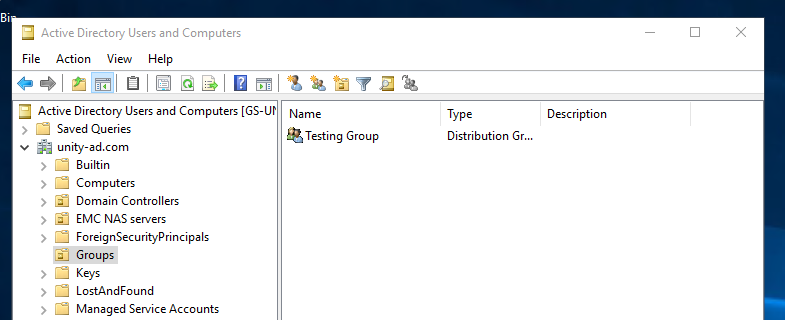
阿拉伯数字。在 Dell EMC Unity 系统上添加组时,执行了语法错误,如以下屏幕截图所示: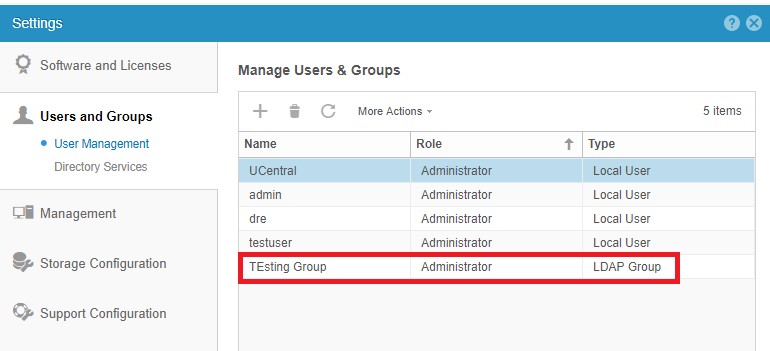
3.当尝试使用属于该组一部分的用户 Gordon Freeman 进行验证时,将收到以下消息: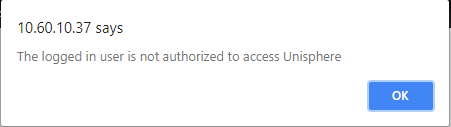
Resolution
在验证过程中,LDAP 组名称信息区分大小写。
要解决此问题,请使用 Active Directory 用户和计算机服务中显示的完全相同的名称再次删除并重新添加 LDAP 组。
在更正组语法后,请尝试使用与该组关联的用户之一再次登录。
如果该情况仍然存在或需要进一步澄清,请联系 Dell EMC 支持部门或您的服务提供商,并引用此知识库文章编号。
Affected Products
Dell Unity 300, Dell EMC Unity 300F, Dell EMC Unity 350F, Dell EMC Unity 400, Dell EMC Unity 400F, Dell EMC Unity 450F, Dell EMC Unity 500F, Dell EMC Unity 550F, Dell EMC Unity 600, Dell EMC Unity 600F, Dell EMC Unity FamilyProducts
Dell EMC Unity 650F, Dell EMC Unity Family |Dell EMC Unity All Flash, Dell EMC Unity Family, Dell EMC Unity HybridArticle Properties
Article Number: 000051932
Article Type: Solution
Last Modified: 16 Sep 2025
Version: 4
Find answers to your questions from other Dell users
Support Services
Check if your device is covered by Support Services.