SR-IOV support with PowerPath on Solaris
Summary: The purpose of this article is to clarify what is supported and what is not supported with SR-IOV for Solaris.
This article applies to
This article does not apply to
This article is not tied to any specific product.
Not all product versions are identified in this article.
Symptoms
SR-IOV Overview
The Peripheral Component Interconnect Express (PCIe) single root I/O virtualization (SR-IOV) implementation is based on version 1.1 of the standard as defined by the PCI-SIG. The SR-IOV standard enables the efficient sharing of PCIe devices among virtual machines and is implemented in the hardware to achieve I/O performance that is comparable to native performance. The SR-IOV specification defines a new standard wherein new devices that are created enable the virtual machine to be directly connected to the I/O device.
A single I/O resource, which is known as a physical function, can be shared by many virtual machines. The shared devices provide dedicated resources and also use shared common resources. In this way, each virtual machine has access to unique resources. Therefore, a PCIe device, such as a Fiber Channel port, that is SR-IOV-enabled with appropriate hardware and OS support can appear as multiple, separate physical devices, each with its own PCIe configuration space.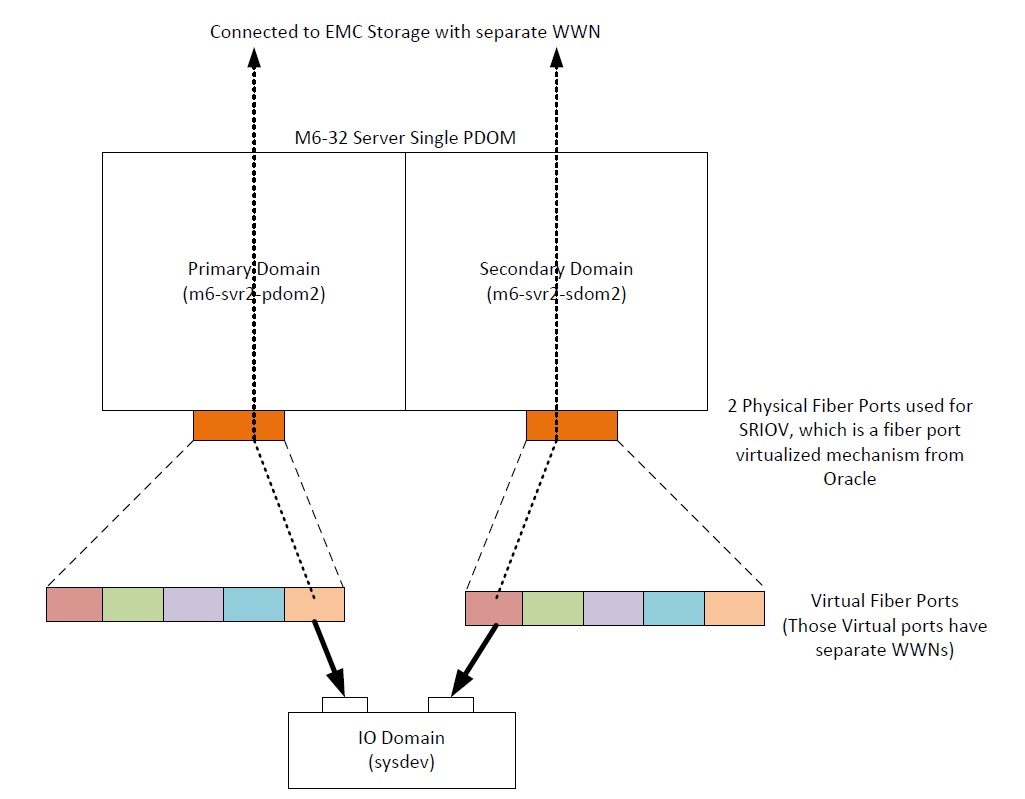
Here above is a typical SR IOV environment that you would find in a DELL EMC environment. The physical HBA are owned by the primary and secondary domains. They are virtualized and presented to "IO domains" under separate WWNs. Each "IO Domain" thinks it accesses the devices through 2 physical HBA ... although they are virtual HBAs.
Cause
The name used here, IO Domain, could let the administrator think that PowerPath is supported in such an environment (our matrix says that PowerPath is supported on IO Domain).
Resolution
1) In such an environment, mpxio can be installed on all the domains (primary, secondary and "IO domain") with the restrictions attached to mpxio (mpxio is not supported with SRDF metro for example)
2) PowerPath is supported on the primary and secondary domains if there are, in reality, multiple HBA within these domains (for redundancy). However, PowerPath is not supported on the so-called "IO Domain" ...because it is a virtual environment, not a real environment. If an attempt is made to install PowerPath on such a domain, it will work at a first glance : IO will be balanced and if the primary domain or the secondary domain is rebooted, the IO will carry on using the remaining path. However, after the completion of the reboot of this primary or secondary domain, the path will not come back "alive" (it will no longer be configured at the OS level), exposing the domain to a risk should the other domain also have an issue.
For this "IO Domain", only mpxio is supported and able to bring back the path (note that VxDmp is having the same issue as PowerPath)
2) PowerPath is supported on the primary and secondary domains if there are, in reality, multiple HBA within these domains (for redundancy). However, PowerPath is not supported on the so-called "IO Domain" ...because it is a virtual environment, not a real environment. If an attempt is made to install PowerPath on such a domain, it will work at a first glance : IO will be balanced and if the primary domain or the secondary domain is rebooted, the IO will carry on using the remaining path. However, after the completion of the reboot of this primary or secondary domain, the path will not come back "alive" (it will no longer be configured at the OS level), exposing the domain to a risk should the other domain also have an issue.
For this "IO Domain", only mpxio is supported and able to bring back the path (note that VxDmp is having the same issue as PowerPath)
Affected Products
PowerPath for SolarisProducts
PowerPath for SolarisArticle Properties
Article Number: 000051973
Article Type: Solution
Last Modified: 17 Oct 2025
Version: 4
Find answers to your questions from other Dell users
Support Services
Check if your device is covered by Support Services.