Unisphere for VMAX: How do I expand an RDF device while in an RDF group on VMAX
Summary: How do I expand an RDF device while in an RDF group on VMAX?
This article applies to
This article does not apply to
This article is not tied to any specific product.
Not all product versions are identified in this article.
Symptoms
How do I expand an RDF device while it is in an RDF group?
Unable to expand an RDF TDEV meta device.
Unable to find volumes to expand an existing RDF TDEV concatenated meta device.
For example, the device is a TDEV concatenated meta:
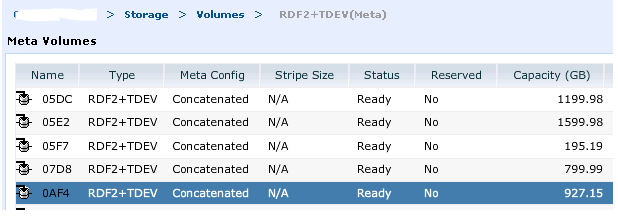
The new TDEV's meta members to expand with, are created and not bound to any pool (should not be bound):

Trying to see these in a list does not show the TDEV devices to add:
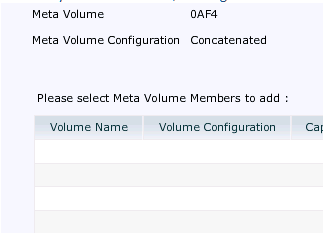
Unable to expand an RDF TDEV meta device.
Unable to find volumes to expand an existing RDF TDEV concatenated meta device.
For example, the device is a TDEV concatenated meta:
The new TDEV's meta members to expand with, are created and not bound to any pool (should not be bound):
Trying to see these in a list does not show the TDEV devices to add:
Cause
SRDF devices cannot be used to form meta devices in one step.
The SRDF devices must first be converted to non-RDF devices. The meta devices must be formed separately on both arrays, and then the meta head on one array can be converted back to an SRDF device.
Also, once the SRDF meta device is established, it cannot be modified in one step.
If any modifications are required, it has to be converted again to a non-SRDF device first.
The SRDF devices must first be converted to non-RDF devices. The meta devices must be formed separately on both arrays, and then the meta head on one array can be converted back to an SRDF device.
Also, once the SRDF meta device is established, it cannot be modified in one step.
If any modifications are required, it has to be converted again to a non-SRDF device first.
Resolution
To resolve this issue:
Note: With the VMAX3 storage array running HYPERMAX OS 5977, there is no such thing as meta. The device can be expanded by selecting the volume, clicking ">>" to expand.
- Take the device out of the RDF and remove the RDF flag by issuing a deletepair operation:
symrdf -sid xx -rdfg x -file <dynpairsfile> deletepair
- Add the new TDEVs as meta, to the concatenated meta head using Unisphere for VMAX or the SYMCLI:
symconfigure -sid xxx -f <command file> commit
Where command file = add dev xxx:xxx to meta xxx;
- Create the pair again with new sizes and establish.
Note: With the VMAX3 storage array running HYPERMAX OS 5977, there is no such thing as meta. The device can be expanded by selecting the volume, clicking ">>" to expand.
Affected Products
Unisphere for VMAXProducts
Solutions Enabler, Unisphere for VMAXArticle Properties
Article Number: 000052048
Article Type: Solution
Last Modified: 19 Dec 2025
Version: 4
Find answers to your questions from other Dell users
Support Services
Check if your device is covered by Support Services.