Dell EMC Unity: Can't access shares on NAS Server with AD LDAP multiprotocol configured (User Correctable)
Summary: Customer informed that he can't access shares either from Linux or Windows hosts on his NAS server with AD LDAP multiprotocol
This article applies to
This article does not apply to
This article is not tied to any specific product.
Not all product versions are identified in this article.
Symptoms
Issue was solved and was able to access shares when the option "Use configured SMB domain" is selected during the steps of creating the NAS server.
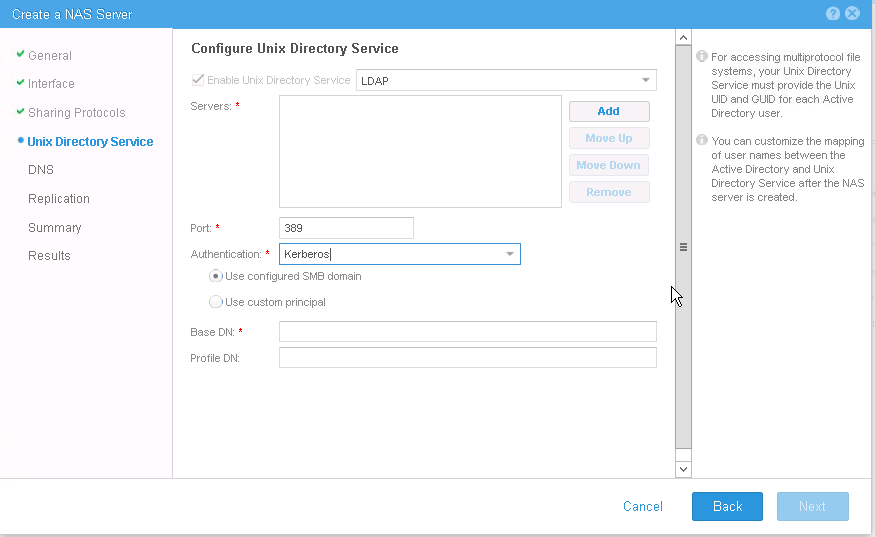
Unable to access shares on NAS Server with AD LDAP multiprotocol configured
Unable to access shares on NAS Server with AD LDAP multiprotocol configured
Cause
The used account in binding AD LDAP configuration is not the correct account
Resolution
Issue was solved and was able to access shares when the option "Use configured SMB domain" is selected during the steps of creating the NAS server.
However, the other method that was used is "Configure Kerberos with a custom realm".
This method of configuring Kerberos uses a Windows KDC and the Windows realm associated with the SMB domain configured on the NAS server to authenticate users and build credentials.
Configuring Kerberos lets you configure any kind of KDC (MIT/Heidmal or AD).
Use this method when you do not have an SMB server domain configured on the NAS server or if you want to use a different Kerberos realm than the one configured for the SMB server
However, the other method that was used is "Configure Kerberos with a custom realm".
This method of configuring Kerberos uses a Windows KDC and the Windows realm associated with the SMB domain configured on the NAS server to authenticate users and build credentials.
Configuring Kerberos lets you configure any kind of KDC (MIT/Heidmal or AD).
Use this method when you do not have an SMB server domain configured on the NAS server or if you want to use a different Kerberos realm than the one configured for the SMB server
Affected Products
Dell EMC Unity FamilyProducts
Dell EMC Unity FamilyArticle Properties
Article Number: 000052570
Article Type: Solution
Last Modified: 23 Oct 2025
Version: 4
Find answers to your questions from other Dell users
Support Services
Check if your device is covered by Support Services.