Dell Unity:無法刪除系統快照 (Dell 可修正)
Summary: 錯誤代碼:刪除系統快照時0x716d80b0
This article applies to
This article does not apply to
This article is not tied to any specific product.
Not all product versions are identified in this article.
Symptoms
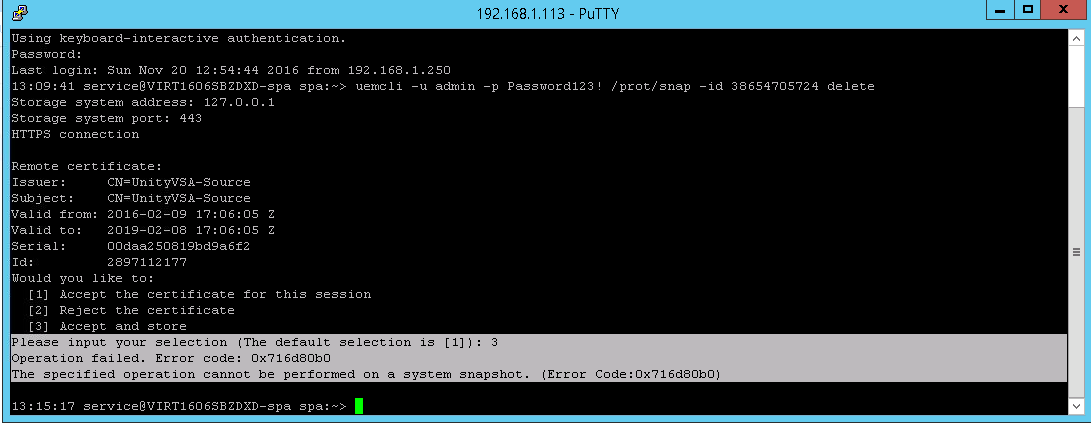
從目的地端刪除複製工作階段後,嘗試從來源刪除快照時發生錯誤。
CLI
service@(none) spb:~> uemcli -u admin -p Password /prot/snap -id delete
Operation failed. Error code: 0x716d80b0
The specified operation cannot be performed on a system snapshot. (Error Code:0x716d80b0)
Unisphere
刪除按鈕已停用,並顯示以下錯誤訊息「
Cannot delete system snapshot":

Cause
系統快照會用於內部用途,例如複寫。理想情況下,刪除複寫應會自動刪除系統快照。
Resolution
Affected Products
Dell EMC Unity FamilyProducts
Dell Unity 300, Dell EMC Unity 300F, Dell EMC Unity 400, Dell EMC Unity 400F, Dell EMC Unity 500, Dell EMC Unity 500F, Dell EMC Unity 600, Dell EMC Unity 600F, Dell EMC Unity Family |Dell EMC Unity All Flash, Dell EMC Unity Family
, Dell EMC Unity Hybrid
...
Article Properties
Article Number: 000052824
Article Type: Solution
Last Modified: 11 Apr 2025
Version: 4
Find answers to your questions from other Dell users
Support Services
Check if your device is covered by Support Services.