vProxy: VMware policy shows failed when all VM's completed successfully
This article applies to
This article does not apply to
This article is not tied to any specific product.
Not all product versions are identified in this article.
Symptoms
The virtual machine that was protected by the VMware Protection Policy has been deleted or removed from the vCenter inventory.
The NetWorker VMware Protection integration is configured with the vProxy Appliance. The NetWorker Management Console (NMC) Monitoring tab shows a VMware Policy backup workflow in a failed status with no virtual machines showing as failed.
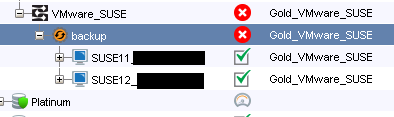
The Backup details "Action Message" section shows a failed backup in the Final Summary section, but the Backup details "Failed" section does not show a virtual machine.
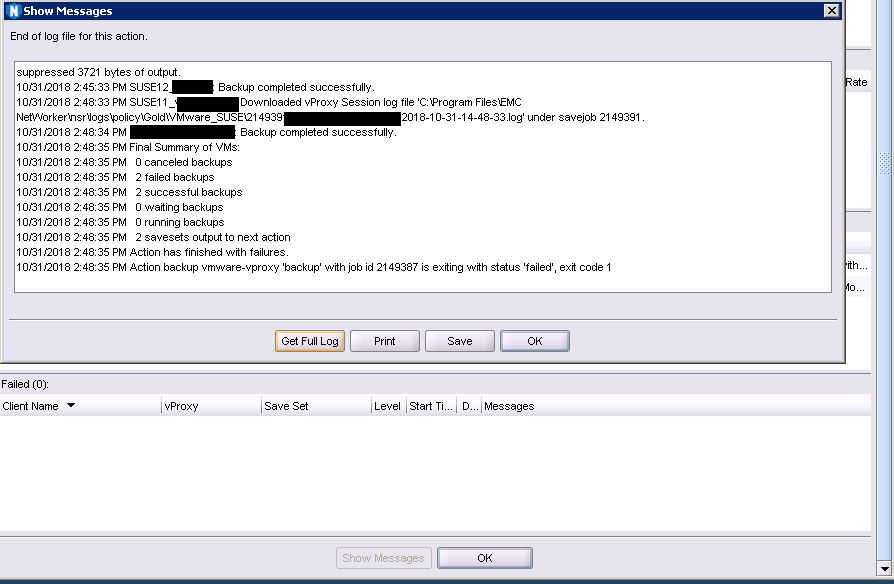
The show action logs and the workflow log provides details indicating it was unable to find a selected virtual machine.
The NetWorker VMware Protection integration is configured with the vProxy Appliance. The NetWorker Management Console (NMC) Monitoring tab shows a VMware Policy backup workflow in a failed status with no virtual machines showing as failed.
The show action logs and the workflow log provides details indicating it was unable to find a selected virtual machine.
MM/DD/YYYY HH:MM:SS Action backup vmware-vproxy 'backup' has initialized as 'vproxysave job' with job id 2149388
...
MM/DD/YYYY HH:MM:SS Unable to find selected VM work item with UUID "xxxxxxxx-xxxx-xxxx-xxxx-xxxxxxxxxxxx" in vCenter, the work item will be skipped.
MM/DD/YYYY HH:MM:SS Unable to find selected VM work item with UUID "xxxxxxxx-xxxx-xxxx-xxxx-xxxxxxxxxxxx" in vCenter, the work item will be skipped.
...
MM/DD/YYYY HH:MM:SS Final Summary of VMs:
MM/DD/YYYY HH:MM:SS 0 canceled backups
MM/DD/YYYY HH:MM:SS 2 failed backups
MM/DD/YYYY HH:MM:SS 2 successful backups
MM/DD/YYYY HH:MM:SS 0 waiting backups
MM/DD/YYYY HH:MM:SS 0 running backups
MM/DD/YYYY HH:MM:SS 2 savesets output to next action
MM/DD/YYYY HH:MM:SS Action has finished with failures.
...
MM/DD/YYYY HH:MM:SS Unable to find selected VM work item with UUID "xxxxxxxx-xxxx-xxxx-xxxx-xxxxxxxxxxxx" in vCenter, the work item will be skipped.
MM/DD/YYYY HH:MM:SS Unable to find selected VM work item with UUID "xxxxxxxx-xxxx-xxxx-xxxx-xxxxxxxxxxxx" in vCenter, the work item will be skipped.
...
MM/DD/YYYY HH:MM:SS Final Summary of VMs:
MM/DD/YYYY HH:MM:SS 0 canceled backups
MM/DD/YYYY HH:MM:SS 2 failed backups
MM/DD/YYYY HH:MM:SS 2 successful backups
MM/DD/YYYY HH:MM:SS 0 waiting backups
MM/DD/YYYY HH:MM:SS 0 running backups
MM/DD/YYYY HH:MM:SS 2 savesets output to next action
MM/DD/YYYY HH:MM:SS Action has finished with failures.
MM/DD/YYYY HH:MM:SS Action backup vmware-vproxy 'backup' with job id 2149388 is exiting with status 'failed', exit code 1
Cause
The virtual machine that was protected by the VMware Protection Policy has been deleted from the vCenter inventory. The NetWorker nsrdb database stores the virtual machine by UUID and performs a lookup of the virtual machine at the start of the backup workflow.
Resolution
The behavior is by design in the event the virtual machine is removed from the vCenter inventory and later re-added to the vCenter inventory. If the virtual machine was removed from the inventory, it will continue to be part of the VMware Protection Group once it has been re-added to the vCenter inventory.
If the virtual machine was deleted from the vCenter environment prior to removing it from the VMware Protection Group, the nsrpolicy command line utility may be used to remove it from the vCenter inventory.
nsrpolicy group update vmware -g [GROUP_NAME] -O "[UUID]"
Example output:
If the virtual machine was deleted from the vCenter environment prior to removing it from the VMware Protection Group, the nsrpolicy command line utility may be used to remove it from the vCenter inventory.
nsrpolicy group update vmware -g [GROUP_NAME] -O "[UUID]"
Example output:
C:\>nsrpolicy group update vmware -g Gold-Vmware -O "503de6ca-b3e5-xxxx-xxxx-xxxxxxxxxxxx"
133584:nsrpolicy: Group 'Gold-Vmware' was successfully updated
Article Properties
Article Number: 000052939
Article Type: Solution
Last Modified: 17 Apr 2026
Version: 3
Find answers to your questions from other Dell users
Support Services
Check if your device is covered by Support Services.