Dell Unity: ESRS (centralized configuration) status is showing missing from UI
Summary: ESRS (centralized configuration) status is showing missing from the UI.
This article applies to
This article does not apply to
This article is not tied to any specific product.
Not all product versions are identified in this article.
Symptoms
ESRS status is missing from Unity UI.
ESRS device status is missing from ESRS Page.
Cause
The user made network changes that affected the connection between one or more devices and the gateway.
There is a hardware/software issue affecting the device which has caused the connectivity problem.
Ports (80,443,8443,9443) are blocked.
Resolution
Follow the steps below to troubleshoot the ESRS missing issue:
- Verify the ESRS device and gateway status from ESRS Page.(esrs3.emc.com)
- Set the device Offline/Online from the ESRS page.
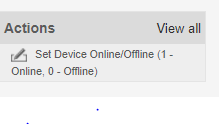
- Restart the connectivity of the ESRS gateway and monitor the status of the device.

- Reboot the ESRS gateway and wait for time. Monitor the status during this time.
- If the status is still missing, remove and readd the device back to the ESRS gateway.
- After a period of time, configure the ESRS from the UI and, if the status changes to "validating," then it will come online within 16 minutes.
If the above procedure does not work, try to perform cleanup and configure the ESRS again.
Affected Products
Dell EMC Unity FamilyProducts
Secure Remote Services, EMC Secure Remote Services Gateway Configuration, Dell EMC Unity FamilyArticle Properties
Article Number: 000053000
Article Type: Solution
Last Modified: 16 Dec 2025
Version: 5
Find answers to your questions from other Dell users
Support Services
Check if your device is covered by Support Services.