DELL EMC Unity: VMFS Datastores support on Unity. Unable to create VMFS 6 datastore (Dell EMC Correctable)
This article applies to
This article does not apply to
This article is not tied to any specific product.
Not all product versions are identified in this article.
Symptoms
Unable to create a VMFS 6 datastore directly from the DELL EMC Unity Storage array.
Cause
VMFS Datastores version 6 are supported starting in Unity OE 4.3
Resolution
Fix:
VMFS Datastores version 6 are supported in Unity OE 4.3, however, this is currently only possible over CLI. Creating a VMFS datastore from Unisphere defaults to VMFS 5.
Please refer to the UEMCLI guide or "uemcli -no /stor/prov/vmware/vmfs -help" for guidance.
Workaround:
The user can create a LUN from Storage -> Block -> LUNs, present it to ESXi host and format it as VMFS 6 from ESXi host.
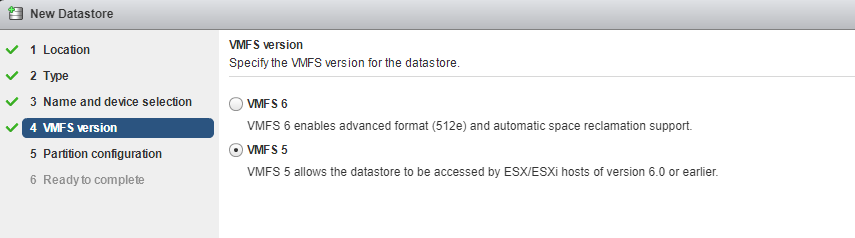
The selection box defaults to VMFS 5 in vSphere also, but it can be changed to VMFS 6 here:
VMFS Datastores version 6 are supported in Unity OE 4.3, however, this is currently only possible over CLI. Creating a VMFS datastore from Unisphere defaults to VMFS 5.
Please refer to the UEMCLI guide or "uemcli -no /stor/prov/vmware/vmfs -help" for guidance.
Workaround:
The user can create a LUN from Storage -> Block -> LUNs, present it to ESXi host and format it as VMFS 6 from ESXi host.
The selection box defaults to VMFS 5 in vSphere also, but it can be changed to VMFS 6 here:
Affected Products
Dell EMC Unity FamilyProducts
Dell Unity 300, Dell EMC Unity 300F, Dell EMC Unity 400, Dell EMC Unity 400F, Dell EMC Unity 500, Dell EMC Unity 500F, Dell EMC Unity 600, Dell EMC Unity 600FArticle Properties
Article Number: 000053034
Article Type: Solution
Last Modified: 12 Dec 2025
Version: 3
Find answers to your questions from other Dell users
Support Services
Check if your device is covered by Support Services.