Dell EMC Unity: OE 升级失败,并显示错误代码:0x6000cb9 /cores/service 中是否有“.bin”文件(用户可纠正)
Summary: Unity OE 升级失败,并显示错误代码:0x6000cb9 /cores/service 中是否有“.bin”文件(用户可纠正)
This article applies to
This article does not apply to
This article is not tied to any specific product.
Not all product versions are identified in this article.
Symptoms
如果 /cores/service/
GUI 中有“.bin”文件,则 Unity OE 升级失败,可能会显示类似以下内容的内容:
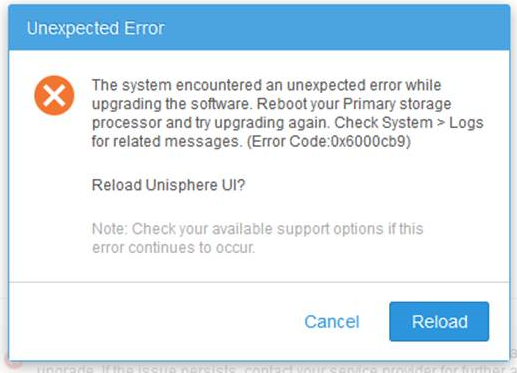
CLI 可能会显示类似于以下内容的内容:
操作失败。Error code:
0x6000cb9 系统在升级软件时遇到意外错误。重新启动主存储处理器,然后再次尝试升级。检查系统 > 日志中的相关消息。(错误代码:0x6000cb9)
0x6000cb9 系统在升级软件时遇到意外错误。重新启动主存储处理器,然后再次尝试升级。检查系统 > 日志中的相关消息。(错误代码:0x6000cb9)
Cause
此问题通常由位于 /cores/service/ 中的“esrs_checker.64.bin”文件(或其他一些.bin文件)引起
Resolution
从 /cores/service/ 中删除 “esrs_checker.64.bin” 文件,然后重新上传升级映像。
执行此作后,升级应该可以正常工作。
如果需要进一步的帮助,请联系 Dell EMC 技术支持或您的授权服务代表,并引用此知识库文章 ID。
此问题已在 Dell EMC Unity OE 版本 4.2.1.9535982 及更高版本中得到解决。
执行此作后,升级应该可以正常工作。
如果需要进一步的帮助,请联系 Dell EMC 技术支持或您的授权服务代表,并引用此知识库文章 ID。
此问题已在 Dell EMC Unity OE 版本 4.2.1.9535982 及更高版本中得到解决。
Article Properties
Article Number: 000054844
Article Type: Solution
Last Modified: 25 Apr 2025
Version: 4
Find answers to your questions from other Dell users
Support Services
Check if your device is covered by Support Services.