Dell Unity: Error: RPA X is Down or ERROR: In Cluster 0x42c525d9ccd582, SP cannot see RPA2
Summary: Error: RPA X is Down or ERROR: In Cluster 0x42c525d9ccd582, SP cannot see RPA2.
This article applies to
This article does not apply to
This article is not tied to any specific product.
Not all product versions are identified in this article.
Symptoms
- No errors were reported on the Dell Unity UI (Unisphere). All connections are logged in and registered.
- Example of errors from the RecoverPoint UI (Unisphere):
ERROR: APM0000000000-A's connection to RPA 2 is DownERROR: APM0000000000-B's connection to RPA 2 is Down
ERROR: In Cluster 0x42c525d9ccd582, SP cannot see RPA2. Verify that SP can see all RPAs at the relevant cluster. ; Site_Name ; APM0000000000-AERROR: In Cluster 0x42c525d9ccd582, SP cannot see RPA2. Verify that SP can see all RPAs at the relevant cluster. ; Site_Name ; APM0000000000-B
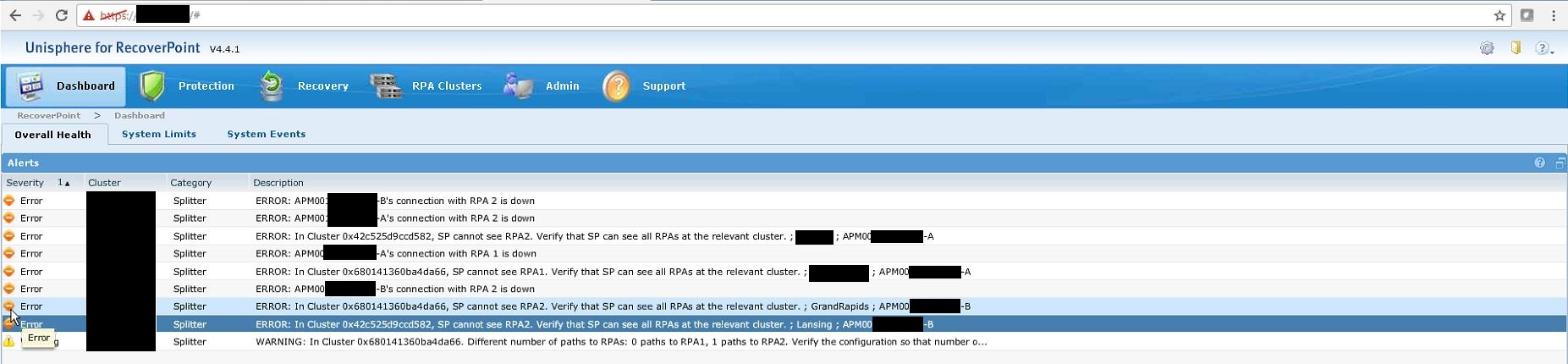
- The Dell Unity EMCSystemLog (also known as splogs) shows the following alerts:
"12b000f [INFO] System: SANCopy Disk Driver: Search failed : could not find or access FC Port xxxxxxxLUN xx : status = 7E11F013"Error code 0x7e11f013 is EMCPAL_STATUS_NO_SUCH_DEVICE
Cause
RecoverPoint was configured to use the Native Synchronous Ports on the Dell Unity array. This is not a valid configuration when using RecoverPoint Appliance (RPA) with a Dell Unity array.
Resolution
Synchronous Replication Interfaces
Native synchronous block replication is performed over the first Fibre Channel (FC) port configured on the array. When configured as Fibre Channel, the lowest numbered port is used for synchronous replication interface.
With Unisphere CLI, you can locate the synchronous block replication port by running the '/remote/sys show -detail' command. This command returns information for the local system, along with all the systems that have replication connections configured. A sample output of this command with only the relevant information displayed is shown below.
17:32:54 service@UnityXT spa:~/user# uemcli /remote/sys show -detailStorage system address: 127.0.0.1Storage system port: 443HTTPS connection
1: ID = RS_0 Name = UnityXT Address = 10.245.18.6 Alternate Management Address = Model = Unity 480 (Local System) Serial number = FNM00190200427 Connection type = async Source interfaces = N/A Local interfaces = N/A Remote interfaces = N/A Operational status = OK (0x2) Health state = OK (5) Health details = "Communication with the replication host is established. No action is required." Synchronous FC ports = spa_iom_0_fc0, spb_iom_0_fc0 Bandwidth schedules = uses available bandwidth Current bandwidth = uses available bandwidth
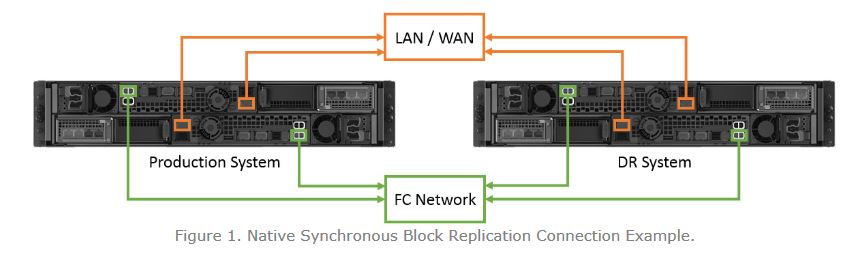
RecoverPoint with Dell Unity
When configuring RecoverPoint, LUNs and VMware vStorage VMFS datastores already replicated with Dell Unity native replication software are not supported. Also, RecoverPoint should not be configured to use the Dell Unity Synchronous Replication Port on either storage processor (SP).
When RecoverPoint is configured connecting to the Synchronous ports the Unity array, it shows that the connections appear to be connected and logged in, but RecoverPoint shows the Ports in a Down State.
ERROR: APM0000000000-A's connection to RPA 2 is DownERROR: APM0000000000-B's connection to RPA 2 is DownERROR: In Cluster 0x42c525d9ccd582, SP cannot see RPA2. Verify that SP can see all RPAs at the relevant cluster. ; Site_Name ; APM0000000000-AERROR: In Cluster 0x42c525d9ccd582, SP cannot see RPA2. Verify that SP can see all RPAs at the relevant cluster. ; Site_Name ; APM0000000000-B
To correct this, the ports must be moved to FC ports that are not set to Native Replication on the Unity array. The zoning must also be updated on the customer's Fibre Channel Network.
Affected Products
Dell EMC Unity Family |Dell EMC Unity All FlashProducts
RecoverPoint Gen5 Server, RecoverPoint Gen6 Server, Dell EMC Unity Family |Dell EMC Unity All Flash, Dell EMC Unity HybridArticle Properties
Article Number: 000054938
Article Type: Solution
Last Modified: 14 May 2025
Version: 4
Find answers to your questions from other Dell users
Support Services
Check if your device is covered by Support Services.