Dell Unity: Large or Incrementing Snapshot Queue Causing Performance Issues
Summary: A large or continuously growing snapshot queue can result in elevated Storage Processor (SP) CPU utilization and system performance degradation. As snapshot operations accumulate and remain unprocessed, host I/O may experience increased latency and reduced throughput. ...
This article applies to
This article does not apply to
This article is not tied to any specific product.
Not all product versions are identified in this article.
Symptoms
- The value for Recover Point Objective (RPO) was reduced to something that is considered more aggressive (that is 10 minutes). "
- "Recovery Point Objective (RPO) is an industry accepted term that indicates the acceptable amount of data, which is measured in units of time, that may be lost in a failure. When you set up an asynchronous replication session, you can configure automatic synchronization based on the RPO. You can specify an RPO from a minimum of 5 minutes up to a maximum of 1440 minutes (24 hours). The default RPO is set at 60 minutes (1 hour) interval. For synchronous replication, RPO is fixed at 0."
- There are many snapshots in a "destroying" state for a LUN.
- The number of Snapshots in a "destroying" state is incrementing over time.
- High SP CPU without a correlating IOPS/Bandwidth workload.
- LUNs and Backend Drives have queuing and elevated response times.
The information can be viewed in Unisphere under the Block section. Add the Snapshots column to display the snapshot count for each LUN. A large number of snapshots associated with one or more LUNs may indicate one of several underlying conditions.
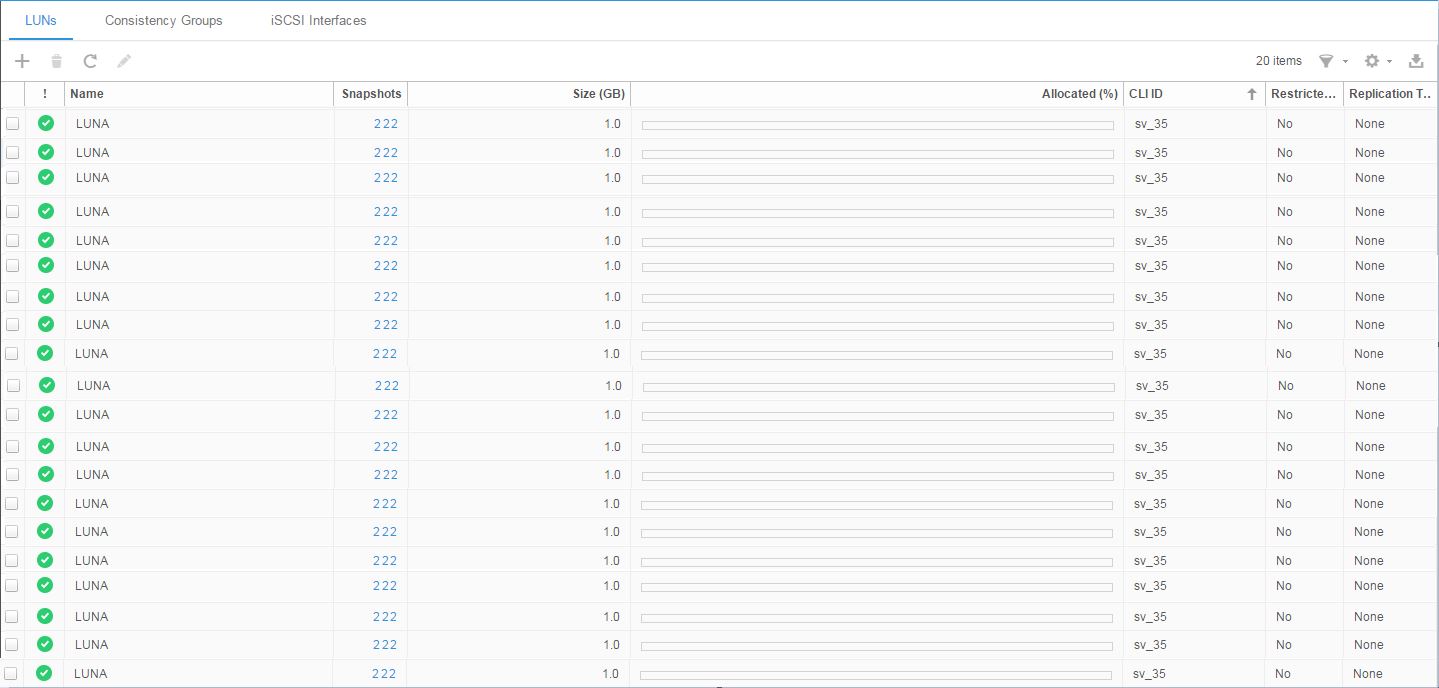
Figure 1: Unisphere Snapshot Count
To confirm the condition, navigate to the affected LUN and select the Snapshots tab. Verify that the State field displays Destroying and the Taken By field displays Replication.
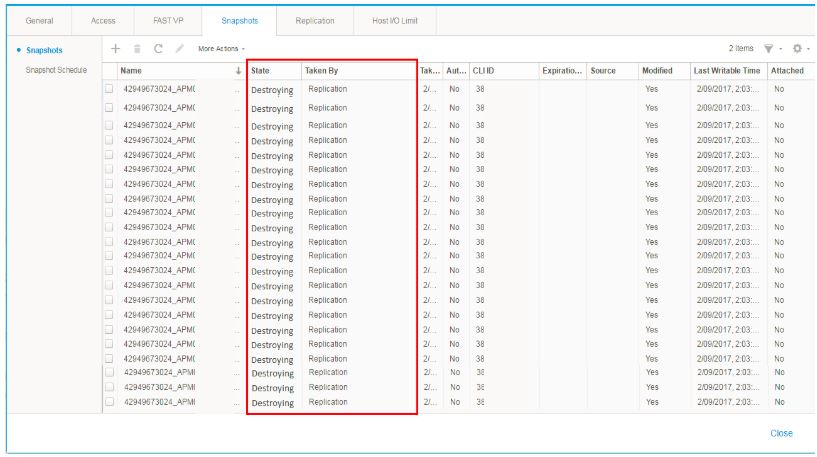
Figure 2: Unisphere Snapshot Destroying State
Cause
Snapshot queue growth can have multiple causes. One of the most common causes is an excessively aggressive Recovery Point Objective (RPO), which generates snapshot operations faster than the system can process them, resulting in a growing backlog of queued snapshot tasks.
Native Asynchronous Block Replication:
Native Asynchronous Block Replication uses snapshots to identify and transfer changed data between replication cycles. Throughout the life of a replication session, these snapshots are periodically refreshed, which involves deleting the existing snapshot and creating a new one in the background.
Each snapshot creation and deletion operation consumes SP CPU resources and generates additional backend I/O. When the configured Recovery Point Objective (RPO) is too aggressive, snapshot refresh operations can occur faster than the system can fully process and delete existing snapshots. As a result, snapshots accumulate in a Destroying state, causing the snapshot queue to grow over time. This increasing backlog can contribute to elevated SP CPU utilization and overall performance degradation.
Resolution
Dell Unity: Best Practices Guide
For the LUN that have the most snapshots in a destroying state, set the Recovery Point Objective (RPO) to at least the default (60 minutes) until the deleting of snapshots can catch up. You may want to leave the value at this new RPO depending on how many snapshots were being queued up and judge accordingly.
"Dell Technologies recommends including a Flash tier in a hybrid pool where snapshots are active.
Snapshots increase the overall CPU load on the system and increase the overall drive IOPS in the storage pool. Snapshots also use pool capacity to store the older data being tracked by the snapshot, which increases the amount of capacity used in the pool, until the snapshot is deleted. Consider the overhead of snapshots when planning both performance and capacity requirements for the storage pool.
Before enabling snapshots on a storage object, it is recommended to monitor the system and ensure that existing resources can meet the additional workload requirements (see the Hardware Capability Guidelines section, Table 2). Enable snapshots on a few storage objects at a time, and then monitor the system to be sure that it is still within recommended operating ranges, before enabling more snapshots.
It is recommended to stagger snapshot operations (creation, deletion, so forth). This can be accomplished by using different snapshot schedules for different sets of storage objects. It is also recommended to schedule snapshot operations after any FAST VP relocations have been completed.
Snapshots are deleted by the system asynchronously; when a snapshot is in the process of being deleted, it is marked "Destroying". If the system is accumulating "Destroying" snapshots over time, it may be an indication that existing snapshot schedules are too aggressive; taking snapshots less frequently may provide more predictable levels of performance.
Dell Unity will throttle snapshot delete operations to reduce the impact to host I/O. Snapshot deletes will occur more quickly during periods of low system utilization."
Additional Information
- When a replication session is created on a storage resource, two internal Unity Snapshots are created on the source and destination storage resources.
- Once the initial synchronization is complete the Destination Snapshot-1 is refreshed and now represents the point-in-time in which the synchronization started.
- Over time the host application writes new data to the source storage resource.
- Once the RPO value is reached (or manually) snapshot-2 on the source is refreshed to reflect the current point-in-time view. All changes since the last update of the destination is copied to the destination.
- After the incremental copy is complete, Snapshot-2 on the destination is refreshed to reflect the current information located in the destination. Snapshot-2 on the source and destination contains the latest information and are the latest common base image for the replication session.
As described above, there can be a bit of snapshot "refreshes" happening depending on the Recovery Point Objective (RPO) value that is set with Asynchronous Replication during any given time period. We can assume that there are two snapshots that have to be deleted for a single transfer session.
Affected Products
Dell EMC Unity FamilyArticle Properties
Article Number: 000055095
Article Type: Solution
Last Modified: 07 Jul 2026
Version: 8
Find answers to your questions from other Dell users
Support Services
Check if your device is covered by Support Services.