DPA:生成警报时,DPA 无法执行 python 脚本。
This article applies to
This article does not apply to
This article is not tied to any specific product.
Not all product versions are identified in this article.
Symptoms
当 DPA 中的事件驱动警报指向在生成警报时运行 python 脚本时,它无法执行脚本,并在服务器日志中观察到以下错误消息:
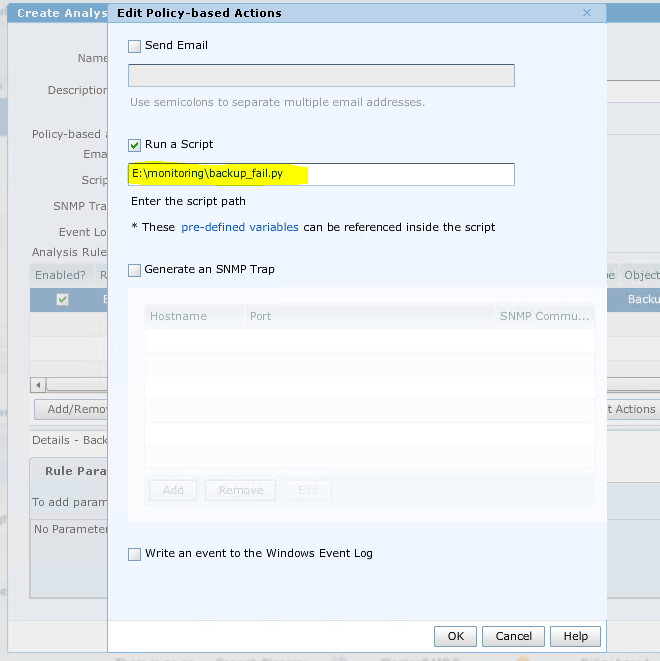
2016-12-31 08:03:24,534 ERROR [com.emc.apollo.command.util.ExecCommandsBean] (EJB default - 195) Error running command.错误消息为无法运行程序 “E:\monitoring\backup_fail.py”:CreateProcess 错误 = 193,%1 不是有效的 Win32 应用程序
下面是 DPA GUI 中的分析策略配置:
Cause
DPA 按设计正常工作。DPA 无法执行 python 脚本或除 Windows Batch 脚本以外的任何其他脚本。
Resolution
DPA 仅支持 Windows 脚本,如批处理脚本。
此方案中的解决方法是创建一个批处理脚本,该脚本将调用 python 进程来运行 python 脚本。然后在 DPA GUI 上基于策略的编辑作中使用批处理文件。
此方案中的解决方法是创建一个批处理脚本,该脚本将调用 python 进程来运行 python 脚本。然后在 DPA GUI 上基于策略的编辑作中使用批处理文件。
Affected Products
App Direct File System AgentArticle Properties
Article Number: 000055098
Article Type: Solution
Last Modified: 06 May 2025
Version: 3
Find answers to your questions from other Dell users
Support Services
Check if your device is covered by Support Services.